Product listing
Audio Oven (procedural audio manipulation)
By Baraka Chacha ·
From $2.00
Listing details
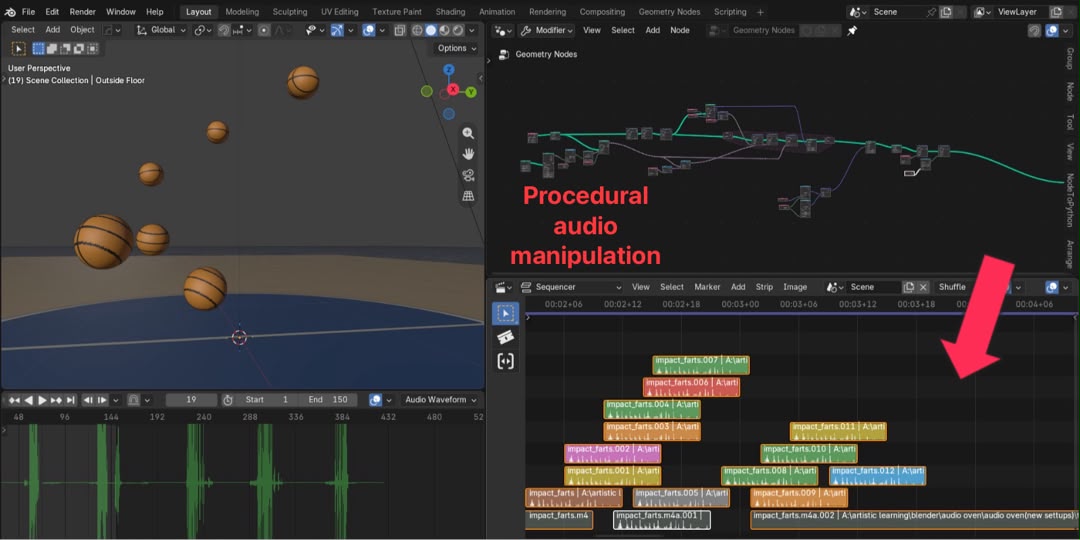
🎧Audio Oven for Blender — Turn Animation into Sound! Bring your animations to life with Audio Oven, a Blender add-on that connects animation and procedural geometry to sound. Trigger audio using animated objects, generate audio from mesh attributes, and create repeating sound patterns — all within Blender's workflow. Whether you're creating character animations, motion graphics, or physics simulations, Audio Oven gives you new ways to make your animations sound as good as they look!. There will less be less need of placing strips in the VSE manually and wasting so much time...instead swimming in the web just to get the right audio... you could trying geometry nodes and have them always make the audio that fits your animation...it also come with a audio waveform display to help you in lip sync animation and audio analysis 🍳Audio Oven — Let's cook animation-driven sounds!
Categories
Tags
Installation
- Download Audio Oven (procedural audio manipulation) and check which Blender versions the creator supports. Keep the installable archive (for example,
Audio_Oven_(procedural_audio_manipulation).zip) intact. If the download is a bundle, extract it first to find the add-on archive. - In Blender, go to Edit → Preferences → Add-ons. In Blender 4.2 and newer, open the top-right menu and choose Install from Disk. In older versions, click Install….
- Select the add-on archive (for example,
Audio_Oven_(procedural_audio_manipulation).zip) or its standalone.pyfile and confirm the installation. - Find the add-on in the Add-ons list and tick its checkbox if it isn’t already enabled.
Check the creator’s instructions for any extra setup, such as dependencies or license activation.
Compare with other products
Choose a category to find products to compare with this listing.
Variants
-
Audio Oven lite published
Price: $12.00 · List price: $12.00
Variant versions
-
Audio Oven (sample writing) published
Created Oct 28, 2026 · Published Oct 28, 2026
Release notes (source)
<p><br></p>
-
-
Audio Oven v1.0.0 (original) published
Price: $10.00 · List price: $10.00
-
Audio Oven(sample writing) published
Price: $2.00 · List price: $2.00
Product versions
-
Audio Oven (sample writing) published
Created Oct 28, 2026 · Published Oct 28, 2026
Release notes (source)
<p><br></p>
-
Audio Oven 1.0.0 published
Created Oct 28, 2026 · Published Oct 28, 2026
Release notes (source)
<p>Audio Oven (original) 1.0.0</p><p>Trigger-based sound strips, frame based audio generation, pattern based audio generation and waveform display. Requires Blender 5.2 or newer. Does not include sample writing, audio gain, offset, overwrite option or the None color tag.</p>
-
Audio Oven lite published
Created Oct 28, 2026 · Published Oct 28, 2026
Release notes (source)
<p>Audio Oven lite 1.2.0</p><p><br></p><p>New</p><p>- Sample writing audio generation: turns mesh point values (sample id, sample amplitude) into raw audio samples, frame after frame, and writes a WAV. The sample rate comes from the scene frame rate and the number of points, and the panel tells you how many points you need.</p><p>- Audio gain on frame based generation. Quiet results can be raised, and anything past full scale is scaled back so it never clips.</p><p>- Offset on frame based and sample writing generation. The strip is placed at "from frame" plus the offset.</p><p>- Overwrite files option. When off, new audio is saved as name(1), name(2) and so on, and existing files are never touched.</p><p>- "None" option for every color tag setting, so a generated strip can have no color tag.</p><p>- Panels now appear in the Audio Oven sidebar tab of the 3D Viewport, the Geometry Node Editor and the Video Sequencer.</p><p>- Folder check: if your chosen audio folder is missing or its drive was disconnected, generation stops with a message instead of writing anywhere else.</p><p><br></p><p>Compatibility</p><p>- Works in Blender 3.2 to 5.2.</p><p><br></p><p>Included from 1.0.0</p><p>- Trigger-based sound strips, frame based generation, pattern based generation and the waveform display, all with NumPy only (no compiled libraries).</p>