Product listing
Time Tracker
By Aksiom ·
From $2.00
Listing details
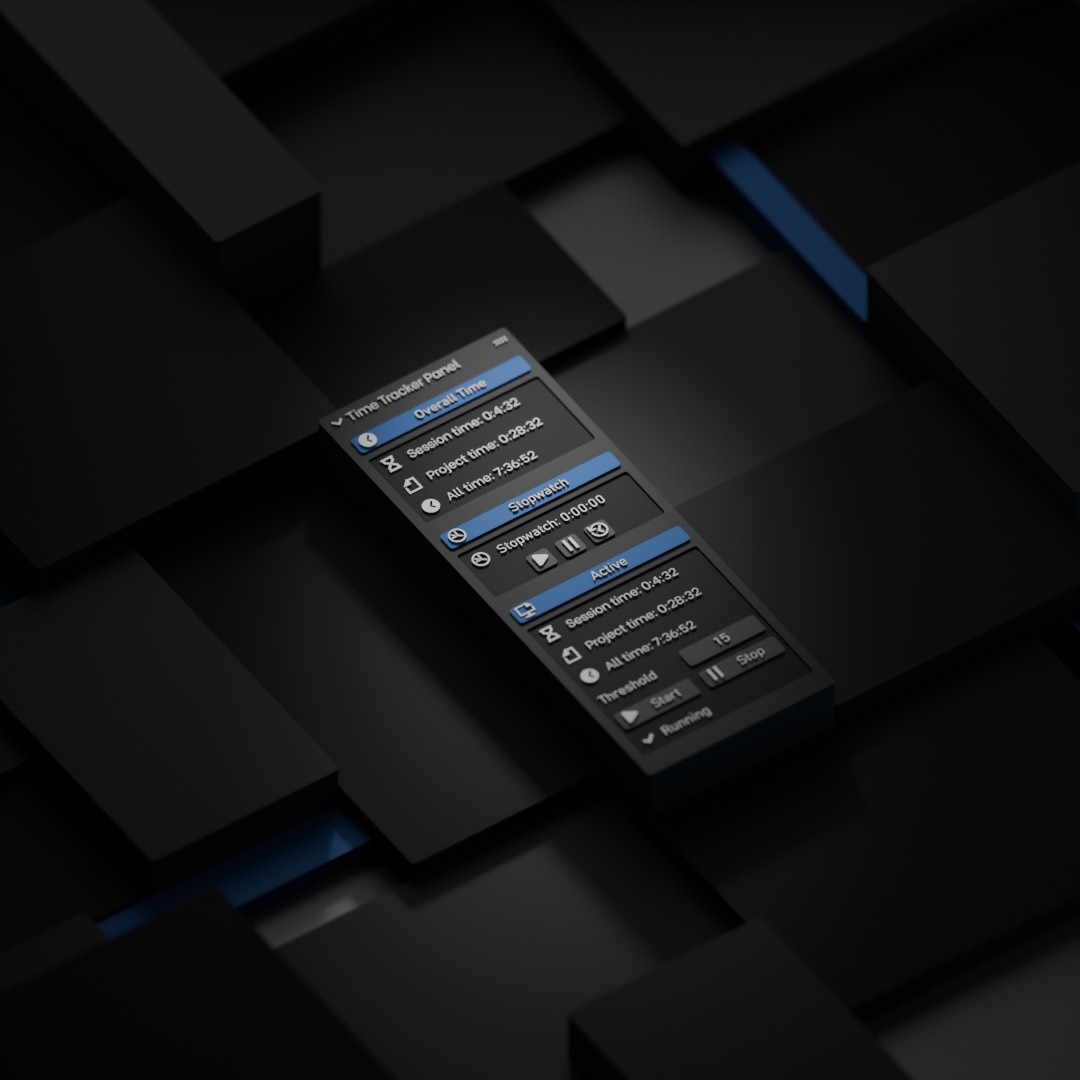
Easily track the time spent on Blender projects with the "Time Tracker" add-on. Get real-time updates on session, project, and total usage times, helping you track the time spent and stay organized and monitor productivity. There are also active time tracking and stopwatch functions.
Categories
Tags
Compare with other products
Choose a category to find products to compare with this listing.
Variants
-
Time Tracker With Active Time published
Price: $3.00 · List price: $3.00
Variant versions
-
2.2.0 published
Created Feb 11, 2026 · Published Feb 12, 2026
Release notes (source)
<p style="border: 0px solid; margin-right: 0px; margin-left: 0px; padding: 0px; line-height: 25.2px;"><span style="border: 0px solid; margin: 0px; padding: 0px;">Time Tracker 2.2.0 (Blender 5.0 Update)</span></p><ul style="border: 0px solid; margin-top: 0.5rem; margin-right: 0px; margin-left: 0px; padding: 0px 0px 0px 1.5rem; list-style-position: outside; list-style-image: initial;"><li style="border: 0px solid; margin: 0px 0px 0.5rem; padding: 0px;"><p style="border: 0px solid; margin-right: 0px; margin-bottom: 0px; margin-left: 0px; padding: 0px; line-height: 25.2px; display: inline;">Full compatibility update for both add-on versions (<span style="border-style: solid; border-color: initial; border-image: initial; font-feature-settings: "ss01";">TimeTracker</span> and <span style="border-style: solid; border-color: initial; border-image: initial; font-feature-settings: "ss01";">TimeTrackerActive</span>) for Blender 5.x.</p></li><li style="border: 0px solid; margin: 0px 0px 0.5rem; padding: 0px;"><p style="border: 0px solid; margin-right: 0px; margin-bottom: 0px; margin-left: 0px; padding: 0px; line-height: 25.2px; display: inline;">Fixed the core issue where <span style="border-style: solid; border-color: initial; border-image: initial; font-feature-settings: "ss01";">Project Time</span> stopped updating (in both standard and active modes).</p></li><li style="border: 0px solid; margin: 0px 0px 0.5rem; padding: 0px;"><p style="border: 0px solid; margin-right: 0px; margin-bottom: 0px; margin-left: 0px; padding: 0px; line-height: 25.2px; display: inline;">Time tracking logic was migrated to Scene RNA properties for Blender 5 compatibility.</p></li><li style="border: 0px solid; margin: 0px 0px 0.5rem; padding: 0px;"><p style="border: 0px solid; margin-right: 0px; margin-bottom: 0px; margin-left: 0px; padding: 0px; line-height: 25.2px; display: inline;">Added migration of legacy stored project-time values from older scene data.</p></li><li style="border: 0px solid; margin: 0px 0px 0.5rem; padding: 0px;"><p style="border: 0px solid; margin-right: 0px; margin-bottom: 0px; margin-left: 0px; padding: 0px; line-height: 25.2px; display: inline;">Added a new <span style="border-style: solid; border-color: initial; border-image: initial; font-feature-settings: "ss01";">Statistics Overlay</span> menu in the add-on panel.</p></li><li style="border: 0px solid; margin: 0px 0px 0.5rem; padding: 0px;"><p style="border: 0px solid; margin-right: 0px; margin-bottom: 0px; margin-left: 0px; padding: 0px; line-height: 25.2px; display: inline;">Added viewport statistics rendering via <span style="border-style: solid; border-color: initial; border-image: initial; font-feature-settings: "ss01";">draw_handler</span> under Blender’s built-in <span style="border-style: solid; border-color: initial; border-image: initial; font-feature-settings: "ss01";">Viewport Overlays > Statistics</span>.</p></li><li style="border: 0px solid; margin: 0px 0px 0.5rem; padding: 0px;"><p style="border: 0px solid; margin-right: 0px; margin-bottom: 0px; margin-left: 0px; padding: 0px; line-height: 25.2px; display: inline;">Added selectable overlay items:</p><ul style="border: 0px solid; margin: 0.25rem 0px; padding: 0px 0px 0px 1rem; list-style: outside disc;"><li style="border: 0px solid; margin: 0px 0px 0.5rem; padding: 0px;"><span style="border-style: solid; border-color: initial; border-image: initial; font-feature-settings: "ss01";">TimeTracker</span>: Session, Project, All, Stopwatch</li><li style="border: 0px solid; margin: 0px 0px 0.5rem; padding: 0px;"><span style="border-style: solid; border-color: initial; border-image: initial; font-feature-settings: "ss01";">TimeTrackerActive</span>: Session, Project, All, Active Session, Active Project, Active All, Stopwatch</li></ul></li><li style="border: 0px solid; margin: 0px 0px 0.5rem; padding: 0px;"><p style="border: 0px solid; margin-right: 0px; margin-bottom: 0px; margin-left: 0px; padding: 0px; line-height: 25.2px; display: inline;">Improved visual integration: two-column layout (label/value), outlined text for readability, aligned under Blender stats.</p></li><li style="border: 0px solid; margin: 0px 0px 0.5rem; padding: 0px;"><p style="border: 0px solid; margin-right: 0px; margin-bottom: 0px; margin-left: 0px; padding: 0px; line-height: 25.2px; display: inline;">In <span style="border-style: solid; border-color: initial; border-image: initial; font-feature-settings: "ss01";">TimeTrackerActive</span>, removed manual <span style="border-style: solid; border-color: initial; border-image: initial; font-feature-settings: "ss01";">Start/Stop</span> controls for active tracking.</p></li><li style="border: 0px solid; margin: 0px 0px 0.5rem; padding: 0px;"><p style="border: 0px solid; margin-right: 0px; margin-bottom: 0px; margin-left: 0px; padding: 0px; line-height: 25.2px; display: inline;">Active tracking now runs automatically.</p></li><li style="border: 0px solid; margin: 0px 0px 0.5rem; padding: 0px;"><p style="border: 0px solid; margin-right: 0px; margin-bottom: 0px; margin-left: 0px; padding: 0px; line-height: 25.2px; display: inline;">Kept configurable <span style="border-style: solid; border-color: initial; border-image: initial; font-feature-settings: "ss01";">Activity Threshold</span> behavior.</p></li><li style="border: 0px solid; margin: 0px 0px 0.5rem; padding: 0px;"><p style="border: 0px solid; margin-right: 0px; margin-bottom: 0px; margin-left: 0px; padding: 0px; line-height: 25.2px; display: inline;">Improved stability around Blender context edge cases (<span style="border-style: solid; border-color: initial; border-image: initial; font-feature-settings: "ss01";">_RestrictData</span>, missing <span style="border-style: solid; border-color: initial; border-image: initial; font-feature-settings: "ss01";">bpy.data.scenes</span> during some load/register stages).</p></li><li style="border: 0px solid; margin: 0px 0px 0.5rem; padding: 0px;"><p style="border: 0px solid; margin-right: 0px; margin-bottom: 0px; margin-left: 0px; padding: 0px; line-height: 25.2px; display: inline;">Improved timer lifecycle and viewport redraw behavior.</p></li><li style="border: 0px solid; margin: 0px 0px 0.5rem; padding: 0px;"><p style="border: 0px solid; margin-right: 0px; margin-bottom: 0px; margin-left: 0px; padding: 0px; line-height: 25.2px; display: inline;">Updated documentation (<span style="border-style: solid; border-color: initial; border-image: initial; font-feature-settings: "ss01";">README</span>) for both versions.</p></li><li style="border: 0px solid; margin: 0px 0px 0.5rem; padding: 0px;"><p style="border: 0px solid; margin-right: 0px; margin-bottom: 0px; margin-left: 0px; padding: 0px; line-height: 25.2px; display: inline;">Updated both <span style="border-style: solid; border-color: initial; border-image: initial; font-feature-settings: "ss01";">blender_manifest.toml</span> files:</p><ul style="border: 0px solid; margin: 0.25rem 0px; padding: 0px 0px 0px 1rem; list-style: outside disc;"><li style="border: 0px solid; margin: 0px 0px 0.5rem; padding: 0px;">unique extension IDs,</li><li style="border: 0px solid; margin: 0px 0px 0.5rem; padding: 0px;"><span style="border-style: solid; border-color: initial; border-image: initial; font-feature-settings: "ss01";">blender_version_min = 5.0.0</span>,</li><li style="border: 0px solid; margin: 0px 0px 0.5rem; padding: 0px;">extension version set to <span style="border-style: solid; border-color: initial; border-image: initial; font-feature-settings: "ss01";">2.2.0</span>.</li></ul></li><li style="border: 0px solid; margin: 0px 0px 0.5rem; padding: 0px;"><p style="border: 0px solid; margin-right: 0px; margin-bottom: 0px; margin-left: 0px; padding: 0px; line-height: 25.2px; display: inline;">Synced <span style="border-style: solid; border-color: initial; border-image: initial; font-feature-settings: "ss01";">bl_info</span> in both <span style="border-style: solid; border-color: initial; border-image: initial; font-feature-settings: "ss01";">__init__.py</span> files (<span style="border-style: solid; border-color: initial; border-image: initial; font-feature-settings: "ss01";">blender: 5.0.0</span>, version <span style="border-style: solid; border-color: initial; border-image: initial; font-feature-settings: "ss01";">2.2.0</span>).</p></li></ul>
-
2.2 published
Created May 17, 2025 · Published May 17, 2025
Release notes (source)
<p style="color:rgb(42, 31, 66);font-family:Inter , sans-serif;line-height:1.6 !important;"><i>FIX ERROR<br>Traceback (most recent call last):</i></p><p style="color:rgb(42, 31, 66);font-family:Inter , sans-serif;line-height:1.6 !important;"><i> File "C:\Users\Olivier\AppData\Roaming\Blender Foundation\Blender\4.4\extensions\user_default\timetrackeractive\__init__.py", line 193, in update_time</i></p><p style="color:rgb(42, 31, 66);font-family:Inter , sans-serif;line-height:1.6 !important;"><i> bpy.context.scene["time_tracker_project_time"] = project_time + elapsed_seconds</i></p><p style="color:rgb(42, 31, 66);font-family:Inter , sans-serif;line-height:1.6 !important;"><i> ~~~~~~~~~~~~~~~~~^^^^^^^^^^^^^^^^^^^^^^^^^^^^^</i></p><p style="color:rgb(42, 31, 66);font-family:Inter , sans-serif;line-height:1.6 !important;"><i>AttributeError: Writing to ID classes in this context is not allowed: Scene, Scene datablock, error setting Scene.time_tracker_project_time</i></p>
-
2.1 published
Created Mar 9, 2025 · Published Mar 10, 2025
Release notes (source)
<h3 class="text-lg font-bold text-text-200 mt-1 -mb-1.5">Reset & Save as Startup File</h3><p class="whitespace-pre-wrap break-words">The add-on includes a "Reset & Save as Startup" function that:</p><ul class="[&:not(:last-child)_ul]:pb-1 [&:not(:last-child)_ol]:pb-1 list-disc space-y-1.5 pl-7">
<li class="whitespace-normal break-words">Resets all time counters (session time, active session time, project time, and active project time) to zero</li>
<li class="whitespace-normal break-words">Saves these reset values to your Blender startup file</li>
<li class="whitespace-normal break-words">This is useful for creating a clean template file with no accumulated time</li>
</ul><p class="whitespace-pre-wrap break-words">To use this feature:</p><p>


</p><ol class="[&:not(:last-child)_ul]:pb-1 [&:not(:last-child)_ol]:pb-1 list-decimal space-y-1.5 pl-7">
<li class="whitespace-normal break-words">Navigate to the Reset & Save Settings section at the bottom of the Time Tracker panel</li>
<li class="whitespace-normal break-words">Click the "Reset & Save as Startup" button</li>
<li class="whitespace-normal break-words">Confirm when prompted</li>
</ol>
-
-
Time Tracker Without Active Time published
Price: $2.00 · List price: $2.00
Variant versions
-
2.2.0 published
Created Feb 11, 2026 · Published Feb 12, 2026
Release notes (source)
<p style="border: 0px solid; margin-right: 0px; margin-left: 0px; padding: 0px; line-height: 25.2px;"><span style="border: 0px solid; margin: 0px; padding: 0px;">Time Tracker 2.2.0 (Blender 5.0 Update)</span></p><ul style="border: 0px solid; margin-top: 0.5rem; margin-right: 0px; margin-left: 0px; padding: 0px 0px 0px 1.5rem; list-style-position: outside; list-style-image: initial;"><li style="border: 0px solid; margin: 0px 0px 0.5rem; padding: 0px;"><p style="border: 0px solid; margin-right: 0px; margin-bottom: 0px; margin-left: 0px; padding: 0px; line-height: 25.2px; display: inline;">Full compatibility update for both add-on versions (<span style="border-style: solid; border-color: initial; border-image: initial; font-feature-settings: "ss01";">TimeTracker</span> and <span style="border-style: solid; border-color: initial; border-image: initial; font-feature-settings: "ss01";">TimeTrackerActive</span>) for Blender 5.x.</p></li><li style="border: 0px solid; margin: 0px 0px 0.5rem; padding: 0px;"><p style="border: 0px solid; margin-right: 0px; margin-bottom: 0px; margin-left: 0px; padding: 0px; line-height: 25.2px; display: inline;">Fixed the core issue where <span style="border-style: solid; border-color: initial; border-image: initial; font-feature-settings: "ss01";">Project Time</span> stopped updating (in both standard and active modes).</p></li><li style="border: 0px solid; margin: 0px 0px 0.5rem; padding: 0px;"><p style="border: 0px solid; margin-right: 0px; margin-bottom: 0px; margin-left: 0px; padding: 0px; line-height: 25.2px; display: inline;">Time tracking logic was migrated to Scene RNA properties for Blender 5 compatibility.</p></li><li style="border: 0px solid; margin: 0px 0px 0.5rem; padding: 0px;"><p style="border: 0px solid; margin-right: 0px; margin-bottom: 0px; margin-left: 0px; padding: 0px; line-height: 25.2px; display: inline;">Added migration of legacy stored project-time values from older scene data.</p></li><li style="border: 0px solid; margin: 0px 0px 0.5rem; padding: 0px;"><p style="border: 0px solid; margin-right: 0px; margin-bottom: 0px; margin-left: 0px; padding: 0px; line-height: 25.2px; display: inline;">Added a new <span style="border-style: solid; border-color: initial; border-image: initial; font-feature-settings: "ss01";">Statistics Overlay</span> menu in the add-on panel.</p></li><li style="border: 0px solid; margin: 0px 0px 0.5rem; padding: 0px;"><p style="border: 0px solid; margin-right: 0px; margin-bottom: 0px; margin-left: 0px; padding: 0px; line-height: 25.2px; display: inline;">Added viewport statistics rendering via <span style="border-style: solid; border-color: initial; border-image: initial; font-feature-settings: "ss01";">draw_handler</span> under Blender’s built-in <span style="border-style: solid; border-color: initial; border-image: initial; font-feature-settings: "ss01";">Viewport Overlays > Statistics</span>.</p></li><li style="border: 0px solid; margin: 0px 0px 0.5rem; padding: 0px;"><p style="border: 0px solid; margin-right: 0px; margin-bottom: 0px; margin-left: 0px; padding: 0px; line-height: 25.2px; display: inline;">Added selectable overlay items:</p><ul style="border: 0px solid; margin: 0.25rem 0px; padding: 0px 0px 0px 1rem; list-style: outside disc;"><li style="border: 0px solid; margin: 0px 0px 0.5rem; padding: 0px;"><span style="border-style: solid; border-color: initial; border-image: initial; font-feature-settings: "ss01";">TimeTracker</span>: Session, Project, All, Stopwatch</li><li style="border: 0px solid; margin: 0px 0px 0.5rem; padding: 0px;"><span style="border-style: solid; border-color: initial; border-image: initial; font-feature-settings: "ss01";">TimeTrackerActive</span>: Session, Project, All, Active Session, Active Project, Active All, Stopwatch</li></ul></li><li style="border: 0px solid; margin: 0px 0px 0.5rem; padding: 0px;"><p style="border: 0px solid; margin-right: 0px; margin-bottom: 0px; margin-left: 0px; padding: 0px; line-height: 25.2px; display: inline;">Improved visual integration: two-column layout (label/value), outlined text for readability, aligned under Blender stats.</p></li><li style="border: 0px solid; margin: 0px 0px 0.5rem; padding: 0px;"><p style="border: 0px solid; margin-right: 0px; margin-bottom: 0px; margin-left: 0px; padding: 0px; line-height: 25.2px; display: inline;">In <span style="border-style: solid; border-color: initial; border-image: initial; font-feature-settings: "ss01";">TimeTrackerActive</span>, removed manual <span style="border-style: solid; border-color: initial; border-image: initial; font-feature-settings: "ss01";">Start/Stop</span> controls for active tracking.</p></li><li style="border: 0px solid; margin: 0px 0px 0.5rem; padding: 0px;"><p style="border: 0px solid; margin-right: 0px; margin-bottom: 0px; margin-left: 0px; padding: 0px; line-height: 25.2px; display: inline;">Active tracking now runs automatically.</p></li><li style="border: 0px solid; margin: 0px 0px 0.5rem; padding: 0px;"><p style="border: 0px solid; margin-right: 0px; margin-bottom: 0px; margin-left: 0px; padding: 0px; line-height: 25.2px; display: inline;">Kept configurable <span style="border-style: solid; border-color: initial; border-image: initial; font-feature-settings: "ss01";">Activity Threshold</span> behavior.</p></li><li style="border: 0px solid; margin: 0px 0px 0.5rem; padding: 0px;"><p style="border: 0px solid; margin-right: 0px; margin-bottom: 0px; margin-left: 0px; padding: 0px; line-height: 25.2px; display: inline;">Improved stability around Blender context edge cases (<span style="border-style: solid; border-color: initial; border-image: initial; font-feature-settings: "ss01";">_RestrictData</span>, missing <span style="border-style: solid; border-color: initial; border-image: initial; font-feature-settings: "ss01";">bpy.data.scenes</span> during some load/register stages).</p></li><li style="border: 0px solid; margin: 0px 0px 0.5rem; padding: 0px;"><p style="border: 0px solid; margin-right: 0px; margin-bottom: 0px; margin-left: 0px; padding: 0px; line-height: 25.2px; display: inline;">Improved timer lifecycle and viewport redraw behavior.</p></li><li style="border: 0px solid; margin: 0px 0px 0.5rem; padding: 0px;"><p style="border: 0px solid; margin-right: 0px; margin-bottom: 0px; margin-left: 0px; padding: 0px; line-height: 25.2px; display: inline;">Updated documentation (<span style="border-style: solid; border-color: initial; border-image: initial; font-feature-settings: "ss01";">README</span>) for both versions.</p></li><li style="border: 0px solid; margin: 0px 0px 0.5rem; padding: 0px;"><p style="border: 0px solid; margin-right: 0px; margin-bottom: 0px; margin-left: 0px; padding: 0px; line-height: 25.2px; display: inline;">Updated both <span style="border-style: solid; border-color: initial; border-image: initial; font-feature-settings: "ss01";">blender_manifest.toml</span> files:</p><ul style="border: 0px solid; margin: 0.25rem 0px; padding: 0px 0px 0px 1rem; list-style: outside disc;"><li style="border: 0px solid; margin: 0px 0px 0.5rem; padding: 0px;">unique extension IDs,</li><li style="border: 0px solid; margin: 0px 0px 0.5rem; padding: 0px;"><span style="border-style: solid; border-color: initial; border-image: initial; font-feature-settings: "ss01";">blender_version_min = 5.0.0</span>,</li><li style="border: 0px solid; margin: 0px 0px 0.5rem; padding: 0px;">extension version set to <span style="border-style: solid; border-color: initial; border-image: initial; font-feature-settings: "ss01";">2.2.0</span>.</li></ul></li><li style="border: 0px solid; margin: 0px 0px 0.5rem; padding: 0px;"><p style="border: 0px solid; margin-right: 0px; margin-bottom: 0px; margin-left: 0px; padding: 0px; line-height: 25.2px; display: inline;">Synced <span style="border-style: solid; border-color: initial; border-image: initial; font-feature-settings: "ss01";">bl_info</span> in both <span style="border-style: solid; border-color: initial; border-image: initial; font-feature-settings: "ss01";">__init__.py</span> files (<span style="border-style: solid; border-color: initial; border-image: initial; font-feature-settings: "ss01";">blender: 5.0.0</span>, version <span style="border-style: solid; border-color: initial; border-image: initial; font-feature-settings: "ss01";">2.2.0</span>).</p></li></ul>
-
2.2 published
Created May 17, 2025 · Published May 17, 2025
Release notes (source)
<p><br></p>
-
2.1 published
Created Mar 9, 2025 · Published Mar 10, 2025
Release notes (source)
<h3 class="text-lg font-bold text-text-200 mt-1 -mb-1.5">Reset & Save as Startup File</h3>
<p class="whitespace-pre-wrap break-words">The add-on includes a "Reset & Save as Startup" function that:</p>
<ul class="[&:not(:last-child)_ul]:pb-1 [&:not(:last-child)_ol]:pb-1 list-disc space-y-1.5 pl-7">
<li class="whitespace-normal break-words">Resets all time counters (session time, active session time, project time, and active project time) to zero</li>
<li class="whitespace-normal break-words">Saves these reset values to your Blender startup file</li>
<li class="whitespace-normal break-words">This is useful for creating a clean template file with no accumulated time</li>
</ul>
<p class="whitespace-pre-wrap break-words">To use this feature:</p>
<ol class="[&:not(:last-child)_ul]:pb-1 [&:not(:last-child)_ol]:pb-1 list-decimal space-y-1.5 pl-7">
<li class="whitespace-normal break-words">Navigate to the Reset & Save Settings section at the bottom of the Time Tracker panel</li>
<li class="whitespace-normal break-words">Click the "Reset & Save as Startup" button</li>
<li class="whitespace-normal break-words">Confirm when prompted</li>
</ol>
-
Product versions
-
2.2.0 published
Created Feb 11, 2026 · Published Feb 12, 2026
Release notes (source)
<p style="border: 0px solid; margin-right: 0px; margin-left: 0px; padding: 0px; line-height: 25.2px;"><span style="border: 0px solid; margin: 0px; padding: 0px;">Time Tracker 2.2.0 (Blender 5.0 Update)</span></p><ul style="border: 0px solid; margin-top: 0.5rem; margin-right: 0px; margin-left: 0px; padding: 0px 0px 0px 1.5rem; list-style-position: outside; list-style-image: initial;"><li style="border: 0px solid; margin: 0px 0px 0.5rem; padding: 0px;"><p style="border: 0px solid; margin-right: 0px; margin-bottom: 0px; margin-left: 0px; padding: 0px; line-height: 25.2px; display: inline;">Full compatibility update for both add-on versions (<span style="border-style: solid; border-color: initial; border-image: initial; font-feature-settings: "ss01";">TimeTracker</span> and <span style="border-style: solid; border-color: initial; border-image: initial; font-feature-settings: "ss01";">TimeTrackerActive</span>) for Blender 5.x.</p></li><li style="border: 0px solid; margin: 0px 0px 0.5rem; padding: 0px;"><p style="border: 0px solid; margin-right: 0px; margin-bottom: 0px; margin-left: 0px; padding: 0px; line-height: 25.2px; display: inline;">Fixed the core issue where <span style="border-style: solid; border-color: initial; border-image: initial; font-feature-settings: "ss01";">Project Time</span> stopped updating (in both standard and active modes).</p></li><li style="border: 0px solid; margin: 0px 0px 0.5rem; padding: 0px;"><p style="border: 0px solid; margin-right: 0px; margin-bottom: 0px; margin-left: 0px; padding: 0px; line-height: 25.2px; display: inline;">Time tracking logic was migrated to Scene RNA properties for Blender 5 compatibility.</p></li><li style="border: 0px solid; margin: 0px 0px 0.5rem; padding: 0px;"><p style="border: 0px solid; margin-right: 0px; margin-bottom: 0px; margin-left: 0px; padding: 0px; line-height: 25.2px; display: inline;">Added migration of legacy stored project-time values from older scene data.</p></li><li style="border: 0px solid; margin: 0px 0px 0.5rem; padding: 0px;"><p style="border: 0px solid; margin-right: 0px; margin-bottom: 0px; margin-left: 0px; padding: 0px; line-height: 25.2px; display: inline;">Added a new <span style="border-style: solid; border-color: initial; border-image: initial; font-feature-settings: "ss01";">Statistics Overlay</span> menu in the add-on panel.</p></li><li style="border: 0px solid; margin: 0px 0px 0.5rem; padding: 0px;"><p style="border: 0px solid; margin-right: 0px; margin-bottom: 0px; margin-left: 0px; padding: 0px; line-height: 25.2px; display: inline;">Added viewport statistics rendering via <span style="border-style: solid; border-color: initial; border-image: initial; font-feature-settings: "ss01";">draw_handler</span> under Blender’s built-in <span style="border-style: solid; border-color: initial; border-image: initial; font-feature-settings: "ss01";">Viewport Overlays > Statistics</span>.</p></li><li style="border: 0px solid; margin: 0px 0px 0.5rem; padding: 0px;"><p style="border: 0px solid; margin-right: 0px; margin-bottom: 0px; margin-left: 0px; padding: 0px; line-height: 25.2px; display: inline;">Added selectable overlay items:</p><ul style="border: 0px solid; margin: 0.25rem 0px; padding: 0px 0px 0px 1rem; list-style: outside disc;"><li style="border: 0px solid; margin: 0px 0px 0.5rem; padding: 0px;"><span style="border-style: solid; border-color: initial; border-image: initial; font-feature-settings: "ss01";">TimeTracker</span>: Session, Project, All, Stopwatch</li><li style="border: 0px solid; margin: 0px 0px 0.5rem; padding: 0px;"><span style="border-style: solid; border-color: initial; border-image: initial; font-feature-settings: "ss01";">TimeTrackerActive</span>: Session, Project, All, Active Session, Active Project, Active All, Stopwatch</li></ul></li><li style="border: 0px solid; margin: 0px 0px 0.5rem; padding: 0px;"><p style="border: 0px solid; margin-right: 0px; margin-bottom: 0px; margin-left: 0px; padding: 0px; line-height: 25.2px; display: inline;">Improved visual integration: two-column layout (label/value), outlined text for readability, aligned under Blender stats.</p></li><li style="border: 0px solid; margin: 0px 0px 0.5rem; padding: 0px;"><p style="border: 0px solid; margin-right: 0px; margin-bottom: 0px; margin-left: 0px; padding: 0px; line-height: 25.2px; display: inline;">In <span style="border-style: solid; border-color: initial; border-image: initial; font-feature-settings: "ss01";">TimeTrackerActive</span>, removed manual <span style="border-style: solid; border-color: initial; border-image: initial; font-feature-settings: "ss01";">Start/Stop</span> controls for active tracking.</p></li><li style="border: 0px solid; margin: 0px 0px 0.5rem; padding: 0px;"><p style="border: 0px solid; margin-right: 0px; margin-bottom: 0px; margin-left: 0px; padding: 0px; line-height: 25.2px; display: inline;">Active tracking now runs automatically.</p></li><li style="border: 0px solid; margin: 0px 0px 0.5rem; padding: 0px;"><p style="border: 0px solid; margin-right: 0px; margin-bottom: 0px; margin-left: 0px; padding: 0px; line-height: 25.2px; display: inline;">Kept configurable <span style="border-style: solid; border-color: initial; border-image: initial; font-feature-settings: "ss01";">Activity Threshold</span> behavior.</p></li><li style="border: 0px solid; margin: 0px 0px 0.5rem; padding: 0px;"><p style="border: 0px solid; margin-right: 0px; margin-bottom: 0px; margin-left: 0px; padding: 0px; line-height: 25.2px; display: inline;">Improved stability around Blender context edge cases (<span style="border-style: solid; border-color: initial; border-image: initial; font-feature-settings: "ss01";">_RestrictData</span>, missing <span style="border-style: solid; border-color: initial; border-image: initial; font-feature-settings: "ss01";">bpy.data.scenes</span> during some load/register stages).</p></li><li style="border: 0px solid; margin: 0px 0px 0.5rem; padding: 0px;"><p style="border: 0px solid; margin-right: 0px; margin-bottom: 0px; margin-left: 0px; padding: 0px; line-height: 25.2px; display: inline;">Improved timer lifecycle and viewport redraw behavior.</p></li><li style="border: 0px solid; margin: 0px 0px 0.5rem; padding: 0px;"><p style="border: 0px solid; margin-right: 0px; margin-bottom: 0px; margin-left: 0px; padding: 0px; line-height: 25.2px; display: inline;">Updated documentation (<span style="border-style: solid; border-color: initial; border-image: initial; font-feature-settings: "ss01";">README</span>) for both versions.</p></li><li style="border: 0px solid; margin: 0px 0px 0.5rem; padding: 0px;"><p style="border: 0px solid; margin-right: 0px; margin-bottom: 0px; margin-left: 0px; padding: 0px; line-height: 25.2px; display: inline;">Updated both <span style="border-style: solid; border-color: initial; border-image: initial; font-feature-settings: "ss01";">blender_manifest.toml</span> files:</p><ul style="border: 0px solid; margin: 0.25rem 0px; padding: 0px 0px 0px 1rem; list-style: outside disc;"><li style="border: 0px solid; margin: 0px 0px 0.5rem; padding: 0px;">unique extension IDs,</li><li style="border: 0px solid; margin: 0px 0px 0.5rem; padding: 0px;"><span style="border-style: solid; border-color: initial; border-image: initial; font-feature-settings: "ss01";">blender_version_min = 5.0.0</span>,</li><li style="border: 0px solid; margin: 0px 0px 0.5rem; padding: 0px;">extension version set to <span style="border-style: solid; border-color: initial; border-image: initial; font-feature-settings: "ss01";">2.2.0</span>.</li></ul></li><li style="border: 0px solid; margin: 0px 0px 0.5rem; padding: 0px;"><p style="border: 0px solid; margin-right: 0px; margin-bottom: 0px; margin-left: 0px; padding: 0px; line-height: 25.2px; display: inline;">Synced <span style="border-style: solid; border-color: initial; border-image: initial; font-feature-settings: "ss01";">bl_info</span> in both <span style="border-style: solid; border-color: initial; border-image: initial; font-feature-settings: "ss01";">__init__.py</span> files (<span style="border-style: solid; border-color: initial; border-image: initial; font-feature-settings: "ss01";">blender: 5.0.0</span>, version <span style="border-style: solid; border-color: initial; border-image: initial; font-feature-settings: "ss01";">2.2.0</span>).</p></li></ul>
-
2.2.0 published
Created Feb 11, 2026 · Published Feb 12, 2026
Release notes (source)
<p style="border: 0px solid; margin-right: 0px; margin-left: 0px; padding: 0px; line-height: 25.2px;"><span style="border: 0px solid; margin: 0px; padding: 0px;">Time Tracker 2.2.0 (Blender 5.0 Update)</span></p><ul style="border: 0px solid; margin-top: 0.5rem; margin-right: 0px; margin-left: 0px; padding: 0px 0px 0px 1.5rem; list-style-position: outside; list-style-image: initial;"><li style="border: 0px solid; margin: 0px 0px 0.5rem; padding: 0px;"><p style="border: 0px solid; margin-right: 0px; margin-bottom: 0px; margin-left: 0px; padding: 0px; line-height: 25.2px; display: inline;">Full compatibility update for both add-on versions (<span style="border-style: solid; border-color: initial; border-image: initial; font-feature-settings: "ss01";">TimeTracker</span> and <span style="border-style: solid; border-color: initial; border-image: initial; font-feature-settings: "ss01";">TimeTrackerActive</span>) for Blender 5.x.</p></li><li style="border: 0px solid; margin: 0px 0px 0.5rem; padding: 0px;"><p style="border: 0px solid; margin-right: 0px; margin-bottom: 0px; margin-left: 0px; padding: 0px; line-height: 25.2px; display: inline;">Fixed the core issue where <span style="border-style: solid; border-color: initial; border-image: initial; font-feature-settings: "ss01";">Project Time</span> stopped updating (in both standard and active modes).</p></li><li style="border: 0px solid; margin: 0px 0px 0.5rem; padding: 0px;"><p style="border: 0px solid; margin-right: 0px; margin-bottom: 0px; margin-left: 0px; padding: 0px; line-height: 25.2px; display: inline;">Time tracking logic was migrated to Scene RNA properties for Blender 5 compatibility.</p></li><li style="border: 0px solid; margin: 0px 0px 0.5rem; padding: 0px;"><p style="border: 0px solid; margin-right: 0px; margin-bottom: 0px; margin-left: 0px; padding: 0px; line-height: 25.2px; display: inline;">Added migration of legacy stored project-time values from older scene data.</p></li><li style="border: 0px solid; margin: 0px 0px 0.5rem; padding: 0px;"><p style="border: 0px solid; margin-right: 0px; margin-bottom: 0px; margin-left: 0px; padding: 0px; line-height: 25.2px; display: inline;">Added a new <span style="border-style: solid; border-color: initial; border-image: initial; font-feature-settings: "ss01";">Statistics Overlay</span> menu in the add-on panel.</p></li><li style="border: 0px solid; margin: 0px 0px 0.5rem; padding: 0px;"><p style="border: 0px solid; margin-right: 0px; margin-bottom: 0px; margin-left: 0px; padding: 0px; line-height: 25.2px; display: inline;">Added viewport statistics rendering via <span style="border-style: solid; border-color: initial; border-image: initial; font-feature-settings: "ss01";">draw_handler</span> under Blender’s built-in <span style="border-style: solid; border-color: initial; border-image: initial; font-feature-settings: "ss01";">Viewport Overlays > Statistics</span>.</p></li><li style="border: 0px solid; margin: 0px 0px 0.5rem; padding: 0px;"><p style="border: 0px solid; margin-right: 0px; margin-bottom: 0px; margin-left: 0px; padding: 0px; line-height: 25.2px; display: inline;">Added selectable overlay items:</p><ul style="border: 0px solid; margin: 0.25rem 0px; padding: 0px 0px 0px 1rem; list-style: outside disc;"><li style="border: 0px solid; margin: 0px 0px 0.5rem; padding: 0px;"><span style="border-style: solid; border-color: initial; border-image: initial; font-feature-settings: "ss01";">TimeTracker</span>: Session, Project, All, Stopwatch</li><li style="border: 0px solid; margin: 0px 0px 0.5rem; padding: 0px;"><span style="border-style: solid; border-color: initial; border-image: initial; font-feature-settings: "ss01";">TimeTrackerActive</span>: Session, Project, All, Active Session, Active Project, Active All, Stopwatch</li></ul></li><li style="border: 0px solid; margin: 0px 0px 0.5rem; padding: 0px;"><p style="border: 0px solid; margin-right: 0px; margin-bottom: 0px; margin-left: 0px; padding: 0px; line-height: 25.2px; display: inline;">Improved visual integration: two-column layout (label/value), outlined text for readability, aligned under Blender stats.</p></li><li style="border: 0px solid; margin: 0px 0px 0.5rem; padding: 0px;"><p style="border: 0px solid; margin-right: 0px; margin-bottom: 0px; margin-left: 0px; padding: 0px; line-height: 25.2px; display: inline;">In <span style="border-style: solid; border-color: initial; border-image: initial; font-feature-settings: "ss01";">TimeTrackerActive</span>, removed manual <span style="border-style: solid; border-color: initial; border-image: initial; font-feature-settings: "ss01";">Start/Stop</span> controls for active tracking.</p></li><li style="border: 0px solid; margin: 0px 0px 0.5rem; padding: 0px;"><p style="border: 0px solid; margin-right: 0px; margin-bottom: 0px; margin-left: 0px; padding: 0px; line-height: 25.2px; display: inline;">Active tracking now runs automatically.</p></li><li style="border: 0px solid; margin: 0px 0px 0.5rem; padding: 0px;"><p style="border: 0px solid; margin-right: 0px; margin-bottom: 0px; margin-left: 0px; padding: 0px; line-height: 25.2px; display: inline;">Kept configurable <span style="border-style: solid; border-color: initial; border-image: initial; font-feature-settings: "ss01";">Activity Threshold</span> behavior.</p></li><li style="border: 0px solid; margin: 0px 0px 0.5rem; padding: 0px;"><p style="border: 0px solid; margin-right: 0px; margin-bottom: 0px; margin-left: 0px; padding: 0px; line-height: 25.2px; display: inline;">Improved stability around Blender context edge cases (<span style="border-style: solid; border-color: initial; border-image: initial; font-feature-settings: "ss01";">_RestrictData</span>, missing <span style="border-style: solid; border-color: initial; border-image: initial; font-feature-settings: "ss01";">bpy.data.scenes</span> during some load/register stages).</p></li><li style="border: 0px solid; margin: 0px 0px 0.5rem; padding: 0px;"><p style="border: 0px solid; margin-right: 0px; margin-bottom: 0px; margin-left: 0px; padding: 0px; line-height: 25.2px; display: inline;">Improved timer lifecycle and viewport redraw behavior.</p></li><li style="border: 0px solid; margin: 0px 0px 0.5rem; padding: 0px;"><p style="border: 0px solid; margin-right: 0px; margin-bottom: 0px; margin-left: 0px; padding: 0px; line-height: 25.2px; display: inline;">Updated documentation (<span style="border-style: solid; border-color: initial; border-image: initial; font-feature-settings: "ss01";">README</span>) for both versions.</p></li><li style="border: 0px solid; margin: 0px 0px 0.5rem; padding: 0px;"><p style="border: 0px solid; margin-right: 0px; margin-bottom: 0px; margin-left: 0px; padding: 0px; line-height: 25.2px; display: inline;">Updated both <span style="border-style: solid; border-color: initial; border-image: initial; font-feature-settings: "ss01";">blender_manifest.toml</span> files:</p><ul style="border: 0px solid; margin: 0.25rem 0px; padding: 0px 0px 0px 1rem; list-style: outside disc;"><li style="border: 0px solid; margin: 0px 0px 0.5rem; padding: 0px;">unique extension IDs,</li><li style="border: 0px solid; margin: 0px 0px 0.5rem; padding: 0px;"><span style="border-style: solid; border-color: initial; border-image: initial; font-feature-settings: "ss01";">blender_version_min = 5.0.0</span>,</li><li style="border: 0px solid; margin: 0px 0px 0.5rem; padding: 0px;">extension version set to <span style="border-style: solid; border-color: initial; border-image: initial; font-feature-settings: "ss01";">2.2.0</span>.</li></ul></li><li style="border: 0px solid; margin: 0px 0px 0.5rem; padding: 0px;"><p style="border: 0px solid; margin-right: 0px; margin-bottom: 0px; margin-left: 0px; padding: 0px; line-height: 25.2px; display: inline;">Synced <span style="border-style: solid; border-color: initial; border-image: initial; font-feature-settings: "ss01";">bl_info</span> in both <span style="border-style: solid; border-color: initial; border-image: initial; font-feature-settings: "ss01";">__init__.py</span> files (<span style="border-style: solid; border-color: initial; border-image: initial; font-feature-settings: "ss01";">blender: 5.0.0</span>, version <span style="border-style: solid; border-color: initial; border-image: initial; font-feature-settings: "ss01";">2.2.0</span>).</p></li></ul>
-
2.2 published
Created May 17, 2025 · Published May 17, 2025
Release notes (source)
<p style="color:rgb(42, 31, 66);font-family:Inter , sans-serif;line-height:1.6 !important;"><i>FIX ERROR<br>Traceback (most recent call last):</i></p><p style="color:rgb(42, 31, 66);font-family:Inter , sans-serif;line-height:1.6 !important;"><i> File "C:\Users\Olivier\AppData\Roaming\Blender Foundation\Blender\4.4\extensions\user_default\timetrackeractive\__init__.py", line 193, in update_time</i></p><p style="color:rgb(42, 31, 66);font-family:Inter , sans-serif;line-height:1.6 !important;"><i> bpy.context.scene["time_tracker_project_time"] = project_time + elapsed_seconds</i></p><p style="color:rgb(42, 31, 66);font-family:Inter , sans-serif;line-height:1.6 !important;"><i> ~~~~~~~~~~~~~~~~~^^^^^^^^^^^^^^^^^^^^^^^^^^^^^</i></p><p style="color:rgb(42, 31, 66);font-family:Inter , sans-serif;line-height:1.6 !important;"><i>AttributeError: Writing to ID classes in this context is not allowed: Scene, Scene datablock, error setting Scene.time_tracker_project_time</i></p>
-
2.2 published
Created May 17, 2025 · Published May 17, 2025
Release notes (source)
<p><br></p>
-
2.1 published
Created Mar 9, 2025 · Published Mar 10, 2025
Release notes (source)
<h3 class="text-lg font-bold text-text-200 mt-1 -mb-1.5">Reset & Save as Startup File</h3>
<p class="whitespace-pre-wrap break-words">The add-on includes a "Reset & Save as Startup" function that:</p>
<ul class="[&:not(:last-child)_ul]:pb-1 [&:not(:last-child)_ol]:pb-1 list-disc space-y-1.5 pl-7">
<li class="whitespace-normal break-words">Resets all time counters (session time, active session time, project time, and active project time) to zero</li>
<li class="whitespace-normal break-words">Saves these reset values to your Blender startup file</li>
<li class="whitespace-normal break-words">This is useful for creating a clean template file with no accumulated time</li>
</ul>
<p class="whitespace-pre-wrap break-words">To use this feature:</p>
<ol class="[&:not(:last-child)_ul]:pb-1 [&:not(:last-child)_ol]:pb-1 list-decimal space-y-1.5 pl-7">
<li class="whitespace-normal break-words">Navigate to the Reset & Save Settings section at the bottom of the Time Tracker panel</li>
<li class="whitespace-normal break-words">Click the "Reset & Save as Startup" button</li>
<li class="whitespace-normal break-words">Confirm when prompted</li>
</ol>
-
2.1 published
Created Mar 9, 2025 · Published Mar 10, 2025
Release notes (source)
<h3 class="text-lg font-bold text-text-200 mt-1 -mb-1.5">Reset & Save as Startup File</h3><p class="whitespace-pre-wrap break-words">The add-on includes a "Reset & Save as Startup" function that:</p><ul class="[&:not(:last-child)_ul]:pb-1 [&:not(:last-child)_ol]:pb-1 list-disc space-y-1.5 pl-7">
<li class="whitespace-normal break-words">Resets all time counters (session time, active session time, project time, and active project time) to zero</li>
<li class="whitespace-normal break-words">Saves these reset values to your Blender startup file</li>
<li class="whitespace-normal break-words">This is useful for creating a clean template file with no accumulated time</li>
</ul><p class="whitespace-pre-wrap break-words">To use this feature:</p><p>


</p><ol class="[&:not(:last-child)_ul]:pb-1 [&:not(:last-child)_ol]:pb-1 list-decimal space-y-1.5 pl-7">
<li class="whitespace-normal break-words">Navigate to the Reset & Save Settings section at the bottom of the Time Tracker panel</li>
<li class="whitespace-normal break-words">Click the "Reset & Save as Startup" button</li>
<li class="whitespace-normal break-words">Confirm when prompted</li>
</ol>
-
2 published
Created Dec 17, 2024 · Published Dec 17, 2024
Release notes (source)
<h3><strong>Time Tracker Add-On - What's New in Version 2.0</strong></h3><ol><li><p><strong>Active Time Tracking</strong></p><ul><li>Added the ability to track <strong>Active Time</strong>, which monitors time spent interacting with Blender.</li><li>Active Time is based on inputs from <strong>keyboard keys</strong> and <strong>mouse buttons</strong> (e.g., <code>'LEFTMOUSE'</code>, <code>'RIGHTMOUSE'</code>, <code>'MIDDLEMOUSE'</code>), but does <strong>not track mouse movement</strong>.</li></ul></li><li><p><strong>Stopwatch Feature</strong></p><ul><li>A new <strong>Stopwatch</strong> tool has been added to manually track specific activities or sessions.</li></ul></li><li><p><strong>Storage Enhancements</strong></p><ul><li><strong>Active Time Data</strong> is now stored in a dedicated <code>active_all_time.json</code> file located in the add-on's directory.</li><li>Improved handling of data files for better stability and performance.</li></ul></li><li><p><strong>First Launch Initialization</strong></p><ul><li>During the first launch, the add-on now includes a <strong>15-second delay</strong> to initialize all active time tracking functions. Subsequent launches will initialize instantly.</li></ul></li><li><p><strong>Enhanced User Documentation</strong></p><ul><li>Updated descriptions and usage instructions for new features.</li><li>Clearer details on how and where data is stored for transparency.</li></ul></li><li><p><strong>Minor Fixes and Improvements</strong></p><ul><li>Optimized real-time updates for smoother tracking.</li><li>Fixed potential issues with time data not saving correctly in rare cases.</li></ul></li></ol><p>This update enhances time tracking precision, adds flexibility with manual tracking, and improves the overall user experience.</p>
Related products
More from this creator
No other products from this creator.