Product listing
Sneaker Panel Pro
By Matthew Cohen ·
$59.99
List price: $59.99
Listing details
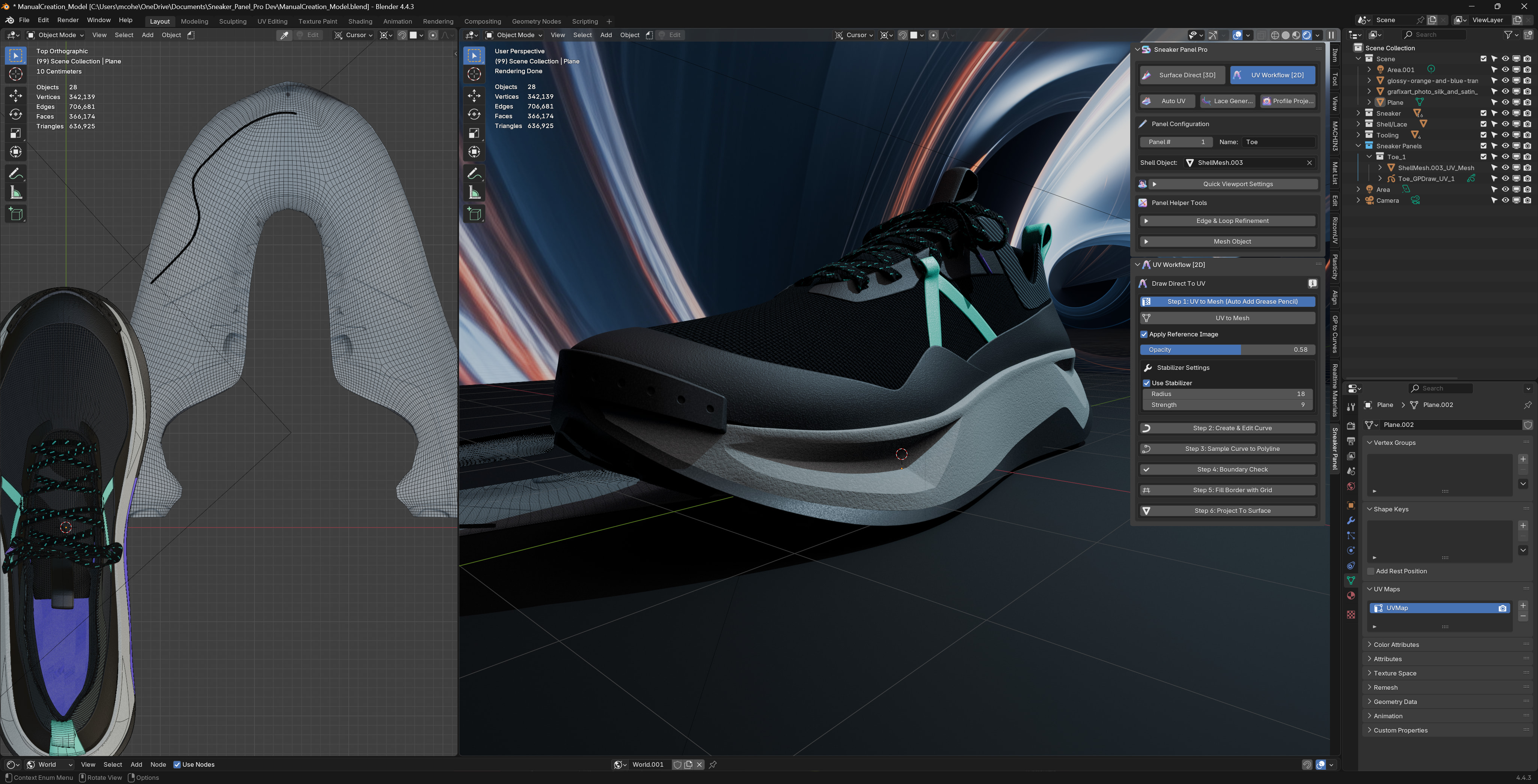
Sneaker Panel Pro integrates proven footwear design workflows into Blender. Created by a designer with 20 years of industry experience and built for professionals, it bridges traditional patternmaking with modern digital visualization — transforming Blender into a powerful tool that simplifies the journey from 2D line art to 3D models.
Categories
Tags
Installation
- Download Sneaker Panel Pro and check which Blender versions the creator supports. Keep the installable archive (for example,
Sneaker_Panel_Pro.zip) intact. If the download is a bundle, extract it first to find the add-on archive. - In Blender, go to Edit → Preferences → Add-ons. In Blender 4.2 and newer, open the top-right menu and choose Install from Disk. In older versions, click Install….
- Select the add-on archive (for example,
Sneaker_Panel_Pro.zip) or its standalone.pyfile and confirm the installation. - Find the add-on in the Add-ons list and tick its checkbox if it isn’t already enabled.
Check the creator’s instructions for any extra setup, such as dependencies or license activation.
Compare with other products
Choose a category to find products to compare with this listing.
Product versions
-
1.0.1 unlisted
Created Apr 7, 2026 · Published Apr 7, 2026
Release notes (source)
<p><span class="font-semibold" node="[object Object]" style="text-rendering: optimizelegibility; border-width: 0px; border-style: solid; border-color: rgb(222, 220, 209); --tw-border-spacing-x: 0; --tw-border-spacing-y: 0; --tw-translate-x: 0; --tw-translate-y: 0; --tw-rotate: 0; --tw-skew-x: 0; --tw-skew-y: 0; --tw-scale-x: 1; --tw-scale-y: 1; --tw-pan-x: ; --tw-pan-y: ; --tw-pinch-zoom: ; --tw-scroll-snap-strictness: proximity; --tw-gradient-from-position: ; --tw-gradient-via-position: ; --tw-gradient-to-position: ; --tw-ordinal: ; --tw-slashed-zero: ; --tw-numeric-figure: ; --tw-numeric-spacing: ; --tw-numeric-fraction: ; --tw-ring-inset: ; --tw-ring-offset-width: 0px; --tw-ring-offset-color: #fff; --tw-ring-color: hsl(210 70.9% 51.6% / 1); --tw-ring-offset-shadow: 0 0 #0000; --tw-ring-shadow: 0 0 #0000; --tw-shadow: 0 0 #0000; --tw-shadow-colored: 0 0 #0000; --tw-blur: ; --tw-brightness: ; --tw-contrast: ; --tw-grayscale: ; --tw-hue-rotate: ; --tw-invert: ; --tw-saturate: ; --tw-sepia: ; --tw-drop-shadow: ; --tw-backdrop-blur: ; --tw-backdrop-brightness: ; --tw-backdrop-contrast: ; --tw-backdrop-grayscale: ; --tw-backdrop-hue-rotate: ; --tw-backdrop-invert: ; --tw-backdrop-opacity: ; --tw-backdrop-saturate: ; --tw-backdrop-sepia: ; --tw-contain-size: ; --tw-contain-layout: ; --tw-contain-paint: ; --tw-contain-style: ; outline-color: rgb(44, 132, 219); scrollbar-width: thin; scrollbar-color: rgba(222, 220, 209, 0.35) rgba(0, 0, 0, 0); color: rgb(250, 249, 245); font-family: "Anthropic Sans", system-ui, "Segoe UI", Roboto, Helvetica, Arial, sans-serif; font-size: 14px; font-style: italic; background-color: rgb(48, 48, 46);">v1.0.1</span><span style="color: rgb(250, 249, 245); font-family: "Anthropic Sans", system-ui, "Segoe UI", Roboto, Helvetica, Arial, sans-serif; font-size: 14px; font-style: italic; background-color: rgb(48, 48, 46);"> — Fixed "Convert to Curve" button crashing in Blender 4.4, 4.5, and 5.0. No third-party add-ons required anymore. Also fixed an install-over-existing-version crash on Blender 5.0.</span></p>
Related products
More from this creator
No other products from this creator.