Product listing
Smart Pivot & Cursor Manager PRO
By Baris Arslan ·
$2.90
List price: $2.90
Listing details
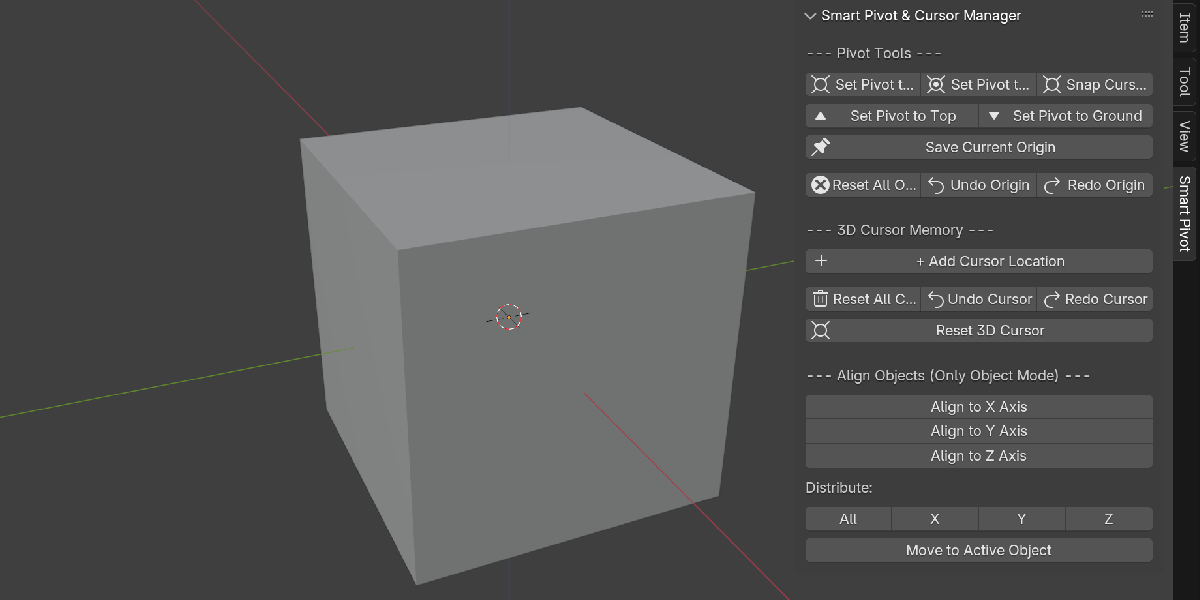
Smart Pivot & Cursor Manager PRO – Blender's ultimate pivot/origin toolkit. Save/recall origins & cursor positions, align objects precisely, and streamline modeling. Essential for precision work!
Categories
Tags
Installation
- Download Smart Pivot & Cursor Manager PRO and check which Blender versions the creator supports. Keep the installable archive (for example,
Smart_Pivot_&_Cursor_Manager_PRO.zip) intact. If the download is a bundle, extract it first to find the add-on archive. - In Blender, go to Edit → Preferences → Add-ons. In Blender 4.2 and newer, open the top-right menu and choose Install from Disk. In older versions, click Install….
- Select the add-on archive (for example,
Smart_Pivot_&_Cursor_Manager_PRO.zip) or its standalone.pyfile and confirm the installation. - Find the add-on in the Add-ons list and tick its checkbox if it isn’t already enabled.
Check the creator’s instructions for any extra setup, such as dependencies or license activation.
Compare with other products
Choose a category to find products to compare with this listing.
Product versions
-
0.4.8 published
Created Jul 22, 2026 · Published Jul 22, 2026
Release notes (source)
<p><div aria-hidden="true" class="pointer-events-none -mt-px h-px translate-y-(--scroll-root-safe-area-inset-bottom)"></div></p><div class="qMYqUG_convSearchResultHighlightRoot"><div class="" data-turn-id-container="request-WEB:a3125906-77d3-4693-8af1-4315c359577c-4" data-is-intersecting="true"><section class="text-token-text-primary w-full focus:outline-none has-data-writing-block:pointer-events-none [&:has([data-writing-block])>*]:pointer-events-auto R6Vx5W_threadScrollVars scroll-mb-[calc(var(--scroll-root-safe-area-inset-bottom,0px)+var(--thread-response-height))] scroll-mt-[calc(var(--header-height)+min(200px,max(70px,20svh)))]" dir="auto" data-turn-id="request-WEB:a3125906-77d3-4693-8af1-4315c359577c-4" data-turn-id-container="request-WEB:a3125906-77d3-4693-8af1-4315c359577c-4" data-testid="conversation-turn-8" data-turn="assistant"><div class="text-base my-auto mx-auto pb-15 [--thread-content-margin:var(--thread-content-margin-xs,calc(var(--spacing)*4))] @w-sm/main:[--thread-content-margin:var(--thread-content-margin-sm,calc(var(--spacing)*6))] @w-lg/main:[--thread-content-margin:var(--thread-content-margin-lg,calc(var(--spacing)*16))] px-(--thread-content-margin)"><div data-conversation-screenshot-content="" class="[--thread-content-max-width:40rem] @w-lg/main:[--thread-content-max-width:48rem] mx-auto max-w-(--thread-content-max-width) flex-1 group/turn-messages focus-visible:outline-hidden @[53.5rem]/main:[--thread-content-max-width:48rem] relative flex w-full min-w-0 flex-col agent-turn"><div class="flex max-w-full flex-col gap-4 grow"><div data-message-author-role="assistant" data-message-id="4dbe3b2b-6ecf-5a82-aeff-d7346f8b93c7" data-turn-start-message="true" dir="auto" tabindex="0" data-message-model-slug="gpt-5.6-sol-wm" class="min-h-8 text-message relative flex w-full flex-col items-end gap-2 text-start break-words whitespace-normal outline-none keyboard-focused:focus-ring [.text-message+&]:mt-1"><div class="flex w-full flex-col gap-1 empty:hidden"><div class="markdown prose dark:prose-invert wrap-break-word w-full dark markdown-new-styling"><h3 data-section-id="1w7hd4u" data-start="0" data-end="15" class="PDq2pG_selectionAnchorContainer">Version 4.8<span aria-hidden="true" class="PDq2pG_selectionAnchor"></span></h3> <ul data-start="17" data-end="995" data-is-last-node="" data-is-only-node=""> <li data-section-id="1uao8cm" data-start="17" data-end="96"> Added an improved interactive Preview Mode for Pivot and 3D Cursor placement. </li> <li data-section-id="y8yk8g" data-start="97" data-end="162"> Added viewport and status-bar instructions during Preview Mode. </li> <li data-section-id="1qr3gv0" data-start="163" data-end="242"> Use <strong data-start="169" data-end="174">G</strong> to move, <strong data-start="184" data-end="189">R</strong> to rotate, <strong data-start="201" data-end="210">Enter</strong> to apply and <strong data-start="224" data-end="231">Esc</strong> to cancel. </li> <li data-section-id="1w8gky0" data-start="243" data-end="365"> Added Curve object support for <strong data-start="276" data-end="298">Pivot to Selection</strong>, <strong data-start="300" data-end="322">Pivot to 3D Cursor</strong>, <strong data-start="324" data-end="340">Pivot to Top</strong> and <strong data-start="345" data-end="364">Pivot to Ground</strong>. </li> <li data-section-id="dgs7s9" data-start="366" data-end="421"> Added visual Pivot Preview support for Curve objects. </li> <li data-section-id="tyvp23" data-start="422" data-end="491"> Added support for selected Curve control points in Curve Edit Mode. </li> <li data-section-id="1dhgpvq" data-start="492" data-end="570"> Curve Edit Mode is automatically restored after applicable Pivot operations. </li> <li data-section-id="pf32um" data-start="571" data-end="641"> Added individual delete buttons for saved Origin and Cursor presets. </li> <li data-section-id="1cdq9v4" data-start="642" data-end="705"> Individual deletions now integrate with the Undo/Redo system. </li> <li data-section-id="1c0pwo3" data-start="706" data-end="793"> Improved X/Y/Z distribution by automatically sorting objects along the selected axis. </li> <li data-section-id="1ukpmta" data-start="794" data-end="872"> Prevented Pivot and Cursor preview handles from being active simultaneously. </li> <li data-section-id="ti25vx" data-start="873" data-end="948"> Improved panel layout and readability for saved presets and Cursor tools. </li> <li data-section-id="wdvk8n" data-start="949" data-end="995" data-is-last-node=""> General workflow and usability improvements. </li> </ul></div></div></div></div><div class="z-0 flex min-h-[46px] justify-start"></div><div class="mt-3 w-full empty:hidden"><div class="text-center"></div></div></div><div data-conversation-screenshot-content="" class="[--thread-content-max-width:40rem] @w-lg/main:[--thread-content-max-width:48rem] mx-auto max-w-(--thread-content-max-width) flex-1"><div></div></div></div></section></div></div>
Related products
More from this creator
No other products from this creator.