Product listing
Select Polygons By Angle
By 3D CADence ·
From $15.00
Listing details
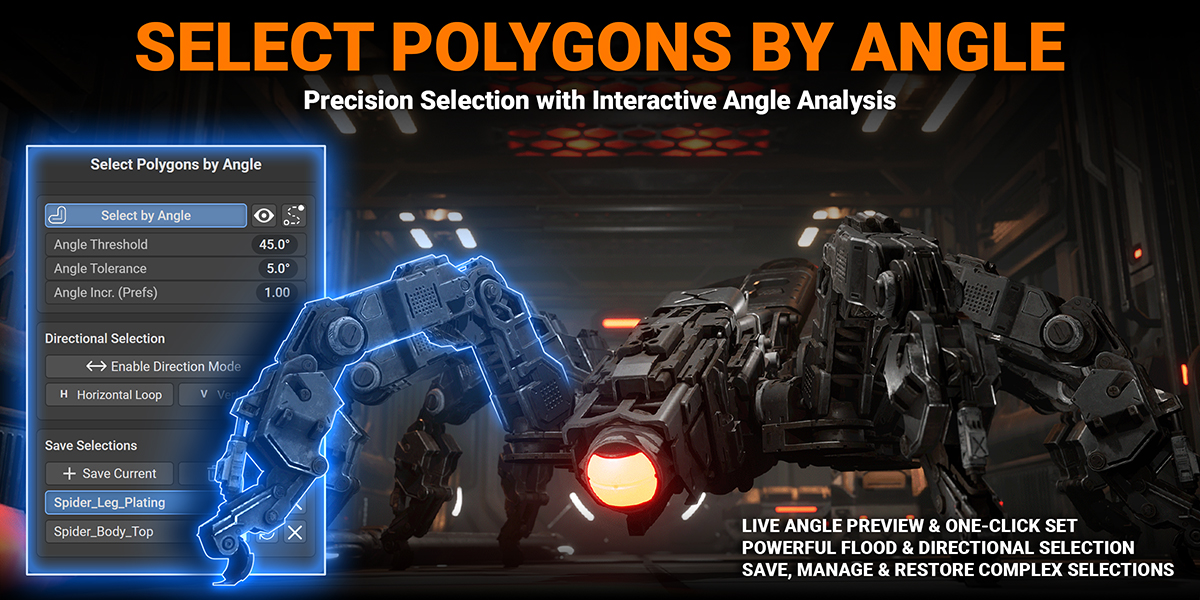
What is Select Polygons by Angle? The Select Polygons by Angle addon is a powerful tool designed to enhance your workflow in Blender. It allows you to easily select polygons based on the angle between their normals, making it ideal for selecting contiguous surfaces that meet specific angular criteria. Whether you are working on detailed models with smooth transitions or sharp edges, this addon will give you the control you need to make precise selections.
Categories
Tags
Installation
- Download Select Polygons By Angle and check which Blender versions the creator supports. Keep the installable archive (for example,
Select_Polygons_By_Angle.zip) intact. If the download is a bundle, extract it first to find the add-on archive. - In Blender, go to Edit → Preferences → Add-ons. In Blender 4.2 and newer, open the top-right menu and choose Install from Disk. In older versions, click Install….
- Select the add-on archive (for example,
Select_Polygons_By_Angle.zip) or its standalone.pyfile and confirm the installation. - Find the add-on in the Add-ons list and tick its checkbox if it isn’t already enabled.
Check the creator’s instructions for any extra setup, such as dependencies or license activation.
Compare with other products
Choose a category to find products to compare with this listing.
Variants
-
Standard published
Price: $15.00 · List price: $15.00
Variant versions
-
Select_Polygons_By_Angle_v_2_0_0 published
Created Jun 23, 2025 · Published Jun 23, 2025
Release notes (source)
<p><br></p>
-
Select Polygons By Angle v1.1.1 published
Created Sep 10, 2024 · Published Sep 10, 2024
Release notes (source)
Patch Notes for Version 1.1.1:
Bug fix related to caching and custom layers: Added clearing of previous selections before making a new selection. Previously selected active polygons no longer appear during new selections.
Selection logic optimization: Improved the polygon selection by angle function, allowing for more accurate selections when changing the angle, without affecting previous selections.
Removal of custom selection data storage: Selection information is no longer stored in custom layers and is now handled dynamically through standard bmesh mechanisms. This reduces the likelihood of conflicts with other addons that work with topology and selections.
Minor fixes: Fixed minor bugs and improved overall addon stability.
-
-
Studio published
Price: $75.00 · List price: $75.00
Variant versions
-
Select_Polygons_By_Angle_v_2_0_0 published
Created Jun 23, 2025 · Published Jun 23, 2025
Release notes (source)
<p><br></p>
-
Select Polygons By Angle v1.1.1 published
Created Sep 10, 2024 · Published Sep 10, 2024
Release notes (source)
Patch Notes for Version 1.1.1:
Bug fix related to caching and custom layers: Added clearing of previous selections before making a new selection. Previously selected active polygons no longer appear during new selections.
Selection logic optimization: Improved the polygon selection by angle function, allowing for more accurate selections when changing the angle, without affecting previous selections.
Removal of custom selection data storage: Selection information is no longer stored in custom layers and is now handled dynamically through standard bmesh mechanisms. This reduces the likelihood of conflicts with other addons that work with topology and selections.
Minor fixes: Fixed minor bugs and improved overall addon stability.
-