Product listing
POLYDOME - The Ultimate HDRI Dome
By Jonas Noell ·
From $24.99
Listing details
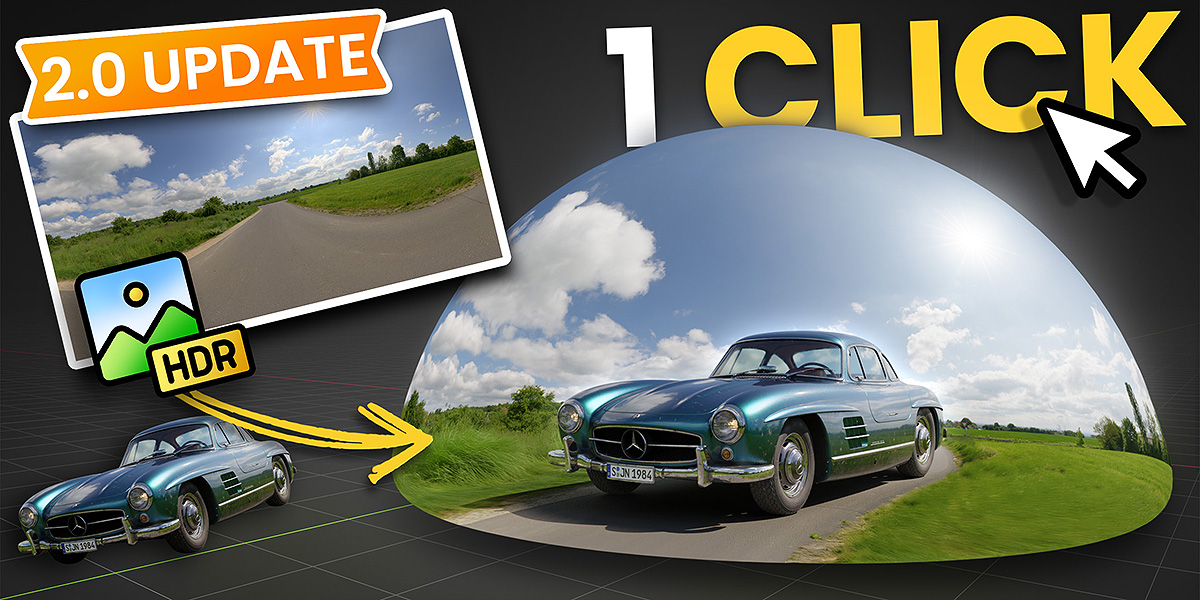
PolyDome is the ultimate HDRI Dome plugin for Blender, optimized for PolyHaven. Drag & drop HDRIs with seamless floor integration, reflections & procedural puddles for next-level realism.
Categories
Tags
Compare with other products
Choose a category to find products to compare with this listing.
Variants
-
Individual License published
Price: $24.99 · List price: $24.99
Variant versions
-
2.1.0 published
Created Nov 6, 2026 · Published Nov 6, 2026
Release notes (source)
<p><b>New Features</b>:</p><p><b>- Backplate:</b> Composite a background image behind the transparent dome (Cycles only), with its own Gamma, Exposure, Saturation, Warmth and Tint controls plus optional Vignette, Glare, Aberration and Grain effects. Colors and effects can stay linked to the Look settings or be unlinked and refined separately<br><b>- Backplate Placement:</b> Scale and offset the backplate inside the camera frame<br><b>- Camera Matching:</b> Match the camera perspective to the backplate by drawing perspective lines directly in the viewport. PolyDome solves focal length and camera pose from the vanishing points, with a draggable ground origin, snapping (Ctrl) and fine adjustment (Shift)<br><b>- Camera-Projected Floor Bump:</b> The floor bump detail can now be projected from the camera view to line up with the backplate<br><b>- Dome Visibility:</b> New Visibility setting for the dome, plus a "View Dome" button (hold to temporarily hide the backplate and see the dome, or lock it while adjusting the dome)<br><b>- Compositor Mode:</b> The compositing mode can now be chosen directly in the Look panel</p><p><b>Improvements</b>:</p><p><b>- Compositor Safety:</b> PolyDome no longer edits the compositor of scenes where it is disabled or that it does not manage, including compositor node trees shared between scenes<br><b>- Viewport Warnings:</b> Hints such as "Requires Cycles" now appear as a short fading message in the viewport<br><b>- Live Preview:</b> Faster and more responsive panel preview, and the preview colors now match the render more closely<br><br></p>
-
2.0.1 published
Created Aug 17, 2026 · Published Aug 17, 2026
Release notes (source)
<p style="color:rgb(42, 31, 66);font-family:Inter , sans-serif;line-height:1.6 !important;"><span style="font-weight:bolder;">Bug Fixes</span>:</p><p style="color:rgb(42, 31, 66);font-family:Inter , sans-serif;line-height:1.6 !important;"><span style="font-weight:bolder;">- Preview Failure: </span>Fixed a broken Preview rendering that can occur on Macs or computers that don't use a NVIDIA GPU<br>- <span style="font-weight:bolder;">Keyframes in UI:</span> Fixed not working keyframes when added directly onto PolyDome's UI</p>
-
2.0 published
Created Jul 15, 2026 · Published Jul 15, 2026
Release notes (source)
<p><span style="font-weight: bolder;">New Features</span>:</p><p data-pm-slice="0 0 []"><b>- Live Preview: </b>Your preview panel now shows a real render of your dome, complete with preview spheres so you can immediately see how your setup looks. Change the HDRI, brightness, gamma, saturation, rotation, look, or color management, and the preview updates live. The key part: it renders in a separate background process. No freezing, no waiting. Blender stays responsive the whole time.<br><b>- Floor Calibration:</b> Now runs entirely in the background and is automatic by default. Whenever your HDRI or any of its adjustments change, the floor recalibrates on its own, no extra steps needed.<br><b>- HDRI Adjustments: </b>Two new sliders, HDRI Brightness and HDRI Gamma, sit right next to HDRI Saturation. Both affect the world and dome shaders together, and any change triggers automatic recalibration, so you always see the final result instantly.<br><b>- Preview Settings:</b> New preferences let you choose your preview render engine (Cycles for maximum accuracy, EEVEE for speed) plus the GPU device/backend for Cycles. Set it up once so the preview matches your hardware and your workflow.<br>- <b>New Transparent Mode: </b>One click renders your dome on a transparent background (Cycles only for now), perfect for compositing over your own backplates. Look out for the full backplate system landing in PolyDome 2.1.</p>
-
1.2.2 - Individual published
Created Mar 9, 2026 · Published Mar 9, 2026
Release notes (source)
<p><span style="font-weight: bolder;">Bug Fixes</span>:</p><p><span style="font-weight: bolder;">- Calibration:</span> Fixed calibration failing when output format is set to a video type (e.g. FFmpeg)</p>
-
1.2.1 - Individual published
Created Mar 3, 2026 · Published Mar 3, 2026
Release notes (source)
<p><span style="font-weight:bolder;">Bug Fixes</span>:</p><p><b>- Libary Import Settings: </b>Fixed broken World Shader in Blender 5.0+ when using Drag+Drop from Asset Library with Import Settings set to "Pack" after reopening saved files<br>- <b>Grain Effects:</b> Fixed non-tiling Grain Texture in Blender 5.0+ which may appear in higher output resolutions</p>
-
-
Small Studio License published
Price: $99.00 · List price: $99.00
Variant versions
-
2.1.0 published
Created Nov 6, 2026 · Published Nov 6, 2026
Release notes (source)
<p><span style="font-weight:bolder;">New Features</span>:</p><p><span style="font-weight:bolder;">- Backplate:</span> Composite a background image behind the transparent dome (Cycles only), with its own Gamma, Exposure, Saturation, Warmth and Tint controls plus optional Vignette, Glare, Aberration and Grain effects. Colors and effects can stay linked to the Look settings or be unlinked and refined separately<br><span style="font-weight:bolder;">- Backplate Placement:</span> Scale and offset the backplate inside the camera frame<br><span style="font-weight:bolder;">- Camera Matching:</span> Match the camera perspective to the backplate by drawing perspective lines directly in the viewport. PolyDome solves focal length and camera pose from the vanishing points, with a draggable ground origin, snapping (Ctrl) and fine adjustment (Shift)<br><span style="font-weight:bolder;">- Camera-Projected Floor Bump:</span> The floor bump detail can now be projected from the camera view to line up with the backplate<br><span style="font-weight:bolder;">- Dome Visibility:</span> New Visibility setting for the dome, plus a "View Dome" button (hold to temporarily hide the backplate and see the dome, or lock it while adjusting the dome)<br><span style="font-weight:bolder;">- Compositor Mode:</span> The compositing mode can now be chosen directly in the Look panel</p><p><span style="font-weight:bolder;">Improvements</span>:</p><p><span style="font-weight:bolder;">- Compositor Safety:</span> PolyDome no longer edits the compositor of scenes where it is disabled or that it does not manage, including compositor node trees shared between scenes<br><span style="font-weight:bolder;">- Viewport Warnings:</span> Hints such as "Requires Cycles" now appear as a short fading message in the viewport<br><span style="font-weight:bolder;">- Live Preview:</span> Faster and more responsive panel preview, and the preview colors now match the render more closely<br></p>
-
2.0.1 published
Created Aug 17, 2026 · Published Aug 17, 2026
Release notes (source)
<p style="color: rgb(42, 31, 66); font-family: Inter, sans-serif; line-height: 1.6 !important;"><span style="font-weight: bolder;">Bug Fixes</span>:</p><p style="color: rgb(42, 31, 66); font-family: Inter, sans-serif; line-height: 1.6 !important;"><span style="font-weight: bolder;">- Preview Failure: </span>Fixed a broken Preview rendering that can occur on Macs or computers that don't use a NVIDIA GPU<br>- <span style="font-weight: bolder;">Keyframes in UI:</span> Fixed not working keyframes when added directly onto PolyDome's UI</p>
-
2.0 published
Created Jul 15, 2026 · Published Jul 15, 2026
Release notes (source)
<p><span style="font-weight: bolder;">New Features</span>:</p><p data-pm-slice="0 0 []"><span style="font-weight: bolder;">- Live Preview: </span>Your preview panel now shows a real render of your dome, complete with preview spheres so you can immediately see how your setup looks. Change the HDRI, brightness, gamma, saturation, rotation, look, or color management, and the preview updates live. The key part: it renders in a separate background process. No freezing, no waiting. Blender stays responsive the whole time.<br><span style="font-weight: bolder;">- Floor Calibration:</span> Now runs entirely in the background and is automatic by default. Whenever your HDRI or any of its adjustments change, the floor recalibrates on its own, no extra steps needed.<br><span style="font-weight: bolder;">- HDRI Adjustments: </span>Two new sliders, HDRI Brightness and HDRI Gamma, sit right next to HDRI Saturation. Both affect the world and dome shaders together, and any change triggers automatic recalibration, so you always see the final result instantly.<br><span style="font-weight: bolder;">- Preview Settings:</span> New preferences let you choose your preview render engine (Cycles for maximum accuracy, EEVEE for speed) plus the GPU device/backend for Cycles. Set it up once so the preview matches your hardware and your workflow.<br>- <span style="font-weight: bolder;">New Transparent Mode: </span>One click renders your dome on a transparent background (Cycles only for now), perfect for compositing over your own backplates. Look out for the full backplate system landing in PolyDome 2.1.</p>
-
1.2.2 - Small Studio published
Created Mar 9, 2026 · Published Mar 9, 2026
Release notes (source)
<p><span style="font-weight: bolder;">Bug Fixes</span>:</p><p><span style="font-weight: bolder;">- Calibration:</span> Fixed calibration failing when output format is set to a video type (e.g. FFmpeg)</p>
-
1.2.1 - Small Studio published
Created Mar 3, 2026 · Published Mar 3, 2026
Release notes (source)
<p><span style="font-weight: bolder;">Bug Fixes</span>:</p><p><span style="font-weight: bolder;">- Libary Import Settings: </span>Fixed broken World Shader in Blender 5.0+ when using Drag+Drop from Asset Library with Import Settings set to "Pack" after reopening saved files<br>- <span style="font-weight: bolder;">Grain Effects:</span> Fixed non-tiling Grain Texture in Blender 5.0+ which may appear in higher output resolutions</p>
-
-
Big Studio License published
Price: $199.00 · List price: $199.00
Variant versions
-
2.1.0 published
Created Nov 6, 2026 · Published Nov 6, 2026
Release notes (source)
<p><span style="font-weight:bolder;">New Features</span>:</p><p><span style="font-weight:bolder;">- Backplate:</span> Composite a background image behind the transparent dome (Cycles only), with its own Gamma, Exposure, Saturation, Warmth and Tint controls plus optional Vignette, Glare, Aberration and Grain effects. Colors and effects can stay linked to the Look settings or be unlinked and refined separately<br><span style="font-weight:bolder;">- Backplate Placement:</span> Scale and offset the backplate inside the camera frame<br><span style="font-weight:bolder;">- Camera Matching:</span> Match the camera perspective to the backplate by drawing perspective lines directly in the viewport. PolyDome solves focal length and camera pose from the vanishing points, with a draggable ground origin, snapping (Ctrl) and fine adjustment (Shift)<br><span style="font-weight:bolder;">- Camera-Projected Floor Bump:</span> The floor bump detail can now be projected from the camera view to line up with the backplate<br><span style="font-weight:bolder;">- Dome Visibility:</span> New Visibility setting for the dome, plus a "View Dome" button (hold to temporarily hide the backplate and see the dome, or lock it while adjusting the dome)<br><span style="font-weight:bolder;">- Compositor Mode:</span> The compositing mode can now be chosen directly in the Look panel</p><p><span style="font-weight:bolder;">Improvements</span>:</p><p><span style="font-weight:bolder;">- Compositor Safety:</span> PolyDome no longer edits the compositor of scenes where it is disabled or that it does not manage, including compositor node trees shared between scenes<br><span style="font-weight:bolder;">- Viewport Warnings:</span> Hints such as "Requires Cycles" now appear as a short fading message in the viewport<br><span style="font-weight:bolder;">- Live Preview:</span> Faster and more responsive panel preview, and the preview colors now match the render more closely<br></p>
-
2.0.1 published
Created Aug 17, 2026 · Published Aug 17, 2026
Release notes (source)
<p style="color: rgb(42, 31, 66); font-family: Inter, sans-serif; line-height: 1.6 !important;"><span style="font-weight: bolder;">Bug Fixes</span>:</p><p style="color: rgb(42, 31, 66); font-family: Inter, sans-serif; line-height: 1.6 !important;"><span style="font-weight: bolder;">- Preview Failure: </span>Fixed a broken Preview rendering that can occur on Macs or computers that don't use a NVIDIA GPU<br>- <span style="font-weight: bolder;">Keyframes in UI:</span> Fixed not working keyframes when added directly onto PolyDome's UI</p>
-
2.0 published
Created Jul 15, 2026 · Published Jul 15, 2026
Release notes (source)
<p><span style="font-weight: bolder;">New Features</span>:</p><p data-pm-slice="0 0 []"><span style="font-weight: bolder;">- Live Preview: </span>Your preview panel now shows a real render of your dome, complete with preview spheres so you can immediately see how your setup looks. Change the HDRI, brightness, gamma, saturation, rotation, look, or color management, and the preview updates live. The key part: it renders in a separate background process. No freezing, no waiting. Blender stays responsive the whole time.<br><span style="font-weight: bolder;">- Floor Calibration:</span> Now runs entirely in the background and is automatic by default. Whenever your HDRI or any of its adjustments change, the floor recalibrates on its own, no extra steps needed.<br><span style="font-weight: bolder;">- HDRI Adjustments: </span>Two new sliders, HDRI Brightness and HDRI Gamma, sit right next to HDRI Saturation. Both affect the world and dome shaders together, and any change triggers automatic recalibration, so you always see the final result instantly.<br><span style="font-weight: bolder;">- Preview Settings:</span> New preferences let you choose your preview render engine (Cycles for maximum accuracy, EEVEE for speed) plus the GPU device/backend for Cycles. Set it up once so the preview matches your hardware and your workflow.<br>- <span style="font-weight: bolder;">New Transparent Mode: </span>One click renders your dome on a transparent background (Cycles only for now), perfect for compositing over your own backplates. Look out for the full backplate system landing in PolyDome 2.1.</p>
-
1.2.2 - Big Studio published
Created Mar 9, 2026 · Published Mar 9, 2026
Release notes (source)
<p><span style="font-weight:bolder;">Bug Fixes</span>:</p><p><span style="font-weight:bolder;">- Calibration:</span> Fixed calibration failing when output format is set to a video type (e.g. FFmpeg)</p>
-
1.2.1 - Big Studio published
Created Mar 3, 2026 · Published Mar 3, 2026
Release notes (source)
<p><span style="font-weight: bolder;">Bug Fixes</span>:</p><p><span style="font-weight: bolder;">- Libary Import Settings: </span>Fixed broken World Shader in Blender 5.0+ when using Drag+Drop from Asset Library with Import Settings set to "Pack" after reopening saved files<br>- <span style="font-weight: bolder;">Grain Effects:</span> Fixed non-tiling Grain Texture in Blender 5.0+ which may appear in higher output resolutions</p>
-
Product versions
-
2.1.0 published
Created Nov 6, 2026 · Published Nov 6, 2026
Release notes (source)
<p><span style="font-weight:bolder;">New Features</span>:</p><p><span style="font-weight:bolder;">- Backplate:</span> Composite a background image behind the transparent dome (Cycles only), with its own Gamma, Exposure, Saturation, Warmth and Tint controls plus optional Vignette, Glare, Aberration and Grain effects. Colors and effects can stay linked to the Look settings or be unlinked and refined separately<br><span style="font-weight:bolder;">- Backplate Placement:</span> Scale and offset the backplate inside the camera frame<br><span style="font-weight:bolder;">- Camera Matching:</span> Match the camera perspective to the backplate by drawing perspective lines directly in the viewport. PolyDome solves focal length and camera pose from the vanishing points, with a draggable ground origin, snapping (Ctrl) and fine adjustment (Shift)<br><span style="font-weight:bolder;">- Camera-Projected Floor Bump:</span> The floor bump detail can now be projected from the camera view to line up with the backplate<br><span style="font-weight:bolder;">- Dome Visibility:</span> New Visibility setting for the dome, plus a "View Dome" button (hold to temporarily hide the backplate and see the dome, or lock it while adjusting the dome)<br><span style="font-weight:bolder;">- Compositor Mode:</span> The compositing mode can now be chosen directly in the Look panel</p><p><span style="font-weight:bolder;">Improvements</span>:</p><p><span style="font-weight:bolder;">- Compositor Safety:</span> PolyDome no longer edits the compositor of scenes where it is disabled or that it does not manage, including compositor node trees shared between scenes<br><span style="font-weight:bolder;">- Viewport Warnings:</span> Hints such as "Requires Cycles" now appear as a short fading message in the viewport<br><span style="font-weight:bolder;">- Live Preview:</span> Faster and more responsive panel preview, and the preview colors now match the render more closely<br></p>
-
2.1.0 published
Created Nov 6, 2026 · Published Nov 6, 2026
Release notes (source)
<p><span style="font-weight:bolder;">New Features</span>:</p><p><span style="font-weight:bolder;">- Backplate:</span> Composite a background image behind the transparent dome (Cycles only), with its own Gamma, Exposure, Saturation, Warmth and Tint controls plus optional Vignette, Glare, Aberration and Grain effects. Colors and effects can stay linked to the Look settings or be unlinked and refined separately<br><span style="font-weight:bolder;">- Backplate Placement:</span> Scale and offset the backplate inside the camera frame<br><span style="font-weight:bolder;">- Camera Matching:</span> Match the camera perspective to the backplate by drawing perspective lines directly in the viewport. PolyDome solves focal length and camera pose from the vanishing points, with a draggable ground origin, snapping (Ctrl) and fine adjustment (Shift)<br><span style="font-weight:bolder;">- Camera-Projected Floor Bump:</span> The floor bump detail can now be projected from the camera view to line up with the backplate<br><span style="font-weight:bolder;">- Dome Visibility:</span> New Visibility setting for the dome, plus a "View Dome" button (hold to temporarily hide the backplate and see the dome, or lock it while adjusting the dome)<br><span style="font-weight:bolder;">- Compositor Mode:</span> The compositing mode can now be chosen directly in the Look panel</p><p><span style="font-weight:bolder;">Improvements</span>:</p><p><span style="font-weight:bolder;">- Compositor Safety:</span> PolyDome no longer edits the compositor of scenes where it is disabled or that it does not manage, including compositor node trees shared between scenes<br><span style="font-weight:bolder;">- Viewport Warnings:</span> Hints such as "Requires Cycles" now appear as a short fading message in the viewport<br><span style="font-weight:bolder;">- Live Preview:</span> Faster and more responsive panel preview, and the preview colors now match the render more closely<br></p>
-
2.1.0 published
Created Nov 6, 2026 · Published Nov 6, 2026
Release notes (source)
<p><b>New Features</b>:</p><p><b>- Backplate:</b> Composite a background image behind the transparent dome (Cycles only), with its own Gamma, Exposure, Saturation, Warmth and Tint controls plus optional Vignette, Glare, Aberration and Grain effects. Colors and effects can stay linked to the Look settings or be unlinked and refined separately<br><b>- Backplate Placement:</b> Scale and offset the backplate inside the camera frame<br><b>- Camera Matching:</b> Match the camera perspective to the backplate by drawing perspective lines directly in the viewport. PolyDome solves focal length and camera pose from the vanishing points, with a draggable ground origin, snapping (Ctrl) and fine adjustment (Shift)<br><b>- Camera-Projected Floor Bump:</b> The floor bump detail can now be projected from the camera view to line up with the backplate<br><b>- Dome Visibility:</b> New Visibility setting for the dome, plus a "View Dome" button (hold to temporarily hide the backplate and see the dome, or lock it while adjusting the dome)<br><b>- Compositor Mode:</b> The compositing mode can now be chosen directly in the Look panel</p><p><b>Improvements</b>:</p><p><b>- Compositor Safety:</b> PolyDome no longer edits the compositor of scenes where it is disabled or that it does not manage, including compositor node trees shared between scenes<br><b>- Viewport Warnings:</b> Hints such as "Requires Cycles" now appear as a short fading message in the viewport<br><b>- Live Preview:</b> Faster and more responsive panel preview, and the preview colors now match the render more closely<br><br></p>
-
2.0.1 published
Created Aug 17, 2026 · Published Aug 17, 2026
Release notes (source)
<p style="color: rgb(42, 31, 66); font-family: Inter, sans-serif; line-height: 1.6 !important;"><span style="font-weight: bolder;">Bug Fixes</span>:</p><p style="color: rgb(42, 31, 66); font-family: Inter, sans-serif; line-height: 1.6 !important;"><span style="font-weight: bolder;">- Preview Failure: </span>Fixed a broken Preview rendering that can occur on Macs or computers that don't use a NVIDIA GPU<br>- <span style="font-weight: bolder;">Keyframes in UI:</span> Fixed not working keyframes when added directly onto PolyDome's UI</p>
-
2.0.1 published
Created Aug 17, 2026 · Published Aug 17, 2026
Release notes (source)
<p style="color: rgb(42, 31, 66); font-family: Inter, sans-serif; line-height: 1.6 !important;"><span style="font-weight: bolder;">Bug Fixes</span>:</p><p style="color: rgb(42, 31, 66); font-family: Inter, sans-serif; line-height: 1.6 !important;"><span style="font-weight: bolder;">- Preview Failure: </span>Fixed a broken Preview rendering that can occur on Macs or computers that don't use a NVIDIA GPU<br>- <span style="font-weight: bolder;">Keyframes in UI:</span> Fixed not working keyframes when added directly onto PolyDome's UI</p>
-
2.0.1 published
Created Aug 17, 2026 · Published Aug 17, 2026
Release notes (source)
<p style="color:rgb(42, 31, 66);font-family:Inter , sans-serif;line-height:1.6 !important;"><span style="font-weight:bolder;">Bug Fixes</span>:</p><p style="color:rgb(42, 31, 66);font-family:Inter , sans-serif;line-height:1.6 !important;"><span style="font-weight:bolder;">- Preview Failure: </span>Fixed a broken Preview rendering that can occur on Macs or computers that don't use a NVIDIA GPU<br>- <span style="font-weight:bolder;">Keyframes in UI:</span> Fixed not working keyframes when added directly onto PolyDome's UI</p>
-
2.0 published
Created Jul 15, 2026 · Published Jul 15, 2026
Release notes (source)
<p><span style="font-weight: bolder;">New Features</span>:</p><p data-pm-slice="0 0 []"><span style="font-weight: bolder;">- Live Preview: </span>Your preview panel now shows a real render of your dome, complete with preview spheres so you can immediately see how your setup looks. Change the HDRI, brightness, gamma, saturation, rotation, look, or color management, and the preview updates live. The key part: it renders in a separate background process. No freezing, no waiting. Blender stays responsive the whole time.<br><span style="font-weight: bolder;">- Floor Calibration:</span> Now runs entirely in the background and is automatic by default. Whenever your HDRI or any of its adjustments change, the floor recalibrates on its own, no extra steps needed.<br><span style="font-weight: bolder;">- HDRI Adjustments: </span>Two new sliders, HDRI Brightness and HDRI Gamma, sit right next to HDRI Saturation. Both affect the world and dome shaders together, and any change triggers automatic recalibration, so you always see the final result instantly.<br><span style="font-weight: bolder;">- Preview Settings:</span> New preferences let you choose your preview render engine (Cycles for maximum accuracy, EEVEE for speed) plus the GPU device/backend for Cycles. Set it up once so the preview matches your hardware and your workflow.<br>- <span style="font-weight: bolder;">New Transparent Mode: </span>One click renders your dome on a transparent background (Cycles only for now), perfect for compositing over your own backplates. Look out for the full backplate system landing in PolyDome 2.1.</p>
-
2.0 published
Created Jul 15, 2026 · Published Jul 15, 2026
Release notes (source)
<p><span style="font-weight: bolder;">New Features</span>:</p><p data-pm-slice="0 0 []"><span style="font-weight: bolder;">- Live Preview: </span>Your preview panel now shows a real render of your dome, complete with preview spheres so you can immediately see how your setup looks. Change the HDRI, brightness, gamma, saturation, rotation, look, or color management, and the preview updates live. The key part: it renders in a separate background process. No freezing, no waiting. Blender stays responsive the whole time.<br><span style="font-weight: bolder;">- Floor Calibration:</span> Now runs entirely in the background and is automatic by default. Whenever your HDRI or any of its adjustments change, the floor recalibrates on its own, no extra steps needed.<br><span style="font-weight: bolder;">- HDRI Adjustments: </span>Two new sliders, HDRI Brightness and HDRI Gamma, sit right next to HDRI Saturation. Both affect the world and dome shaders together, and any change triggers automatic recalibration, so you always see the final result instantly.<br><span style="font-weight: bolder;">- Preview Settings:</span> New preferences let you choose your preview render engine (Cycles for maximum accuracy, EEVEE for speed) plus the GPU device/backend for Cycles. Set it up once so the preview matches your hardware and your workflow.<br>- <span style="font-weight: bolder;">New Transparent Mode: </span>One click renders your dome on a transparent background (Cycles only for now), perfect for compositing over your own backplates. Look out for the full backplate system landing in PolyDome 2.1.</p>
-
2.0 published
Created Jul 15, 2026 · Published Jul 15, 2026
Release notes (source)
<p><span style="font-weight: bolder;">New Features</span>:</p><p data-pm-slice="0 0 []"><b>- Live Preview: </b>Your preview panel now shows a real render of your dome, complete with preview spheres so you can immediately see how your setup looks. Change the HDRI, brightness, gamma, saturation, rotation, look, or color management, and the preview updates live. The key part: it renders in a separate background process. No freezing, no waiting. Blender stays responsive the whole time.<br><b>- Floor Calibration:</b> Now runs entirely in the background and is automatic by default. Whenever your HDRI or any of its adjustments change, the floor recalibrates on its own, no extra steps needed.<br><b>- HDRI Adjustments: </b>Two new sliders, HDRI Brightness and HDRI Gamma, sit right next to HDRI Saturation. Both affect the world and dome shaders together, and any change triggers automatic recalibration, so you always see the final result instantly.<br><b>- Preview Settings:</b> New preferences let you choose your preview render engine (Cycles for maximum accuracy, EEVEE for speed) plus the GPU device/backend for Cycles. Set it up once so the preview matches your hardware and your workflow.<br>- <b>New Transparent Mode: </b>One click renders your dome on a transparent background (Cycles only for now), perfect for compositing over your own backplates. Look out for the full backplate system landing in PolyDome 2.1.</p>
-
1.2.2 - Big Studio published
Created Mar 9, 2026 · Published Mar 9, 2026
Release notes (source)
<p><span style="font-weight:bolder;">Bug Fixes</span>:</p><p><span style="font-weight:bolder;">- Calibration:</span> Fixed calibration failing when output format is set to a video type (e.g. FFmpeg)</p>
-
1.2.2 - Small Studio published
Created Mar 9, 2026 · Published Mar 9, 2026
Release notes (source)
<p><span style="font-weight: bolder;">Bug Fixes</span>:</p><p><span style="font-weight: bolder;">- Calibration:</span> Fixed calibration failing when output format is set to a video type (e.g. FFmpeg)</p>
-
1.2.2 - Individual published
Created Mar 9, 2026 · Published Mar 9, 2026
Release notes (source)
<p><span style="font-weight: bolder;">Bug Fixes</span>:</p><p><span style="font-weight: bolder;">- Calibration:</span> Fixed calibration failing when output format is set to a video type (e.g. FFmpeg)</p>
-
1.2.1 - Big Studio published
Created Mar 3, 2026 · Published Mar 3, 2026
Release notes (source)
<p><span style="font-weight: bolder;">Bug Fixes</span>:</p><p><span style="font-weight: bolder;">- Libary Import Settings: </span>Fixed broken World Shader in Blender 5.0+ when using Drag+Drop from Asset Library with Import Settings set to "Pack" after reopening saved files<br>- <span style="font-weight: bolder;">Grain Effects:</span> Fixed non-tiling Grain Texture in Blender 5.0+ which may appear in higher output resolutions</p>
-
1.2.1 - Small Studio published
Created Mar 3, 2026 · Published Mar 3, 2026
Release notes (source)
<p><span style="font-weight: bolder;">Bug Fixes</span>:</p><p><span style="font-weight: bolder;">- Libary Import Settings: </span>Fixed broken World Shader in Blender 5.0+ when using Drag+Drop from Asset Library with Import Settings set to "Pack" after reopening saved files<br>- <span style="font-weight: bolder;">Grain Effects:</span> Fixed non-tiling Grain Texture in Blender 5.0+ which may appear in higher output resolutions</p>
-
1.2.1 - Individual published
Created Mar 3, 2026 · Published Mar 3, 2026
Release notes (source)
<p><span style="font-weight:bolder;">Bug Fixes</span>:</p><p><b>- Libary Import Settings: </b>Fixed broken World Shader in Blender 5.0+ when using Drag+Drop from Asset Library with Import Settings set to "Pack" after reopening saved files<br>- <b>Grain Effects:</b> Fixed non-tiling Grain Texture in Blender 5.0+ which may appear in higher output resolutions</p>
-
1.2 published
Created Jan 29, 2026 · Published Jan 29, 2026
Release notes (source)
<p><b>New Features:</b></p><p>- <b>UI Overhaul</b>: New minimalistic and semi-transparent design<br>- <b>Panel Location</b>: Choose whether PolyDome appears in the Sidebar, World Properties, or both<br>- <b>Sidebar Tab Name & Order</b>: Customize the Sidebar tab name and its position<br>- <b>Delete Dome</b>: Completely removes PolyDome from the scene and cleans up all remaining data</p><p><b>Bug Fixes</b>:</p><p>- <b>Keymap Fixes</b>: Fixed rare issues with keyboard shortcuts<br>- <b>Saturation Slider</b>: Fixed value clamping</p>
-
1.1 published
Created Jan 8, 2026 · Published Jan 8, 2026
Release notes (source)
<p><b>New Features:</b></p><p>- <b>Compositing Modes</b>: Three different compositing modes that define how PolyDome controls Blender's Compositor<br>- <b>Shortcuts</b>: Optional shortcuts for dome rotation, projection height, and stretch<br>- <b>UI Overhaul</b>: A more structured interface with categories and subcategories that can be toggled for faster access<br>- <b>Additional Post Effects</b>: Film grain, glare, and aberration<br>- <b>More Precise Calibration</b>: For seamless transitions, even in Invisible Mode<br>- <b>Faster Calibration</b></p><p><b>Bug Fixes:</b></p><p>- <b>HDRI Saturation in Invisible Mode</b>: Fixed color-matching issues<br>- <b>Loading Saved Scene</b>s: Fixed rare loading problems</p>
-
1.0 published
Created Jan 8, 2026 · Published Dec 15, 2025
Release notes (source)
<p>Initial Release of POLYDOME<br></p>