Product listing
NLA Batch Exporter
By Martyn Tranter (Arthzuul) ·
$10.00
List price: $10.00
Listing details
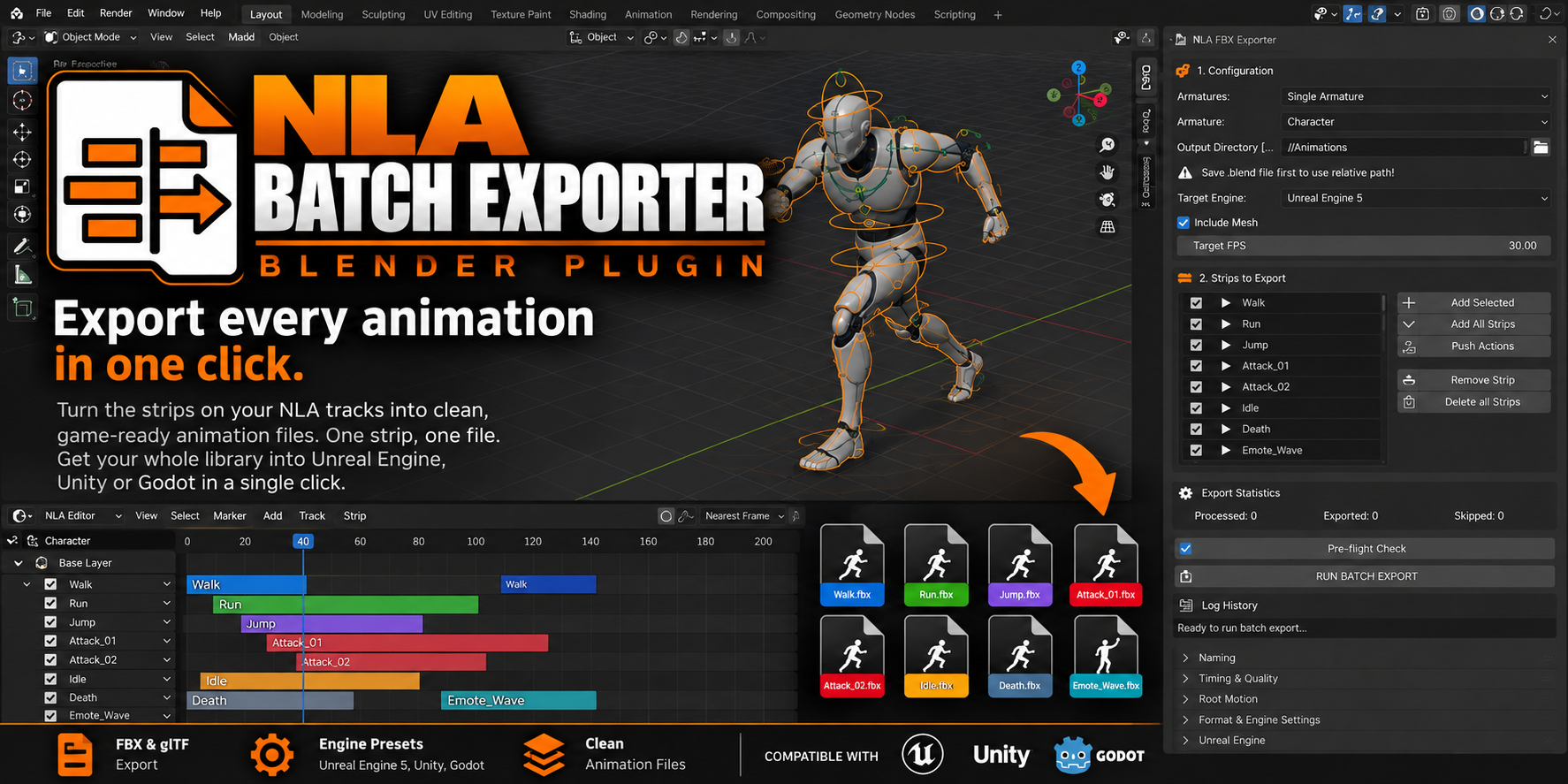
Supercharge your Blender workflow. The NLA Batch FBX Exporter is the fastest way to get animations into your game engine, exporting all NLA tracks to individual FBX files in a single operation.
Categories
Tags
Installation
- Download NLA Batch Exporter and check which Blender versions the creator supports. Keep the installable archive (for example,
NLA_Batch_Exporter.zip) intact. If the download is a bundle, extract it first to find the add-on archive. - In Blender, go to Edit → Preferences → Add-ons. In Blender 4.2 and newer, open the top-right menu and choose Install from Disk. In older versions, click Install….
- Select the add-on archive (for example,
NLA_Batch_Exporter.zip) or its standalone.pyfile and confirm the installation. - Find the add-on in the Add-ons list and tick its checkbox if it isn’t already enabled.
Check the creator’s instructions for any extra setup, such as dependencies or license activation.
Compare with other products
Choose a category to find products to compare with this listing.
Product versions
-
NLA Batch Exporter v1.2.0 published
Created Oct 31, 2026 · Published Oct 31, 2026
Release notes (source)
<p><b>v1.2.0 – Root motion, engine presets and a new panel</b></p><p><b>This update also includes everything from 1.1.0, which wasn't released separately here.</b></p><p><b>Compatibility</b></p><ul><li>Works with Blender 4.5 LTS through 5.2 LTS (tested on 4.5 LTS, 5.1 and 5.2 LTS).</li><li>Now installs as a Blender extension: Edit > Preferences > Get Extensions > Install from Disk. Remove the old version first, then restart Blender.</li></ul><p><b>New</b></p><ul><li>Include Mesh toggle and Export Mesh Only, for animation-only files.</li><li>Root motion: export as animated or in place, with a root bone picker.</li><li>One-click engine presets for Unreal Engine 5, Unity and Godot, plus glTF (.glb) export.</li><li>Simplify Keys control (off by default for exact animation).</li><li>Push Actions to NLA creates strips from actions that aren't on the NLA yet.</li><li>Per-strip file name, frame range, frame rate and loop settings.</li><li>Loop detection that drops the duplicate last frame, so cycles play seamlessly.</li><li>Frame Range option: strip (default), action or scene.</li><li>Naming patterns with tokens and subfolders, and a Name Files By option.</li><li>Export one armature, a collection or the whole scene in one run.</li><li>Check for Problems pre-flight check, and Preview for a strip.</li><li>Shape key (facial) animation export.</li><li>Send to Unreal (beta).</li><li>Redesigned panel with collapsible sections and new icons.</li></ul><p><b>Fixes</b></p><ul><li>Each animation now exports at its own length instead of the scene's frame range.</li><li>Other NLA strips no longer bleed into exported animations.</li><li>Animations made on another rig (imported or appended actions) export correctly.</li><li>Fractional frame rates such as 29.97 export correctly.</li><li>Scene settings are restored after every export, even if one fails.</li><li>A 3D Viewport no longer needs to be open.</li></ul>
-
NLA Batch Exporter v1.0.3 published
Created Nov 23, 2025 · Published Nov 23, 2025
Release notes (source)
<h2>NLA Batch Exporter v1.0.3 Patch Notes (The User-Friendly Update!)</h2><p></p><p>This update focuses on making your animation workflow easier, faster, and more reliable. We've added features that give you better control over how your files are named and exported, and we've significantly improved the post-export experience.</p><p></p><h3>New Features & Quality Control</h3><p></p><ul>
<li><p><b>Quick Access to Exports (NEW!):</b> After a batch export is completed, the summary window now includes a <b>"Open Export Folder"</b> button. One click instantly opens the directory where your FBX files were saved, eliminating the need to manually navigate your file system.</p></li>
<li>
<p><b>Custom File Naming:</b> You can now tell the exporter exactly how to name your files using a Prefix and Suffix. This is essential for keeping your game projects organized.</p>
<blockquote><p><i>Example:</i> Set Prefix to <code>A_</code> and Suffix to <code>_LOOP</code> to get files named <code>A_Walk_LOOP.fbx</code>, etc.</p></blockquote>
</li>
<li>
<p><b>Set Your Own Frame Rate (FPS Control):</b> Added a Target FPS field (default: 30.0). This ensures all your animations are baked at a consistent speed (like 60 FPS) required by your game engine.</p>
<ul><li><p><b>Safeguard:</b> The exporter now automatically changes the scene's FPS just for the export process and immediately changes it back when done, so your main Blender file isn't altered.</p></li></ul>
</li>
<li><p><b>Blender 5.0 Ready:</b> The add-on is now officially compatible with Blender 5.0 and all future versions based on that API.</p></li>
</ul><p></p><h3>Workflow & Usability Improvements</h3><p></p><ul>
<li>
<p><b>Easy Project Folders:</b> The Output Directory field reliably supports the Blender-standard <code>//</code> (double slash). This means you can save your exports to a folder right next to your saved Blender file without typing a long path.</p>
<blockquote><p><i>Note:</i> You must save your <code>.blend</code> file before using the <code>//</code> option.</p></blockquote>
</li>
<li><p><b>Quick List Population:</b> New <b>"List All Strips"</b> button instantly fills your export list with every unique animation action found on your armature. You can then quickly uncheck the few you don't need.</p></li>
<li><p><b>Export Statistics Panel:</b> The panel now shows you exactly what happened during the run: how many animations were <b>Processed</b>, <b>Exported</b>, and <b>Skipped</b>.</p></li>
<li><p><b>In-App Log History:</b> A new Log History box is on the panel. If anything goes wrong, you'll see a clear, simple message right there—no more hunting through the complex Blender System Console!</p></li>
</ul>