Product listing
Make It Cardboard! Cardboard City Generator, Diorama and Papercraft Look for Blender
By Alessia ·
From $49.00
Listing details
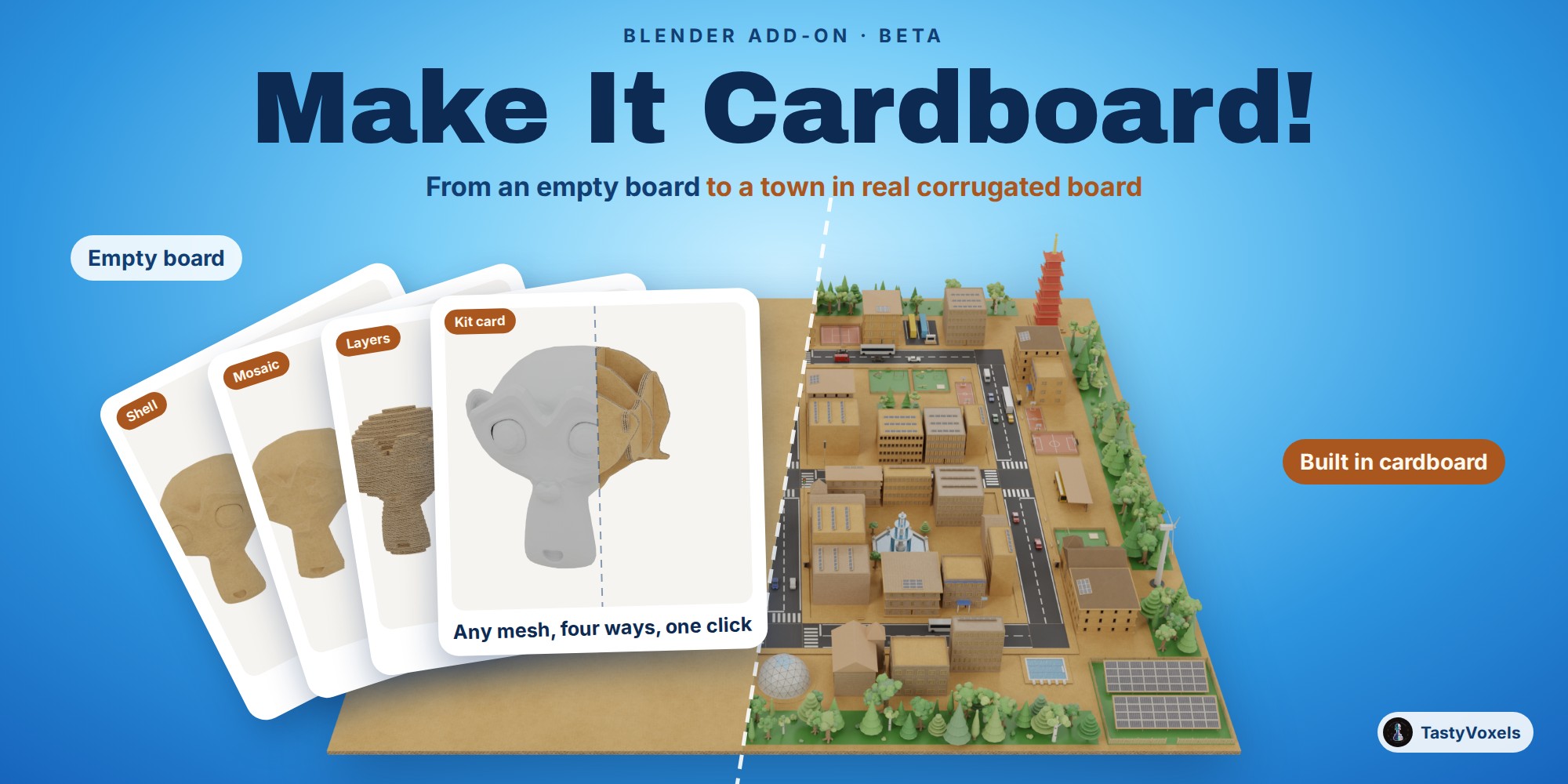
Turn an empty board into a whole cardboard town, and any mesh into real corrugated board four ways: shell, laser-cut layers, glued mosaic or kit card. Flutes on every cut edge, every setting live.
Categories
Tags
Compare with other products
Choose a category to find products to compare with this listing.
Variants
-
Make It Cardboard! add-on + Only Asset Kit published
Price: $129.00 · List price: $129.00
Variant versions
-
0.9.6 published
Created Nov 18, 2026 · Published Nov 18, 2026
Release notes (source)
<p>Pieces and fixes asked for while building the round interiors and the layered hill dioramas.</p><ul><li>New pieces in step 12 (and in the asset library, under the new theme Interiors), for a room seen from above:<ul><li>Shop: a supermarket shelf open on both sides with four shelves of packets a side, an open chest freezer, a row of upright fridges with glass doors, the checkout with its belt, till and stool, a shopping trolley, a hand basket.</li><li>Office: a desk with its monitor, keyboard, mug and chair, four desks face to face between screens, a meeting table with six chairs and a screen on its stand, the coffee corner (counter, coffee machine, cups, a high table and two stools), a potted plant.</li><li>Gift corner: a wall unit of shelves full of wrapped presents and gift bags, a round display table with a pyramid of presents.</li></ul></li><li>New in Camp: a pedal boat, two floats, two seats side by side and the wheel box.</li><li>Fixed: the light presets placed their lamps around the add-on's own sheets only, so on a large diorama made of library pieces or of your own objects the studio lights stood a few centimetres from the centre and made a bright patch there. Every preset now takes the size of everything visible in the scene, pieces placed as collection instances included.</li><li>Fixed: the van outside the factory stood on bare ground; it now stands on its own concrete loading yard beside the hall.</li></ul><p>Checked before release: 668 automated checks pass in Blender 5.2 LTS and 664 in Blender 4.2 LTS and 5.0; every new piece checked part by part, nothing floating and no two parts sharing a face.</p><p>Everything else is as in 0.9.5.</p>
-
0.9.5 published
Created Nov 14, 2026 · Published Nov 14, 2026
Release notes (source)
<p>Fixes and new pieces asked for while building themed dioramas (a park, energy, industry, a forest, layered hills).</p><ul><li>New switch in step 7, Bulbs and flames glow: one click turns every glowing part the add-on made off or on (your own materials are left alone): bulbs, lanterns, lamp lenses, flames, and the pieces appended from the Only Asset Kit too. Off, they are plain card (no green or yellow halo round a substation or a charger when the lights are off); on, each one glows exactly as before.</li><li>New option under Add Building, Ground of the areas: a park, a playground, a solar field, a wood or a row of trees lies on a rectangle of board (as before), on one with round corners, or on nothing at all, to set it into a lawn or a terrain of your own. A pitch, a pool and a car park keep their own ground, with round corners.</li><li>New: Width and Depth for Add Building, in real metres. A car park fills the lot you give it with as many rows of bays as its depth holds, and nothing of it leaves the lot. 0 keeps the real size.</li><li>The park is new: a path in a soft loop round a round flower bed, trees outside the loop, benches on its edge looking in. With a base, one path leads in from the street at the front; with No base the park is part of a larger green, so no path runs off into nothing. The trees keep their crowns over the park.</li><li>New pieces in step 12 (and in the asset library):</li><ul><li>Water and rocks: ponds of a free shape, their water a little under the ground, with an edge of stepped board, of faceted pebbles, or of pebbles and a little beach; a footbridge of sticks and a road bridge, so a path or a road never runs over water; a group of faceted rocks.</li><li>Gardens, none of them on a slab: a round flower bed, a free-shaped one, a rose garden with its hedge and sundial, a gazebo, a fountain, a vegetable plot (lettuce, cabbages, tomatoes on stakes, pumpkins), a tunnel greenhouse, a compost bin.</li><li>Camp: a picnic table, a campfire in one ring of stones, a canoe, the sign at the gate.</li><li>Roads: a crossing for two roads, laid a little over them with its zebra crossings, so the two road surfaces never flicker through each other.</li></ul><li>Fixed: the footbridge of sticks floated over its stringers; it now stands on them, and they stand on the banks.</li><li>Fixed: the walls of the square fountain stood partly outside its floor; they now stand on it.</li><li>Fixed: a bush could hover a hair over the ground; its lowest leaves now touch it.</li><li>Fixed: the pilasters and the cap of the stone footbridge no longer share a face with its side panels (no flicker in a close render).</li></ul><p>Checked before release: 637 automated checks pass in Blender 5.2 LTS and 633 in Blender 4.2 LTS and 5.0; every piece of the add-on, every area with each of its three grounds and every city style checked part by part, nothing floating.</p><p>Everything else is as in 0.9.4.</p>
-
0.9.4 published
Created Nov 14, 2026 · Published Nov 14, 2026
Release notes (source)
<p>New: Bake Trim Sheet, for whole cities and big sets in a game engine or on the web.</p><ul><li>Step 8 (Bake and export), new button Bake Trim Sheet: every look in the selection is baked once into a trim sheet, a square texture made of horizontal bands. Each board look gets a band that repeats along its length, each flute edge a thin band as thick as the board, and tape and stickers a row of cells. A look that does not repeat on its own is blended at its two ends, so the bands tile without a seam.</li><li>Automatic mapping: a clone of the selection is mapped onto the sheet face by face. The long side of each piece runs along its band, at the same number of pixels per metre everywhere; a piece taller than its band is scaled down to fit it, and each piece starts at a different place along the band so the grain does not repeat in a row. Curved walls (cylinders, tubes, arches) are unrolled into one strip, so the band runs on around the curve instead of starting again on every facet, and the flute edges run on around corners and rings. The originals are never touched.</li><li>One material and one texture set (1K, 2K or 4K) for the whole scene: fewer draw calls and less texture memory than one atlas per model, and the repeating bands stay sharp however big the model is.</li><li>Reuse and grow the sheet: bake the next model with the same name and it is mapped onto the sheet you already have, with no new bake. If it brings a look the sheet lacks, only that look is baked, into the 15% of the sheet left empty for this, and every model mapped before keeps its place.</li><li>Built the way trim sheets are made for games: the same texel density everywhere, band heights on steps of 4 pixels and a gutter between bands that grows with the sheet (8 pixels at 1K, 16 at 2K, 32 at 4K), so mipmaps do not bleed one band into the next.</li><li>Files for the engines, beside colour (with alpha), normal and roughness: an ORM map (occlusion, roughness, metallic) for Unreal and glTF, a mask map for Unity, a normal map with the green channel flipped for Unreal, and a layout file (JSON) with the pixel and UV rectangle of every band and cell. The GLB and the Unreal and Unity FBX exports work as with Bake and Export (collision boxes, LODs, real size).</li><li>Window glass goes to a second, see-through material on the same sheet, so the sheet itself keeps an alpha clip that every engine draws cheaply. Clear tape is clipped out on the sheet.</li><li>Fixed: the half-timbered house (houses of the world) put the windows of every upper floor at the height of the ground floor; each floor now has its own windows, on its own jutting face.</li><li>Fixed: on a low, wide lot a shed (and, more rarely, a palazzo or a tower) could get a roof taller than the whole building, so its walls, door and windows went into the ground (seen in the Industry and port city style). The roof now takes at most part of the height.</li><li>Checked again, part by part, that nothing hangs in the air: the check now also sees the inside skin of closed shapes for what it is, and finds every leaf, pane and frame that is not held by its wall.</li></ul><p>Checked before release: 600 automated checks pass in Blender 5.2 LTS and 596 in Blender 4.2 LTS.</p><p>Everything else is as in 0.9.3.</p>
-
0.9.3 published
Created Nov 12, 2026 · Published Nov 12, 2026
Release notes (source)
<p>Nothing hangs in the air any more. Every piece of the library, every city style, a real place (flat and on a relief), a terrain with houses, a painted city and a maze were checked part by part: each loose part of a model must touch another part that, in the end, stands on the ground.</p><ul><li>Fixed: gable, hip and pyramid roofs now sit down on their walls. Before, a roof stood on the wall tops by its outer edge only, and from below or in a close render a thin gap showed between roof and walls. The solar panels on a roof come down with it.</li><li>Fixed, parts that were a few millimetres in the air: floor slabs between storeys, the church windows (now on the nave's own side walls, none hidden behind the tower), the legs of the pool loungers (they had none), the crown of the cottage chimney, the roofs of the stacks, the beams of the adobe house, the roof and chimney of the thatched cottage, the roofs of the pagoda tiers, the panels of the science dome, the rungs of the slide's ladder.</li><li>Fixed: the town hall's clock dial now sits on the tower wall (it stood a few millimetres in front of it), and the head of a standing statue sits on its body.</li><li>Fixed, the stacks (ruined future): a level standing over the middle of the room below now has posts down to that room's floor; a wall broken off half way is found only on the top level, never under another level; no dark window hole above a broken wall; the torn flaps hang from the wall; the landing at the top of every ladder reaches the next floor.</li><li>Fixed: a district's base board now reaches under every lot. A building at the edge of the district, such as a factory, could stand partly off the board.</li><li>Fixed: the first roads made in a new file could take the thickness of another board group, so cars, buses and road markings stood a little above the road (seen in a painted city).</li><li>Fixed: the football goal net now runs from the crossbar down and back to the ground; the basketball hoop has an arm to its pole.</li><li>Fixed: the leaves of round trees always touch their trunk. Round trees grown before keep their shape until they are made again; new ones can differ slightly from the same seed in 0.9.2.</li><li>Fixed: curtains touch the inside of the window frame and ripple in depth. In a file made with an earlier version, the window and door node groups are updated the first time you add a window, a door or a piece in that file; the windows and doors already there keep their size, their settings and the animation of their doors.</li><li>Step 14 (A real place): roads, water, green areas, lots and buildings now end at the edge of the chosen area, not beyond it.</li><li>Step 14 (A real place): water lies inside a low bank of board along its shore (left out where a road or a path crosses or runs along the water), below the bank's top, instead of lying on the board like a sheet of paper. With the relief on, water, green areas and roads follow the ground every 10 m instead of spanning the dips in the air.</li><li>Step 14 (A real place) with the relief on: benches, bus stops, buses, cars, avenue trees, traffic lights, signs and road markings stand on the sloping street. Before, on a slope they stood at the height of the junction they started from.</li><li>Roads: no crossing, stop line or traffic light on a stub of road too short to carry it (a road cut by the edge of the area just after a junction). Traffic lights and signs stand on the pavement that is really there.</li><li>Painted city: water cells get the same bank along every side that meets something else.</li></ul><p>Checked before release: 591 automated checks pass in Blender 5.2 LTS and 587 in Blender 4.2 LTS.</p><p>Everything else is as in 0.9.2.</p><p>The Only Asset Kit in this download is updated to 1.0.1: the same 150 pieces, rebuilt with these fixes.</p>
-
-
Only Asset Kit (no add-on) published
Price: $49.00 · List price: $49.00
Variant versions
-
Asset Kit 1.0.1 published
Created Nov 12, 2026 · Published Nov 12, 2026
Release notes (source)
<p>The pieces rebuilt with Make It Cardboard! 0.9.3, after a check part by part of every piece: each loose part must touch another part that, in the end, stands on the ground.</p><ul><li>Fixed: the frames of the windows, the doors and the portico on the walls now sit on the wall's outer face. In 1.0.0 they stood a little off it.</li><li>Fixed: gable, hip and pyramid roofs sit down on their walls, with no thin gap between roof and walls.</li><li>Fixed, where the pieces have them, parts that were a few millimetres in the air: floor slabs between storeys, the church windows, the legs of the pool loungers, the crown of the cottage chimney, the beams of the adobe house, the roof and chimney of the thatched cottage, the roofs of the pagoda tiers, the panels of the science dome, the rungs of the slide's ladder, the town hall's clock dial, the head of a standing statue, the leaves of the round trees.</li><li>Fixed, the stack (vertical slum): posts under a level that stands over the middle of the room below, broken walls only on the top level, the torn flaps hang from the wall, every ladder's landing reaches the next floor.</li></ul><p>Same 150 pieces, same catalogs. Needs Blender 4.2 or newer.</p>
-
Asset Kit 1.0.0 published
Created Oct 24, 2026 · Published Oct 24, 2026
Release notes (source)
<p>Only Asset Kit 1.0.0: 150 ready cardboard pieces for Blender's Asset Browser (buildings, world houses, street furniture and infrastructure, trees, vehicles, areas and squares, the themed sets, shapes, walls with windows, doors and a portico, tape and stickers, the example house). No add-on and no code. Blender 4.2 or newer. Royalty-free asset licence in LICENSE_ASSETS.txt.</p>
-
-
Make It Cardboard! City Builder + Only Asset Kit published
Price: $89.00 · List price: $89.00
Variant versions
-
City Builder 0.9.6 published
Created Nov 18, 2026 · Published Nov 18, 2026
Release notes (source)
<p>Pieces and fixes asked for while building the round interiors and the layered hill dioramas.</p><ul><li>New pieces in step 12 (and in the asset library, under the new theme Interiors), for a room seen from above:<ul><li>Shop: a supermarket shelf open on both sides with four shelves of packets a side, an open chest freezer, a row of upright fridges with glass doors, the checkout with its belt, till and stool, a shopping trolley, a hand basket.</li><li>Office: a desk with its monitor, keyboard, mug and chair, four desks face to face between screens, a meeting table with six chairs and a screen on its stand, the coffee corner (counter, coffee machine, cups, a high table and two stools), a potted plant.</li><li>Gift corner: a wall unit of shelves full of wrapped presents and gift bags, a round display table with a pyramid of presents.</li></ul></li><li>New in Camp: a pedal boat, two floats, two seats side by side and the wheel box.</li><li>Fixed: the light presets placed their lamps around the add-on's own sheets only, so on a large diorama made of library pieces or of your own objects the studio lights stood a few centimetres from the centre and made a bright patch there. Every preset now takes the size of everything visible in the scene, pieces placed as collection instances included.</li><li>Fixed: the van outside the factory stood on bare ground; it now stands on its own concrete loading yard beside the hall.</li></ul><p>Checked before release: the City Builder zip installs and passes its automated checks in Blender 5.0 (the two checks about expansion sets do not apply: this edition ships without them), and both zips pass Blender 5.2's extension validation; every new piece checked part by part, nothing floating and no two parts sharing a face.</p><p>Everything else is as in 0.9.5.</p>
-
City Builder 0.9.5 published
Created Nov 14, 2026 · Published Nov 14, 2026
Release notes (source)
<p>Fixes and new pieces asked for while building themed dioramas (a park, energy, industry, a forest, layered hills).</p><ul><li>New switch in step 7, Bulbs and flames glow: one click turns every glowing part the add-on made off or on (your own materials are left alone): bulbs, lanterns, lamp lenses, flames, and the pieces appended from the Only Asset Kit too. Off, they are plain card (no green or yellow halo round a substation or a charger when the lights are off); on, each one glows exactly as before.</li><li>New option under Add Building, Ground of the areas: a park, a playground, a solar field, a wood or a row of trees lies on a rectangle of board (as before), on one with round corners, or on nothing at all, to set it into a lawn or a terrain of your own. A pitch, a pool and a car park keep their own ground, with round corners.</li><li>New: Width and Depth for Add Building, in real metres. A car park fills the lot you give it with as many rows of bays as its depth holds, and nothing of it leaves the lot. 0 keeps the real size.</li><li>The park is new: a path in a soft loop round a round flower bed, trees outside the loop, benches on its edge looking in. With a base, one path leads in from the street at the front; with No base the park is part of a larger green, so no path runs off into nothing. The trees keep their crowns over the park.</li><li>New pieces in step 12 (and in the asset library):</li><ul><li>Water and rocks: ponds of a free shape, their water a little under the ground, with an edge of stepped board, of faceted pebbles, or of pebbles and a little beach; a footbridge of sticks and a road bridge, so a path or a road never runs over water; a group of faceted rocks.</li><li>Gardens, none of them on a slab: a round flower bed, a free-shaped one, a rose garden with its hedge and sundial, a gazebo, a fountain, a vegetable plot (lettuce, cabbages, tomatoes on stakes, pumpkins), a tunnel greenhouse, a compost bin.</li><li>Camp: a picnic table, a campfire in one ring of stones, a canoe, the sign at the gate.</li><li>Roads: a crossing for two roads, laid a little over them with its zebra crossings, so the two road surfaces never flicker through each other.</li></ul><li>Fixed: the footbridge of sticks floated over its stringers; it now stands on them, and they stand on the banks.</li><li>Fixed: the walls of the square fountain stood partly outside its floor; they now stand on it.</li><li>Fixed: a bush could hover a hair over the ground; its lowest leaves now touch it.</li><li>Fixed: the pilasters and the cap of the stone footbridge no longer share a face with its side panels (no flicker in a close render).</li></ul><p>Checked before release: the City Builder zip installs and passes its automated checks in Blender 5.0 (the two checks about expansion sets do not apply: this edition ships without them), and passes Blender 5.2's extension validation.</p><p>Everything else is as in 0.9.4.</p>
-
City Builder 0.9.4 published
Created Nov 14, 2026 · Published Nov 14, 2026
Release notes (source)
<p>New: Bake Trim Sheet, for whole cities in a game engine or on the web.</p><ul><li>Step 8 (Bake and export), new button Bake Trim Sheet: every look in the selection is baked once into a trim sheet, a square texture made of horizontal bands. Each board look gets a band that repeats along its length, each flute edge a thin band as thick as the board, and tape and stickers a row of cells. A look that does not repeat on its own is blended at its two ends, so the bands tile without a seam.</li><li>Automatic mapping: a clone of the selection is mapped onto the sheet face by face. The long side of each piece runs along its band, at the same number of pixels per metre everywhere; a piece taller than its band is scaled down to fit it, and each piece starts at a different place along the band so the grain does not repeat in a row. Curved walls (cylinders, tubes, arches) are unrolled into one strip, so the band runs on around the curve instead of starting again on every facet, and the flute edges run on around corners and rings. The originals are never touched.</li><li>One material and one texture set (1K, 2K or 4K) for the whole city: fewer draw calls and less texture memory than one atlas per model, and the repeating bands stay sharp however big the city is.</li><li>Reuse and grow the sheet: bake the next model with the same name and it is mapped onto the sheet you already have, with no new bake. If it brings a look the sheet lacks, only that look is baked, into the 15% of the sheet left empty for this, and every model mapped before keeps its place.</li><li>Built the way trim sheets are made for games: the same texel density everywhere, band heights on steps of 4 pixels and a gutter between bands that grows with the sheet (8 pixels at 1K, 16 at 2K, 32 at 4K), so mipmaps do not bleed one band into the next.</li><li>Files for the engines, beside colour (with alpha), normal and roughness: an ORM map for Unreal and glTF, a mask map for Unity, a normal map with the green channel flipped for Unreal, and a layout file (JSON) with the pixel and UV rectangle of every band and cell. The GLB and the Unreal and Unity FBX exports work as with Bake and Export.</li><li>Window glass goes to a second, see-through material on the same sheet, so the sheet itself keeps an alpha clip that every engine draws cheaply. Clear tape is clipped out on the sheet.</li><li>Fixed: the half-timbered house (houses of the world) put the windows of every upper floor at the height of the ground floor; each floor now has its own windows, on its own jutting face.</li><li>Fixed: on a low, wide lot a shed (and, more rarely, a palazzo or a tower) could get a roof taller than the whole building, so its walls, door and windows went into the ground (seen in the Industry and port city style). The roof now takes at most part of the height.</li><li>Checked again, part by part, that nothing hangs in the air: the check now also sees the inside skin of closed shapes for what it is, and finds every leaf, pane and frame that is not held by its wall.</li></ul><p>Checked before release: the City Builder zip installs and passes its automated checks in Blender 4.2 and 5.0 (the two checks about expansion sets do not apply: this edition ships without them), and passes Blender 5.2's extension validation.</p><p>Everything else is as in 0.9.3.</p>
-
City Builder 0.9.3 published
Created Nov 12, 2026 · Published Nov 12, 2026
Release notes (source)
<p>Nothing hangs in the air any more. Every piece of the library, every city style and a maze were checked part by part: each loose part of a model must touch another part that, in the end, stands on the ground.</p><ul><li>Fixed: gable, hip and pyramid roofs now sit down on their walls. Before, a roof stood on the wall tops by its outer edge only, and from below or in a close render a thin gap showed between roof and walls. The solar panels on a roof come down with it.</li><li>Fixed, parts that were a few millimetres in the air: floor slabs between storeys, the church windows (now on the nave's own side walls, none hidden behind the tower), the legs of the pool loungers (they had none), the crown of the cottage chimney, the roofs of the stacks, the beams of the adobe house, the roof and chimney of the thatched cottage, the roofs of the pagoda tiers, the panels of the science dome, the rungs of the slide's ladder.</li><li>Fixed: the town hall's clock dial now sits on the tower wall (it stood a few millimetres in front of it), and the head of a standing statue sits on its body.</li><li>Fixed, the stacks (ruined future): a level standing over the middle of the room below now has posts down to that room's floor; a wall broken off half way is found only on the top level, never under another level; no dark window hole above a broken wall; the torn flaps hang from the wall; the landing at the top of every ladder reaches the next floor.</li><li>Fixed: a district's base board now reaches under every lot. A building at the edge of the district, such as a factory, could stand partly off the board.</li><li>Fixed: the first roads made in a new file could take the thickness of another board group, so cars, buses and road markings stood a little above the road.</li><li>Fixed: the football goal net now runs from the crossbar down and back to the ground; the basketball hoop has an arm to its pole.</li><li>Fixed: the leaves of round trees always touch their trunk. Round trees grown before keep their shape until they are made again; new ones can differ slightly from the same seed in 0.9.2.</li><li>Fixed: curtains touch the inside of the window frame and ripple in depth. In a file made with an earlier version, the window and door node groups are updated the first time you add a window, a door or a piece in that file; the windows and doors already there keep their size, their settings and the animation of their doors.</li><li>Roads: no crossing, stop line or traffic light on a stub of road too short to carry it. Traffic lights and signs stand on the pavement that is really there.</li><li>Fixed: one text in the extension manifest was longer than Blender's 64 characters, so <code>blender --command extension validate</code> failed on the City Builder 0.9.2 zip (it installed and worked all the same with Install from Disk).</li></ul><p>Checked before release: the City Builder zip installs and passes its automated checks in Blender 4.2 and 5.0 (the two checks about expansion sets do not apply: this edition ships without them), and passes Blender 5.2's extension validation.</p><p>Everything else is as in 0.9.2.</p><p>The Only Asset Kit in this download is updated to 1.0.1: the same 150 pieces, rebuilt with these fixes.</p>
-
City Builder 0.9.2 published
Created Oct 24, 2026 · Published Oct 24, 2026
Release notes (source)
<p>Make It Cardboard! City Builder, cut from the full add-on 0.9.2. Not included: Make It Cardboard! on your own meshes (shell, laser slices, panels, kit card), A real place, Terrain and Paint a city; their code is not in this zip. Everything else works as in 0.9.2. The Only Asset Kit 1.0.0 is in a separate zip.</p>
-
-
Free: Lake Resort diorama scene (personal use, no add-on) disabled
Price: $0.00 · List price: $0.00
Product versions
-
City Builder 0.9.6 published
Created Nov 18, 2026 · Published Nov 18, 2026
Release notes (source)
<p>Pieces and fixes asked for while building the round interiors and the layered hill dioramas.</p><ul><li>New pieces in step 12 (and in the asset library, under the new theme Interiors), for a room seen from above:<ul><li>Shop: a supermarket shelf open on both sides with four shelves of packets a side, an open chest freezer, a row of upright fridges with glass doors, the checkout with its belt, till and stool, a shopping trolley, a hand basket.</li><li>Office: a desk with its monitor, keyboard, mug and chair, four desks face to face between screens, a meeting table with six chairs and a screen on its stand, the coffee corner (counter, coffee machine, cups, a high table and two stools), a potted plant.</li><li>Gift corner: a wall unit of shelves full of wrapped presents and gift bags, a round display table with a pyramid of presents.</li></ul></li><li>New in Camp: a pedal boat, two floats, two seats side by side and the wheel box.</li><li>Fixed: the light presets placed their lamps around the add-on's own sheets only, so on a large diorama made of library pieces or of your own objects the studio lights stood a few centimetres from the centre and made a bright patch there. Every preset now takes the size of everything visible in the scene, pieces placed as collection instances included.</li><li>Fixed: the van outside the factory stood on bare ground; it now stands on its own concrete loading yard beside the hall.</li></ul><p>Checked before release: the City Builder zip installs and passes its automated checks in Blender 5.0 (the two checks about expansion sets do not apply: this edition ships without them), and both zips pass Blender 5.2's extension validation; every new piece checked part by part, nothing floating and no two parts sharing a face.</p><p>Everything else is as in 0.9.5.</p>
-
0.9.6 published
Created Nov 18, 2026 · Published Nov 18, 2026
Release notes (source)
<p>Pieces and fixes asked for while building the round interiors and the layered hill dioramas.</p><ul><li>New pieces in step 12 (and in the asset library, under the new theme Interiors), for a room seen from above:<ul><li>Shop: a supermarket shelf open on both sides with four shelves of packets a side, an open chest freezer, a row of upright fridges with glass doors, the checkout with its belt, till and stool, a shopping trolley, a hand basket.</li><li>Office: a desk with its monitor, keyboard, mug and chair, four desks face to face between screens, a meeting table with six chairs and a screen on its stand, the coffee corner (counter, coffee machine, cups, a high table and two stools), a potted plant.</li><li>Gift corner: a wall unit of shelves full of wrapped presents and gift bags, a round display table with a pyramid of presents.</li></ul></li><li>New in Camp: a pedal boat, two floats, two seats side by side and the wheel box.</li><li>Fixed: the light presets placed their lamps around the add-on's own sheets only, so on a large diorama made of library pieces or of your own objects the studio lights stood a few centimetres from the centre and made a bright patch there. Every preset now takes the size of everything visible in the scene, pieces placed as collection instances included.</li><li>Fixed: the van outside the factory stood on bare ground; it now stands on its own concrete loading yard beside the hall.</li></ul><p>Checked before release: 668 automated checks pass in Blender 5.2 LTS and 664 in Blender 4.2 LTS and 5.0; every new piece checked part by part, nothing floating and no two parts sharing a face.</p><p>Everything else is as in 0.9.5.</p>
-
City Builder 0.9.5 published
Created Nov 14, 2026 · Published Nov 14, 2026
Release notes (source)
<p>Fixes and new pieces asked for while building themed dioramas (a park, energy, industry, a forest, layered hills).</p><ul><li>New switch in step 7, Bulbs and flames glow: one click turns every glowing part the add-on made off or on (your own materials are left alone): bulbs, lanterns, lamp lenses, flames, and the pieces appended from the Only Asset Kit too. Off, they are plain card (no green or yellow halo round a substation or a charger when the lights are off); on, each one glows exactly as before.</li><li>New option under Add Building, Ground of the areas: a park, a playground, a solar field, a wood or a row of trees lies on a rectangle of board (as before), on one with round corners, or on nothing at all, to set it into a lawn or a terrain of your own. A pitch, a pool and a car park keep their own ground, with round corners.</li><li>New: Width and Depth for Add Building, in real metres. A car park fills the lot you give it with as many rows of bays as its depth holds, and nothing of it leaves the lot. 0 keeps the real size.</li><li>The park is new: a path in a soft loop round a round flower bed, trees outside the loop, benches on its edge looking in. With a base, one path leads in from the street at the front; with No base the park is part of a larger green, so no path runs off into nothing. The trees keep their crowns over the park.</li><li>New pieces in step 12 (and in the asset library):</li><ul><li>Water and rocks: ponds of a free shape, their water a little under the ground, with an edge of stepped board, of faceted pebbles, or of pebbles and a little beach; a footbridge of sticks and a road bridge, so a path or a road never runs over water; a group of faceted rocks.</li><li>Gardens, none of them on a slab: a round flower bed, a free-shaped one, a rose garden with its hedge and sundial, a gazebo, a fountain, a vegetable plot (lettuce, cabbages, tomatoes on stakes, pumpkins), a tunnel greenhouse, a compost bin.</li><li>Camp: a picnic table, a campfire in one ring of stones, a canoe, the sign at the gate.</li><li>Roads: a crossing for two roads, laid a little over them with its zebra crossings, so the two road surfaces never flicker through each other.</li></ul><li>Fixed: the footbridge of sticks floated over its stringers; it now stands on them, and they stand on the banks.</li><li>Fixed: the walls of the square fountain stood partly outside its floor; they now stand on it.</li><li>Fixed: a bush could hover a hair over the ground; its lowest leaves now touch it.</li><li>Fixed: the pilasters and the cap of the stone footbridge no longer share a face with its side panels (no flicker in a close render).</li></ul><p>Checked before release: the City Builder zip installs and passes its automated checks in Blender 5.0 (the two checks about expansion sets do not apply: this edition ships without them), and passes Blender 5.2's extension validation.</p><p>Everything else is as in 0.9.4.</p>
-
0.9.5 published
Created Nov 14, 2026 · Published Nov 14, 2026
Release notes (source)
<p>Fixes and new pieces asked for while building themed dioramas (a park, energy, industry, a forest, layered hills).</p><ul><li>New switch in step 7, Bulbs and flames glow: one click turns every glowing part the add-on made off or on (your own materials are left alone): bulbs, lanterns, lamp lenses, flames, and the pieces appended from the Only Asset Kit too. Off, they are plain card (no green or yellow halo round a substation or a charger when the lights are off); on, each one glows exactly as before.</li><li>New option under Add Building, Ground of the areas: a park, a playground, a solar field, a wood or a row of trees lies on a rectangle of board (as before), on one with round corners, or on nothing at all, to set it into a lawn or a terrain of your own. A pitch, a pool and a car park keep their own ground, with round corners.</li><li>New: Width and Depth for Add Building, in real metres. A car park fills the lot you give it with as many rows of bays as its depth holds, and nothing of it leaves the lot. 0 keeps the real size.</li><li>The park is new: a path in a soft loop round a round flower bed, trees outside the loop, benches on its edge looking in. With a base, one path leads in from the street at the front; with No base the park is part of a larger green, so no path runs off into nothing. The trees keep their crowns over the park.</li><li>New pieces in step 12 (and in the asset library):</li><ul><li>Water and rocks: ponds of a free shape, their water a little under the ground, with an edge of stepped board, of faceted pebbles, or of pebbles and a little beach; a footbridge of sticks and a road bridge, so a path or a road never runs over water; a group of faceted rocks.</li><li>Gardens, none of them on a slab: a round flower bed, a free-shaped one, a rose garden with its hedge and sundial, a gazebo, a fountain, a vegetable plot (lettuce, cabbages, tomatoes on stakes, pumpkins), a tunnel greenhouse, a compost bin.</li><li>Camp: a picnic table, a campfire in one ring of stones, a canoe, the sign at the gate.</li><li>Roads: a crossing for two roads, laid a little over them with its zebra crossings, so the two road surfaces never flicker through each other.</li></ul><li>Fixed: the footbridge of sticks floated over its stringers; it now stands on them, and they stand on the banks.</li><li>Fixed: the walls of the square fountain stood partly outside its floor; they now stand on it.</li><li>Fixed: a bush could hover a hair over the ground; its lowest leaves now touch it.</li><li>Fixed: the pilasters and the cap of the stone footbridge no longer share a face with its side panels (no flicker in a close render).</li></ul><p>Checked before release: 637 automated checks pass in Blender 5.2 LTS and 633 in Blender 4.2 LTS and 5.0; every piece of the add-on, every area with each of its three grounds and every city style checked part by part, nothing floating.</p><p>Everything else is as in 0.9.4.</p>
-
City Builder 0.9.4 published
Created Nov 14, 2026 · Published Nov 14, 2026
Release notes (source)
<p>New: Bake Trim Sheet, for whole cities in a game engine or on the web.</p><ul><li>Step 8 (Bake and export), new button Bake Trim Sheet: every look in the selection is baked once into a trim sheet, a square texture made of horizontal bands. Each board look gets a band that repeats along its length, each flute edge a thin band as thick as the board, and tape and stickers a row of cells. A look that does not repeat on its own is blended at its two ends, so the bands tile without a seam.</li><li>Automatic mapping: a clone of the selection is mapped onto the sheet face by face. The long side of each piece runs along its band, at the same number of pixels per metre everywhere; a piece taller than its band is scaled down to fit it, and each piece starts at a different place along the band so the grain does not repeat in a row. Curved walls (cylinders, tubes, arches) are unrolled into one strip, so the band runs on around the curve instead of starting again on every facet, and the flute edges run on around corners and rings. The originals are never touched.</li><li>One material and one texture set (1K, 2K or 4K) for the whole city: fewer draw calls and less texture memory than one atlas per model, and the repeating bands stay sharp however big the city is.</li><li>Reuse and grow the sheet: bake the next model with the same name and it is mapped onto the sheet you already have, with no new bake. If it brings a look the sheet lacks, only that look is baked, into the 15% of the sheet left empty for this, and every model mapped before keeps its place.</li><li>Built the way trim sheets are made for games: the same texel density everywhere, band heights on steps of 4 pixels and a gutter between bands that grows with the sheet (8 pixels at 1K, 16 at 2K, 32 at 4K), so mipmaps do not bleed one band into the next.</li><li>Files for the engines, beside colour (with alpha), normal and roughness: an ORM map for Unreal and glTF, a mask map for Unity, a normal map with the green channel flipped for Unreal, and a layout file (JSON) with the pixel and UV rectangle of every band and cell. The GLB and the Unreal and Unity FBX exports work as with Bake and Export.</li><li>Window glass goes to a second, see-through material on the same sheet, so the sheet itself keeps an alpha clip that every engine draws cheaply. Clear tape is clipped out on the sheet.</li><li>Fixed: the half-timbered house (houses of the world) put the windows of every upper floor at the height of the ground floor; each floor now has its own windows, on its own jutting face.</li><li>Fixed: on a low, wide lot a shed (and, more rarely, a palazzo or a tower) could get a roof taller than the whole building, so its walls, door and windows went into the ground (seen in the Industry and port city style). The roof now takes at most part of the height.</li><li>Checked again, part by part, that nothing hangs in the air: the check now also sees the inside skin of closed shapes for what it is, and finds every leaf, pane and frame that is not held by its wall.</li></ul><p>Checked before release: the City Builder zip installs and passes its automated checks in Blender 4.2 and 5.0 (the two checks about expansion sets do not apply: this edition ships without them), and passes Blender 5.2's extension validation.</p><p>Everything else is as in 0.9.3.</p>
-
0.9.4 published
Created Nov 14, 2026 · Published Nov 14, 2026
Release notes (source)
<p>New: Bake Trim Sheet, for whole cities and big sets in a game engine or on the web.</p><ul><li>Step 8 (Bake and export), new button Bake Trim Sheet: every look in the selection is baked once into a trim sheet, a square texture made of horizontal bands. Each board look gets a band that repeats along its length, each flute edge a thin band as thick as the board, and tape and stickers a row of cells. A look that does not repeat on its own is blended at its two ends, so the bands tile without a seam.</li><li>Automatic mapping: a clone of the selection is mapped onto the sheet face by face. The long side of each piece runs along its band, at the same number of pixels per metre everywhere; a piece taller than its band is scaled down to fit it, and each piece starts at a different place along the band so the grain does not repeat in a row. Curved walls (cylinders, tubes, arches) are unrolled into one strip, so the band runs on around the curve instead of starting again on every facet, and the flute edges run on around corners and rings. The originals are never touched.</li><li>One material and one texture set (1K, 2K or 4K) for the whole scene: fewer draw calls and less texture memory than one atlas per model, and the repeating bands stay sharp however big the model is.</li><li>Reuse and grow the sheet: bake the next model with the same name and it is mapped onto the sheet you already have, with no new bake. If it brings a look the sheet lacks, only that look is baked, into the 15% of the sheet left empty for this, and every model mapped before keeps its place.</li><li>Built the way trim sheets are made for games: the same texel density everywhere, band heights on steps of 4 pixels and a gutter between bands that grows with the sheet (8 pixels at 1K, 16 at 2K, 32 at 4K), so mipmaps do not bleed one band into the next.</li><li>Files for the engines, beside colour (with alpha), normal and roughness: an ORM map (occlusion, roughness, metallic) for Unreal and glTF, a mask map for Unity, a normal map with the green channel flipped for Unreal, and a layout file (JSON) with the pixel and UV rectangle of every band and cell. The GLB and the Unreal and Unity FBX exports work as with Bake and Export (collision boxes, LODs, real size).</li><li>Window glass goes to a second, see-through material on the same sheet, so the sheet itself keeps an alpha clip that every engine draws cheaply. Clear tape is clipped out on the sheet.</li><li>Fixed: the half-timbered house (houses of the world) put the windows of every upper floor at the height of the ground floor; each floor now has its own windows, on its own jutting face.</li><li>Fixed: on a low, wide lot a shed (and, more rarely, a palazzo or a tower) could get a roof taller than the whole building, so its walls, door and windows went into the ground (seen in the Industry and port city style). The roof now takes at most part of the height.</li><li>Checked again, part by part, that nothing hangs in the air: the check now also sees the inside skin of closed shapes for what it is, and finds every leaf, pane and frame that is not held by its wall.</li></ul><p>Checked before release: 600 automated checks pass in Blender 5.2 LTS and 596 in Blender 4.2 LTS.</p><p>Everything else is as in 0.9.3.</p>
-
City Builder 0.9.3 published
Created Nov 12, 2026 · Published Nov 12, 2026
Release notes (source)
<p>Nothing hangs in the air any more. Every piece of the library, every city style and a maze were checked part by part: each loose part of a model must touch another part that, in the end, stands on the ground.</p><ul><li>Fixed: gable, hip and pyramid roofs now sit down on their walls. Before, a roof stood on the wall tops by its outer edge only, and from below or in a close render a thin gap showed between roof and walls. The solar panels on a roof come down with it.</li><li>Fixed, parts that were a few millimetres in the air: floor slabs between storeys, the church windows (now on the nave's own side walls, none hidden behind the tower), the legs of the pool loungers (they had none), the crown of the cottage chimney, the roofs of the stacks, the beams of the adobe house, the roof and chimney of the thatched cottage, the roofs of the pagoda tiers, the panels of the science dome, the rungs of the slide's ladder.</li><li>Fixed: the town hall's clock dial now sits on the tower wall (it stood a few millimetres in front of it), and the head of a standing statue sits on its body.</li><li>Fixed, the stacks (ruined future): a level standing over the middle of the room below now has posts down to that room's floor; a wall broken off half way is found only on the top level, never under another level; no dark window hole above a broken wall; the torn flaps hang from the wall; the landing at the top of every ladder reaches the next floor.</li><li>Fixed: a district's base board now reaches under every lot. A building at the edge of the district, such as a factory, could stand partly off the board.</li><li>Fixed: the first roads made in a new file could take the thickness of another board group, so cars, buses and road markings stood a little above the road.</li><li>Fixed: the football goal net now runs from the crossbar down and back to the ground; the basketball hoop has an arm to its pole.</li><li>Fixed: the leaves of round trees always touch their trunk. Round trees grown before keep their shape until they are made again; new ones can differ slightly from the same seed in 0.9.2.</li><li>Fixed: curtains touch the inside of the window frame and ripple in depth. In a file made with an earlier version, the window and door node groups are updated the first time you add a window, a door or a piece in that file; the windows and doors already there keep their size, their settings and the animation of their doors.</li><li>Roads: no crossing, stop line or traffic light on a stub of road too short to carry it. Traffic lights and signs stand on the pavement that is really there.</li><li>Fixed: one text in the extension manifest was longer than Blender's 64 characters, so <code>blender --command extension validate</code> failed on the City Builder 0.9.2 zip (it installed and worked all the same with Install from Disk).</li></ul><p>Checked before release: the City Builder zip installs and passes its automated checks in Blender 4.2 and 5.0 (the two checks about expansion sets do not apply: this edition ships without them), and passes Blender 5.2's extension validation.</p><p>Everything else is as in 0.9.2.</p><p>The Only Asset Kit in this download is updated to 1.0.1: the same 150 pieces, rebuilt with these fixes.</p>
-
0.9.3 published
Created Nov 12, 2026 · Published Nov 12, 2026
Release notes (source)
<p>Nothing hangs in the air any more. Every piece of the library, every city style, a real place (flat and on a relief), a terrain with houses, a painted city and a maze were checked part by part: each loose part of a model must touch another part that, in the end, stands on the ground.</p><ul><li>Fixed: gable, hip and pyramid roofs now sit down on their walls. Before, a roof stood on the wall tops by its outer edge only, and from below or in a close render a thin gap showed between roof and walls. The solar panels on a roof come down with it.</li><li>Fixed, parts that were a few millimetres in the air: floor slabs between storeys, the church windows (now on the nave's own side walls, none hidden behind the tower), the legs of the pool loungers (they had none), the crown of the cottage chimney, the roofs of the stacks, the beams of the adobe house, the roof and chimney of the thatched cottage, the roofs of the pagoda tiers, the panels of the science dome, the rungs of the slide's ladder.</li><li>Fixed: the town hall's clock dial now sits on the tower wall (it stood a few millimetres in front of it), and the head of a standing statue sits on its body.</li><li>Fixed, the stacks (ruined future): a level standing over the middle of the room below now has posts down to that room's floor; a wall broken off half way is found only on the top level, never under another level; no dark window hole above a broken wall; the torn flaps hang from the wall; the landing at the top of every ladder reaches the next floor.</li><li>Fixed: a district's base board now reaches under every lot. A building at the edge of the district, such as a factory, could stand partly off the board.</li><li>Fixed: the first roads made in a new file could take the thickness of another board group, so cars, buses and road markings stood a little above the road (seen in a painted city).</li><li>Fixed: the football goal net now runs from the crossbar down and back to the ground; the basketball hoop has an arm to its pole.</li><li>Fixed: the leaves of round trees always touch their trunk. Round trees grown before keep their shape until they are made again; new ones can differ slightly from the same seed in 0.9.2.</li><li>Fixed: curtains touch the inside of the window frame and ripple in depth. In a file made with an earlier version, the window and door node groups are updated the first time you add a window, a door or a piece in that file; the windows and doors already there keep their size, their settings and the animation of their doors.</li><li>Step 14 (A real place): roads, water, green areas, lots and buildings now end at the edge of the chosen area, not beyond it.</li><li>Step 14 (A real place): water lies inside a low bank of board along its shore (left out where a road or a path crosses or runs along the water), below the bank's top, instead of lying on the board like a sheet of paper. With the relief on, water, green areas and roads follow the ground every 10 m instead of spanning the dips in the air.</li><li>Step 14 (A real place) with the relief on: benches, bus stops, buses, cars, avenue trees, traffic lights, signs and road markings stand on the sloping street. Before, on a slope they stood at the height of the junction they started from.</li><li>Roads: no crossing, stop line or traffic light on a stub of road too short to carry it (a road cut by the edge of the area just after a junction). Traffic lights and signs stand on the pavement that is really there.</li><li>Painted city: water cells get the same bank along every side that meets something else.</li></ul><p>Checked before release: 591 automated checks pass in Blender 5.2 LTS and 587 in Blender 4.2 LTS.</p><p>Everything else is as in 0.9.2.</p><p>The Only Asset Kit in this download is updated to 1.0.1: the same 150 pieces, rebuilt with these fixes.</p>
-
Asset Kit 1.0.1 published
Created Nov 12, 2026 · Published Nov 12, 2026
Release notes (source)
<p>The pieces rebuilt with Make It Cardboard! 0.9.3, after a check part by part of every piece: each loose part must touch another part that, in the end, stands on the ground.</p><ul><li>Fixed: the frames of the windows, the doors and the portico on the walls now sit on the wall's outer face. In 1.0.0 they stood a little off it.</li><li>Fixed: gable, hip and pyramid roofs sit down on their walls, with no thin gap between roof and walls.</li><li>Fixed, where the pieces have them, parts that were a few millimetres in the air: floor slabs between storeys, the church windows, the legs of the pool loungers, the crown of the cottage chimney, the beams of the adobe house, the roof and chimney of the thatched cottage, the roofs of the pagoda tiers, the panels of the science dome, the rungs of the slide's ladder, the town hall's clock dial, the head of a standing statue, the leaves of the round trees.</li><li>Fixed, the stack (vertical slum): posts under a level that stands over the middle of the room below, broken walls only on the top level, the torn flaps hang from the wall, every ladder's landing reaches the next floor.</li></ul><p>Same 150 pieces, same catalogs. Needs Blender 4.2 or newer.</p>
-
City Builder 0.9.2 published
Created Oct 24, 2026 · Published Oct 24, 2026
Release notes (source)
<p>Make It Cardboard! City Builder, cut from the full add-on 0.9.2. Not included: Make It Cardboard! on your own meshes (shell, laser slices, panels, kit card), A real place, Terrain and Paint a city; their code is not in this zip. Everything else works as in 0.9.2. The Only Asset Kit 1.0.0 is in a separate zip.</p>
-
Asset Kit 1.0.0 published
Created Oct 24, 2026 · Published Oct 24, 2026
Release notes (source)
<p>Only Asset Kit 1.0.0: 150 ready cardboard pieces for Blender's Asset Browser (buildings, world houses, street furniture and infrastructure, trees, vehicles, areas and squares, the themed sets, shapes, walls with windows, doors and a portico, tape and stickers, the example house). No add-on and no code. Blender 4.2 or newer. Royalty-free asset licence in LICENSE_ASSETS.txt.</p>
-
0.9.2 published
Created Oct 20, 2026 · Published Oct 20, 2026
Release notes (source)
<ul>
<li>Fixed: the extension manifest now passes Blender's extension validation. In 0.9.0 and 0.9.1 two texts in the manifest were longer than 64 characters, so that check failed; those zips still installed and worked with Install from Disk. (Corrected: an earlier wording of this line said they would not install, which was wrong.) It is checked with Blender's own extension tool and installed and enabled in Blender 4.2 and 5.2.</li>
<li>New: kits bought on their own. Step 17 now lists the kits installed and has an Install Kit button: pick the kit's .zip, restart Blender, and its pieces appear in the step's gallery and in the asset library, with their own optional parts in the Elements table. A kit goes into the add-on's folder of user data, so updating the add-on never removes it; installing a newer copy keeps the older one beside it, renamed. A kit that needs a newer add-on says so in the panel instead of failing.</li>
<li>Install Kit refuses a zip that is not a kit: more than one folder, a path that leaves the folder, a missing build file, or the name of a set already in the add-on.</li>
<li>Fixed: in a new file, steps 9 (City) and 10 (Palette and odds) could open empty until a city had been made once. The two panels now fill their tables right after they first draw.</li>
<li>Fixed: step 14 (A real place) could take many minutes, or seem to hang, on a dense area such as a city centre. The road network is now checked with a grid: a few seconds for Piazza San Marco.</li>
<li>Step 14 (A real place): when the map server is busy for a moment (it answers 429, 502, 503 or 504), the download is tried again twice before the add-on reports the error.</li>
</ul><p>Checked before release: 591 automated checks pass in Blender 5.2 LTS and in Blender 4.2 LTS.</p><p>Everything else is as in 0.9.1.</p>
-
0.9.1 published
Created Oct 19, 2026 · Published Oct 19, 2026
Release notes (source)
<p><strong>Improved: automatic handling of canal corners and junctions.</strong> In the Venice style, where two canals meet, the quay balustrade of one canal could run across the water of the other. Balustrades now stop at the water's edge and never stand in a canal. A new automated check covers it.</p><p>Everything else is as in 0.9.0. To update: Edit > Preferences > Get Extensions, remove the old version, then Install from Disk and pick make_it_cardboard-0.9.1.zip.</p>
-
0.9.0 published
Created Oct 19, 2026 · Published Oct 19, 2026
Release notes (source)
<p>The first public beta.</p>