Product listing
M3D Prep Tools
By Jan Michael Santos ·
$3.00
List price: $3.00
Listing details
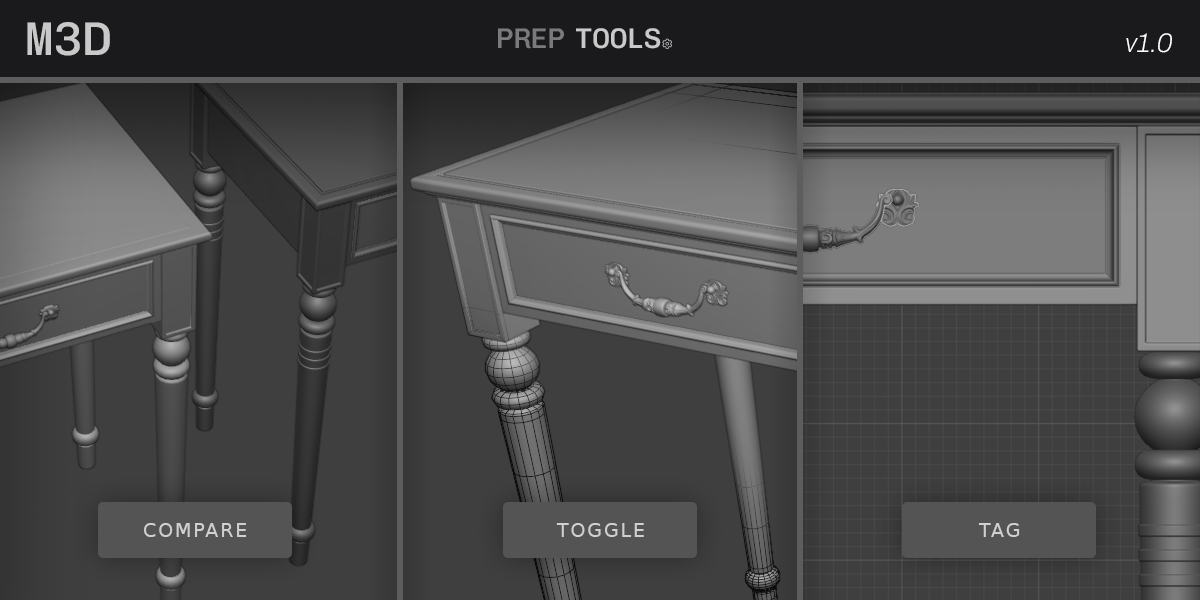
M3D Prep Tools streamlines the bake-prep workflow for 3D game artists. Rapidly group low-poly and high-poly meshes, rename mesh families in one click, and assign IDs via material or vertex color—all within a seamless, click-to-export pipeline.
Categories
Tags
Compare with other products
Choose a category to find products to compare with this listing.
Product versions
-
v1.1 published
Created May 25, 2026 · Published May 25, 2026
Release notes (source)
<h4 class="text-text-100 mt-2 -mb-1 text-base font-bold">Changelog:</h4><h4 class="text-text-100 mt-2 -mb-1 text-base font-bold">Version 1.1.0</h4><h4 class="text-text-100 mt-2 -mb-1 text-base font-bold">Sub-collection support</h4><p class="font-claude-response-body break-words whitespace-normal leading-[1.7]">All operations (Toggle Visibility, Compare View, Select, Isolate, Bake Family Check, export, floating-mesh counter, Name Tagger untagged counts) now recurse into sub-collections at every depth. A mesh inside <code class="bg-text-200/5 border border-0.5 border-border-300 text-danger-000 whitespace-pre-wrap rounded-[0.4rem] px-1 py-px text-[0.9rem]">Low → Low-chains → Low-chains-detail</code> is treated as part of MG1 everywhere.</p><h4 class="text-text-100 mt-2 -mb-1 text-base font-bold">Compare View — sub-collection awareness</h4><p class="font-claude-response-body break-words whitespace-normal leading-[1.7]">Compare View now shifts and restores all MG1 meshes regardless of which sub-collection they live in. The bounding box used to compute the offset also spans all sub-collection meshes, so the gap is accurate for the full group extent.</p><h4 class="text-text-100 mt-2 -mb-1 text-base font-bold">Modifier dependency handling</h4><p class="font-claude-response-body break-words whitespace-normal leading-[1.7]">When Tag, Auto Tag, or Tag to Active moves a mesh into a Hub collection, any objects referenced by its modifiers (Mirror object, Boolean cutter, Data Transfer source, etc.) that live outside the Hub are automatically moved into the same target collection. This prevents broken modifier links when tagging meshes that depend on helper objects.</p><h4 class="text-text-100 mt-2 -mb-1 text-base font-bold">Toggle Visibility scope checkboxes</h4><p class="font-claude-response-body break-words whitespace-normal leading-[1.7]">MG1 and MG2 checkboxes beside Toggle Visibility let you toggle only one group at a time.</p><h4 class="text-text-100 mt-2 -mb-1 text-base font-bold">Retopology Helper — MG1/MG2 rows redesigned</h4><p class="font-claude-response-body break-words whitespace-normal leading-[1.7]">Two per-collection rows, each with cursor icon (selectability), eye icon (viewport visibility), Select, and Isolate. Both icons cascade through sub-collections. Buttons are text-only.</p><h4 class="text-text-100 mt-2 -mb-1 text-base font-bold">Retopology Helper — Select Family / Isolate Family</h4><p class="font-claude-response-body break-words whitespace-normal leading-[1.7]">Operate on the active object's bake family across both collections.</p><h4 class="text-text-100 mt-2 -mb-1 text-base font-bold">Name Tagger — Tag to Active</h4><p class="font-claude-response-body break-words whitespace-normal leading-[1.7]">New button below Tag / Auto Tag. Tags all selected meshes into the same bake family as the active object. The active mesh must already belong to a family; if it is floating a warning is shown. Suffix is determined by which Hub collection each mesh belongs to. Modifier dependencies are moved automatically. Bake Family Check opens and refreshes on completion.</p><h4 class="text-text-100 mt-2 -mb-1 text-base font-bold">Name Tagger — Untag</h4><p class="font-claude-response-body break-words whitespace-normal leading-[1.7]">New button next to Tag to Active. Renames selected tagged meshes to <code class="bg-text-200/5 border border-0.5 border-border-300 text-danger-000 whitespace-pre-wrap rounded-[0.4rem] px-1 py-px text-[0.9rem]">floating</code> / <code class="bg-text-200/5 border border-0.5 border-border-300 text-danger-000 whitespace-pre-wrap rounded-[0.4rem] px-1 py-px text-[0.9rem]">floating.001</code> etc., removing them from their bake family. Meshes already floating are left untouched. Bake Family Check opens and refreshes on completion.</p><h4 class="text-text-100 mt-2 -mb-1 text-base font-bold">Tag and Auto Tag — outside-mesh handling</h4><p class="font-claude-response-body break-words whitespace-normal leading-[1.7]">Both operators handle meshes outside the designated MG collections: suffixed meshes are auto-routed or kept as-is, suffixless meshes prompt for a target, mixed selections are handled per-bucket.</p><h4 class="text-text-100 mt-2 -mb-1 text-base font-bold">Bake Family Check — renamed from Match Check</h4><p class="font-claude-response-body break-words whitespace-normal leading-[1.7]">All UI text updated throughout.</p><h4 class="text-text-100 mt-2 -mb-1 text-base font-bold">Bake Family Check — default open, collapsible icon</h4><p class="font-claude-response-body break-words whitespace-normal leading-[1.7]">The panel now defaults to open (previously collapsed). The header shows a ▼/▶ arrow to indicate it is collapsible. Clicking the header collapses or expands it.</p><h4 class="text-text-100 mt-2 -mb-1 text-base font-bold">Bake Family Check — auto-show and auto-refresh after tagging</h4><p class="font-claude-response-body break-words whitespace-normal leading-[1.7]">Tag, Auto Tag, Tag to Active, and Untag all open the panel and trigger a refresh on completion, unconditionally. Previously the refresh was skipped if the panel was closed.</p><h4 class="text-text-100 mt-2 -mb-1 text-base font-bold">Bake Family Check — Hub-collection scope with sub-collection support</h4><p class="font-claude-response-body break-words whitespace-normal leading-[1.7]">Scans only MG1/MG2 Hub collections including all sub-collections. Floating meshes elsewhere in the scene are excluded.</p><h4 class="text-text-100 mt-2 -mb-1 text-base font-bold">Bake Family Check — bulk action buttons</h4><p class="font-claude-response-body break-words whitespace-normal leading-[1.7]">Three buttons above the family list: <strong>▣ With Family</strong> (select tagged), <strong>👁 With Family</strong> (toggle visibility of tagged), <strong>▣ Floating</strong> (select untagged). The visibility button reflects state via its icon.</p><h4 class="text-text-100 mt-2 -mb-1 text-base font-bold">Bake Family Check — 3-line list layout</h4><p class="font-claude-response-body break-words whitespace-normal leading-[1.7]">Header row (full size) + LP sub-row (smaller) + HP sub-row (smaller). Sub-rows collapsed by default; expand arrow on header. Eye icon on header row toggles whole-family visibility.</p><h4 class="text-text-100 mt-2 -mb-1 text-base font-bold">Bake Family Check — Rename, additive Select, Iso toggle, family name tooltip</h4><p class="font-claude-response-body break-words whitespace-normal leading-[1.7]">All previously documented. Iso toggle persists across multiple families simultaneously; button is highlighted when active.</p><h4 class="text-text-100 mt-2 -mb-1 text-base font-bold">Bake Family Check — "No Family" button renamed to "Floating"</h4><p class="font-claude-response-body break-words whitespace-normal leading-[1.7]">The bulk select button for untagged meshes is now labelled "Floating" for clarity.</p><h4 class="text-text-100 mt-2 -mb-1 text-base font-bold">Compare View — all object types shift together</h4><p class="font-claude-response-body break-words whitespace-normal leading-[1.7]">Previously only MESH-type objects in MG1 were stashed and offset during Compare View. Empties, Lattices, Lights, Cameras, and any other object type inside MG1 (including sub-collections) were silently ignored and stayed in place. The type filter has been removed — every object in MG1 is now stashed, shifted, and restored together. This means a Mirror modifier's Empty pivot, a Lattice deformer, or any other helper object placed inside MG1 will correctly move with the low-poly group when Compare View is activated.</p><h4 class="text-text-100 mt-2 -mb-1 text-base font-bold">Modifier dependency detection — full RNA introspection</h4><p class="font-claude-response-body break-words whitespace-normal leading-[1.7]">The previous implementation checked a hardcoded list of four modifier property names, which missed Mirror's <code class="bg-text-200/5 border border-0.5 border-border-300 text-danger-000 whitespace-pre-wrap rounded-[0.4rem] px-1 py-px text-[0.9rem]">mirror_object</code>, Lattice's <code class="bg-text-200/5 border border-0.5 border-border-300 text-danger-000 whitespace-pre-wrap rounded-[0.4rem] px-1 py-px text-[0.9rem]">object</code>, and most other modifier types. The helper now uses Blender's RNA property introspection: it iterates every pointer-type property on every modifier and collects any referenced object that lives outside the Hub collections. This is exhaustive and future-proof — Mirror empties, Lattice deformers, Boolean cutters, Shrinkwrap targets, Data Transfer sources, and any modifier type added in future Blender versions are all handled automatically.</p><h4 class="text-text-100 mt-2 -mb-1 text-base font-bold">Compare View — modifier dependency objects move with the group</h4><p class="font-claude-response-body break-words whitespace-normal leading-[1.7]">Because all object types are now stashed (see above), Empties and Lattices that are inside MG1 — whether at the top level or in a sub-collection — are offset and restored as part of the group. Combined with the improved modifier dependency detection, this means even modifier helper objects that live outside MG1 are moved into the collection when tagging, and then shift correctly during Compare View.</p><h4 class="text-text-100 mt-2 -mb-1 text-base font-bold">Name Tagger — Tag to Active hides the active mesh</h4><p class="font-claude-response-body break-words whitespace-normal leading-[1.7]">When <strong>Hide Tagged Meshes</strong> is enabled, Tag to Active now also hides the active object itself after tagging the other selected meshes. Previously only the non-active selected meshes were hidden.</p><h4 class="text-text-100 mt-2 -mb-1 text-base font-bold">Name Tagger — Hide Tagged Meshes checkbox</h4><p class="font-claude-response-body break-words whitespace-normal leading-[1.7]">A new checkbox placed above the Tag and Auto Tag buttons controls whether meshes are hidden in the viewport immediately after being tagged. Defaults to on (preserving the original behaviour). When unchecked, meshes stay visible after Tag, Auto Tag, and Tag to Active — useful when you want to review the rename result before hiding.</p><h4 class="text-text-100 mt-2 -mb-1 text-base font-bold">Isolation — no camera movement</h4><p class="font-claude-response-body break-words whitespace-normal leading-[1.7]">All Isolate buttons (Isolate MG1, Isolate MG2, Isolate Family, LP/HP Isolate in Bake Family Check, and the Bake Family Check persistent Iso toggle) no longer use Blender's Local View. Instead a custom hide-based system is used: everything outside the target set is hidden in the viewport, the camera is left completely untouched. An <strong>Exit Isolation</strong> button (shown in red at the top of the Retopology Helper when active) restores all objects that were hidden. The persistent Bake Family Check Iso toggle works the same as before — click to isolate a family, click again to remove it, multiple families can be isolated simultaneously — but without the camera jump.</p><h4 class="text-text-100 mt-2 -mb-1 text-base font-bold">Isolation — works in Edit Mode</h4><p>


</p><p class="font-claude-response-body break-words whitespace-normal leading-[1.7]">Previously, triggering any Isolate button while in Edit Mode would fail silently or throw a Blender runtime error because <code class="bg-text-200/5 border border-0.5 border-border-300 text-danger-000 whitespace-pre-wrap rounded-[0.4rem] px-1 py-px text-[0.9rem]">hide_viewport</code> cannot be changed while an object is being edited. Both <code class="bg-text-200/5 border border-0.5 border-border-300 text-danger-000 whitespace-pre-wrap rounded-[0.4rem] px-1 py-px text-[0.9rem]">_m3d_isolate</code> and <code class="bg-text-200/5 border border-0.5 border-border-300 text-danger-000 whitespace-pre-wrap rounded-[0.4rem] px-1 py-px text-[0.9rem]">_m3d_unisolate</code> now detect the current mode, temporarily switch to Object Mode to apply the visibility changes, then restore the original mode (Edit, Sculpt, Weight Paint, etc.) before returning. This means you can isolate a family or collection while actively editing a mesh and the viewport will update correctly without disrupting your editing session.</p>
Related products
More from this creator
No other products from this creator.