Product listing
LK Driver Master
By Lewiskratos ·
From $9.99
Listing details
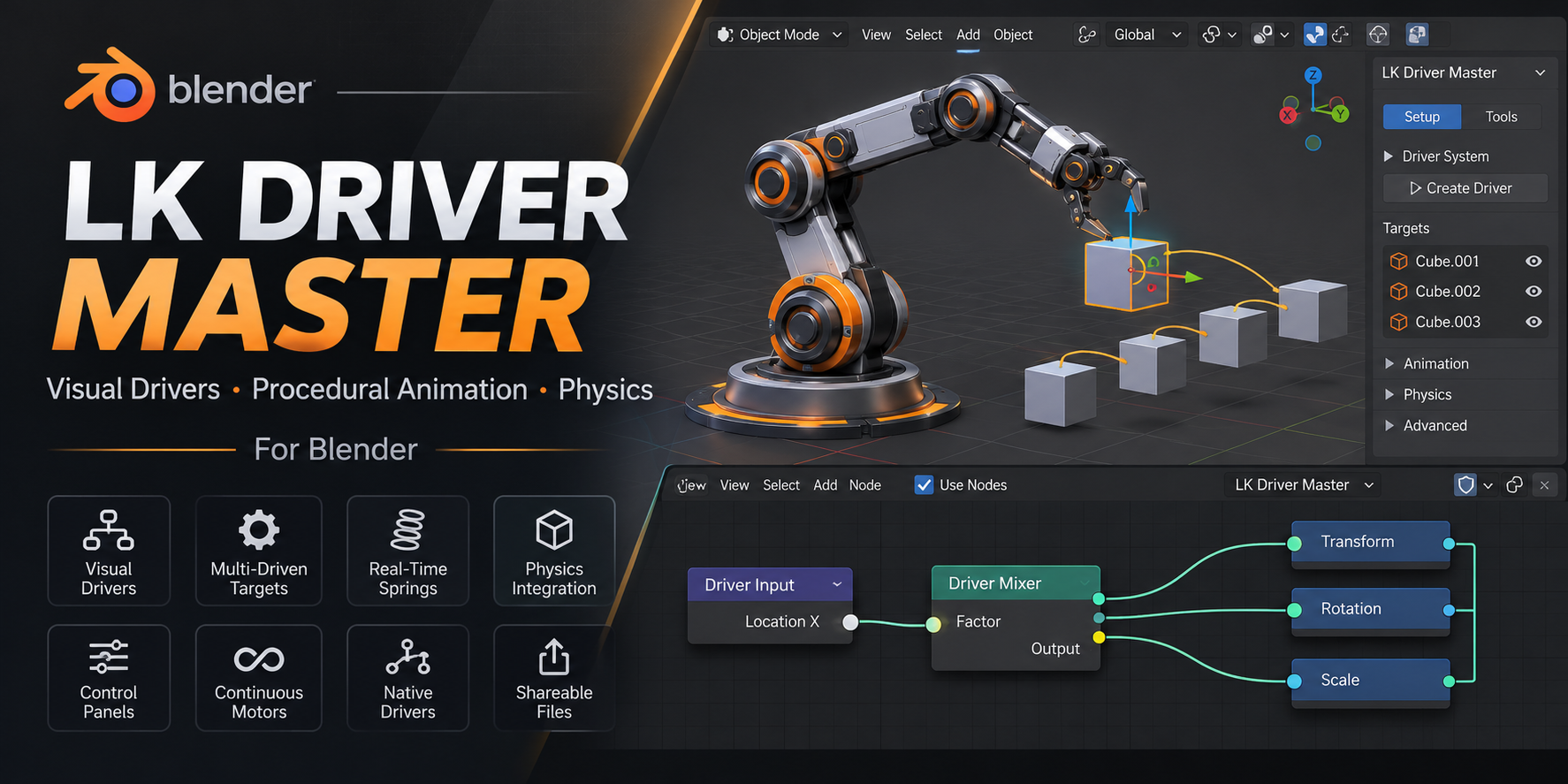
Lk Driver is an Addon that makes driver setups easy in Blender. Th addon that enables quick workflows for creating drivers and automous mechanical systems and more. Also has step by step guide to activate the driver and bake it into blender itself.
Categories
Tags
Installation
- Download LK Driver Master and check which Blender versions the creator supports. Keep the installable archive (for example,
LK_Driver_Master.zip) intact. If the download is a bundle, extract it first to find the add-on archive. - In Blender, go to Edit → Preferences → Add-ons. In Blender 4.2 and newer, open the top-right menu and choose Install from Disk. In older versions, click Install….
- Select the add-on archive (for example,
LK_Driver_Master.zip) or its standalone.pyfile and confirm the installation. - Find the add-on in the Add-ons list and tick its checkbox if it isn’t already enabled.
Check the creator’s instructions for any extra setup, such as dependencies or license activation.
Compare with other products
Choose a category to find products to compare with this listing.
Variants
-
Lite (Recommended for Simple Driver Actions) published
Price: $9.99 · List price: $9.99
Variant versions
-
3.0.2 published
Created Nov 1, 2026 · Published Nov 1, 2026
Release notes (source)
Improvements across the LITE and PRO variants. <br>Details on the attached HTML Doc file.
-
3.0.1 published
Created Sep 30, 2026 · Published Sep 30, 2026
Release notes (source)
<h3>What's New in Version 3.0.1 (Changelog Highlights)</h3><ul style="padding-left:20px;margin:0px;font-family:system-ui , -apple-system , BlinkMacSystemFont , "Segoe UI" , Roboto , Helvetica , Arial , sans-serif;color:rgb(51, 65, 85);font-size:0.95rem;">
<li><p id="p-rc_0848c56e59cf6894-63"></p></li>
<li style="margin-bottom:8px;">
<span style="font-weight:700;">Viewport Visualizer Lifecycle:</span> Fixed ghost element cleanups on viewport and enabled instant cache flushing.</li>
<li style="margin-bottom:8px;">
<span style="font-weight:700;">Preset Generation:</span> Default preset loading architecture now spawns full Standard 4-node chains automatically.</li>
<li style="margin-bottom:8px;">
<span style="font-weight:700;">Quick Node RNA Fixes:</span> Fixed errors when node callbacks returned nothing and improved input/output socket checks<span class="superscript" style="position:relative;font-size:0.75em;line-height:0;vertical-align:baseline;top:-0.5em;"></span>..</li>
<li style="margin-bottom:8px;">
<span style="font-size:0.95rem;font-weight:700;">Dynamic Parameters Node:</span><span style="font-size:0.95rem;"> Dynamic unit labels with responsive scaling for Move and Rotate values.</span>
</li>
<li style="margin-bottom:8px;">
<span style="font-weight:700;">Constraint Param Sync:</span> Live two-way Constraint Param Range synchronization featuring symmetric clamping support.</li>
</ul>
-
3.0.0 published
Created Sep 16, 2026 · Published Sep 18, 2026
Release notes (source)
<div>
<div><span style="font-weight:bolder;">Major Architecture Improvements and New Animation Autonomous Systems integrated into the new version 3.0.0<br>1. Core Architecture & Node Ecosystem</span></div>
<ul>
<li>
<span style="font-weight:bolder;">Pro vs. Beta Node Segmentation</span>: Formal separation into 12 Core Pro Nodes (zero runtime overhead, evaluated at native C-speed inside Blender's Dependency Graph) and 5 Beta Simulation Nodes (iterative physics, procedural motors, and dynamic sensors).</li>
<li>
<span style="font-weight:bolder;">Native C-Speed Driver Compilation</span>: Eliminates external proprietary binary dependencies; massive boost and compiles and uses Blender's internal C/C++ engine in its core architecture..</li>
<li>
<span style="font-weight:bolder;">Blender 5.0+ to 5.2 LTS + Native Parity</span> : Full compatibility with modern Blender releases, including new Action slot channel bags, modern extension manifest specifications and safe undo/redo memory hooks.</li>
</ul>
<span style="font-weight:bolder;">2. Bug Fixes & Stability Hardening</span>
</div><ul>
<li>
<span style="font-weight:bolder;">Undo/Redo Crash Prevention</span>: Added persistent hooks to prevent memory corruption in Blender 5.2+ during active timer loops.</li>
<li>
<i><span style="font-weight:bolder;">Far-Viewport Coordinate Guard</span></i>: Clamps extreme position vectors (10,000 unit safety threshold) to prevent floating-point division crashes.</li>
<li>
<span style="font-weight:bolder;"><i>Orphaned Tree Registration</i></span>: Automatically rebinds unassigned node trees into the sidebar outliner upon loading .blend files.</li>
<li>
<span style="font-weight:bolder;"><i>Overlay Cleanup on Deletion</i></span>: Eliminates ghost relationship lines and stuck viewport bracket guides when nodes or links are removed.</li>
<li>
<span style="font-weight:bolder;"><i>Current Position Calibration</i></span>: Fixed origin offset calculations reading live evaluated values prematurely by using stored rest-pose transformations.</li>
</ul>
-
2.0.2 published
Created Jul 27, 2026 · Published Jul 27, 2026
Release notes (source)
<li style=""><p id="p-rc_1a15ceae9734a718-46" style="line-height:1.15 !important;"><span style="line-height:1.15 !important;margin-top:0px !important;"><b style="line-height:1.15 !important;margin-top:0px !important;">Bone Chain Propagation:</b> Flow tools to control bone chains from root-to-tip, tip-to-root, or center-out</span><span style="line-height:1.15 !important;margin-top:0px !important;"><sup class="superscript" style="line-height:1.15 !important;margin-top:0px !important;font-size:16px !important;background-color:transparent !important;"></sup></span><span style="line-height:1.15 !important;margin-top:0px !important;">.</span> </p></li><li style=""><p id="p-rc_1a15ceae9734a718-47" style="line-height:1.15 !important;"><span style="line-height:1.15 !important;margin-top:0px !important;"><b style="line-height:1.15 !important;margin-top:0px !important;">Trigger Action Menu:</b> Multi-action menu (pass, activate, mute, reset) with driver-chain gating</span><span style="line-height:1.15 !important;margin-top:0px !important;"><sup class="superscript" style="line-height:1.15 !important;margin-top:0px !important;font-size:16px !important;background-color:transparent !important;"></sup></span><span style="line-height:1.15 !important;margin-top:0px !important;">.</span> </p></li><li style=""><p id="p-rc_1a15ceae9734a718-48" style="line-height:1.15 !important;"><span style="line-height:1.15 !important;margin-top:0px !important;"><b style="line-height:1.15 !important;margin-top:0px !important;">Shape Key Steps:</b> Named shape key collections with automatic blend weight normalization</span><span style="line-height:1.15 !important;margin-top:0px !important;"><sup class="superscript" style="line-height:1.15 !important;margin-top:0px !important;font-size:16px !important;background-color:transparent !important;"></sup></span><span style="line-height:1.15 !important;margin-top:0px !important;">.</span> </p></li><li style=""><p id="p-rc_1a15ceae9734a718-49" style="line-height:1.15 !important;"><span style="line-height:1.15 !important;margin-top:0px !important;"><b style="line-height:1.15 !important;margin-top:0px !important;">Smart Node Tools:</b> Scan timing, preview status, and one-click socket repairs</span><span style="line-height:1.15 !important;margin-top:0px !important;"><sup class="superscript" style="line-height:1.15 !important;margin-top:0px !important;font-size:16px !important;background-color:transparent !important;"></sup></span><span style="line-height:1.15 !important;margin-top:0px !important;">.</span> </p></li><li style=""><p id="p-rc_1a15ceae9734a718-50" style="line-height:1.15 !important;"><span style="line-height:1.15 !important;margin-top:0px !important;"><b style="line-height:1.15 !important;margin-top:0px !important;">Logic Gating:</b> Live influence and expression gating for all effectors</span><span style="line-height:1.15 !important;margin-top:0px !important;"><sup class="superscript" style="line-height:1.15 !important;margin-top:0px !important;font-size:16px !important;background-color:transparent !important;"></sup></span><span style="line-height:1.15 !important;margin-top:0px !important;">.</span> </p></li><li style=""><p id="p-rc_1a15ceae9734a718-51" style="line-height:1.15 !important;"><span style="line-height:1.15 !important;margin-top:0px !important;"><b style="line-height:1.15 !important;margin-top:0px !important;">Vertical Sorting:</b> Top-to-bottom execution sorting for constraints and effectors</span><span style="line-height:1.15 !important;margin-top:0px !important;"><sup class="superscript" style="line-height:1.15 !important;margin-top:0px !important;font-size:16px !important;background-color:transparent !important;"></sup></span><span style="line-height:1.15 !important;margin-top:0px !important;">.</span> </p></li><li style=""><p id="p-rc_1a15ceae9734a718-52" style="line-height:1.15 !important;"><span style="line-height:1.15 !important;margin-top:0px !important;"><b style="line-height:1.15 !important;margin-top:0px !important;">Auto Drivers:</b> Automatic driver creation for extra effector axes</span><span style="line-height:1.15 !important;margin-top:0px !important;"><sup class="superscript" style="line-height:1.15 !important;margin-top:0px !important;font-size:16px !important;background-color:transparent !important;"></sup></span><span style="line-height:1.15 !important;margin-top:0px !important;">.</span></p></li>
-
2.0 published
Created Jul 17, 2026 · Published Jul 17, 2026
Release notes (source)
<p><span style="color: rgb(148, 163, 184); font-weight: 700;">- A new shapekey parameter node for better shapekey flow (Pro Only)</span><br style="color: rgb(148, 163, 184); font-weight: 700;"><span style="color: rgb(148, 163, 184); font-weight: 700;">- Improvement in node connection data path (Pro)</span><br style="color: rgb(148, 163, 184); font-weight: 700;"><span style="color: rgb(148, 163, 184); font-weight: 700;">- Better UI and Quality of life improvements for Lite and Pro</span><br style="color: rgb(148, 163, 184); font-weight: 700;"><span style="color: rgb(148, 163, 184); font-weight: 700;">- New Tutorials on how Nodes work via Youtube Links.</span></p>
-
1.0.54 published
Created Jun 22, 2026 · Published Jun 22, 2026
Release notes (source)
<ol>
<li style="cursor:text;margin:0px;padding:0px;color:rgb(227, 227, 227);font-family:" google="" sans="" flex"="" ,="" "google="" sans"="" "helvetica="" neue"="" sans-serif;font-size:17px;white-space:pre-wrap;background-color:rgb(30,="" 31,="" 32);"="">Better MultiDriven axis mapping for Armature Bones (Pro version)</li>
<li style="cursor:text;margin:0px;padding:0px;color:rgb(227, 227, 227);font-family:" google="" sans="" flex"="" ,="" "google="" sans"="" "helvetica="" neue"="" sans-serif;font-size:17px;white-space:pre-wrap;background-color:rgb(30,="" 31,="" 32);"="">Constraint type safety</li>
<li style="cursor:text;margin:0px;padding:0px;color:rgb(227, 227, 227);font-family:" google="" sans="" flex"="" ,="" "google="" sans"="" "helvetica="" neue"="" sans-serif;font-size:17px;white-space:pre-wrap;background-color:rgb(30,="" 31,="" 32);"="">Fixed Signed direction visuals</li>
<li style="cursor:text;margin:0px;padding:0px;color:rgb(227, 227, 227);font-family:" google="" sans="" flex"="" ,="" "google="" sans"="" "helvetica="" neue"="" sans-serif;font-size:17px;white-space:pre-wrap;background-color:rgb(30,="" 31,="" 32);"="">Multidriven Node Unified override controls fix(Pro version)</li>
</ol>
-
1.0.52 published
Created Jun 5, 2026 · Published Jun 5, 2026
Release notes (source)
<h3 data-path-to-node="1">Key Performance & UI Improvements (Both Versions)</h3><ul data-path-to-node="2"><li><p data-path-to-node="2,0,0"><b data-path-to-node="2,0,0" data-index-in-node="0">Better Performance:</b> Animated viewport dots and driver scans are now cached and capped per frame, making dense setups run much smoother.</p></li><li><p data-path-to-node="2,1,0"><b data-path-to-node="2,1,0" data-index-in-node="0">Cleaner Interface:</b> Panel spacing has been refreshed so it looks less cramped and is easier to navigate.</p></li><li><p data-path-to-node="2,2,0"><b data-path-to-node="2,2,0" data-index-in-node="0">Grouped MultiDriven Entries:</b> Linked targets are now neatly grouped under a single named panel driver instead of cluttering the UI.</p></li><li><p data-path-to-node="2,3,0"><b data-path-to-node="2,3,0" data-index-in-node="0">Flow Improvements:</b> Added <b data-path-to-node="2,3,0" data-index-in-node="25">Sensitivity</b> and <b data-path-to-node="2,3,0" data-index-in-node="41">Target Delay</b> features to the Flow nodes/effectors for easier cascading animations.</p></li></ul><h3 data-path-to-node="4"> Exclusive to the Pro Version</h3><ul data-path-to-node="5"><li><p data-path-to-node="5,0,0"><b data-path-to-node="5,0,0" data-index-in-node="0">Delay Effector Mode:</b> Adds a dedicated waiting period before driven values start to respond.</p></li><li><p data-path-to-node="5,1,0"><b data-path-to-node="5,1,0" data-index-in-node="0">Math Node Support:</b> The Math Node now actively integrates with and affects <i data-path-to-node="5,1,0" data-index-in-node="74">Quick Flow</i> and <i data-path-to-node="5,1,0" data-index-in-node="89">MultiDriven</i> chains.</p></li><li><p data-path-to-node="5,2,0"><b data-path-to-node="5,2,0" data-index-in-node="0">Documentation:</b> Refreshed and updated documentation.</p></li></ul><h3 data-path-to-node="7">⚠️ Important Update Requirements</h3><ul data-path-to-node="8"><li><p data-path-to-node="8,0,0"><b data-path-to-node="8,0,0" data-index-in-node="0">Minimum Version:</b> You must already be on <b data-path-to-node="8,0,0" data-index-in-node="40">v1.0.5</b> or higher to automatically update.</p></li><li><p data-path-to-node="8,1,0"><b data-path-to-node="8,1,0" data-index-in-node="0">Older Versions:</b> If you are running <b data-path-to-node="8,1,0" data-index-in-node="35">v1.0.4 or below</b>, you cannot auto-update. You will need to contact the Addon Developer to manually get version 1.0.5 first.</p></li></ul>
-
1.0.5 published
Created May 14, 2026 · Published May 14, 2026
Release notes (source)
<div class="header" style="border-bottom: 2px solid rgb(3, 102, 214); margin-bottom: 30px; padding-bottom: 15px; color: rgb(36, 41, 46); font-family: -apple-system, BlinkMacSystemFont, "Segoe UI", Roboto, Helvetica, Arial, sans-serif; font-size: medium;"><h1 style="font-size: 28px; margin: 0px; color: rgb(26, 26, 26);">Version 1.0.5 Stable Version</h1><p style="margin-top: 5px; color: rgb(88, 96, 105);">Consolidated Stability, Sync, and System Updates</p></div><div class="section-title" style="font-size: 18px; font-weight: 600; margin-top: 30px; margin-bottom: 15px; color: rgb(3, 102, 214); text-transform: uppercase; display: flex; align-items: center; font-family: -apple-system, BlinkMacSystemFont, "Segoe UI", Roboto, Helvetica, Arial, sans-serif;">System Integration & Connectivity</div><ul class="changelog-list" style="padding-left: 0px; margin: 0px; list-style: none; color: rgb(36, 41, 46); font-family: -apple-system, BlinkMacSystemFont, "Segoe UI", Roboto, Helvetica, Arial, sans-serif; font-size: medium;"><li style="margin-bottom: 12px; font-size: 15px; line-height: 1.6; padding-left: 20px; position: relative;"><span class="feature-name" style="font-weight: 600;">In-Editor Update Notifications:</span> You can now see when a new version is available directly within the LK node network work area, ensuring you never miss an optimization.</li><li style="margin-bottom: 12px; font-size: 15px; line-height: 1.6; padding-left: 20px; position: relative;"><span class="feature-name" style="font-weight: 600;">Improved Panel & Node Sync:</span> Enhanced the synchronization between the sidebar panel and the node system to ensure data consistency across your entire workflow.</li><li style="margin-bottom: 12px; font-size: 15px; line-height: 1.6; padding-left: 20px; position: relative;"><span class="feature-name" style="font-weight: 600;">Better Chain Handling:</span> Optimized how data is managed across complex node connections for smoother performance when handling multiple driven objects.</li></ul><div class="section-title" style="font-size: 18px; font-weight: 600; margin-top: 30px; margin-bottom: 15px; color: rgb(3, 102, 214); text-transform: uppercase; display: flex; align-items: center; font-family: -apple-system, BlinkMacSystemFont, "Segoe UI", Roboto, Helvetica, Arial, sans-serif;">Visual Precision & Guidance</div><ul class="changelog-list" style="padding-left: 0px; margin: 0px; list-style: none; color: rgb(36, 41, 46); font-family: -apple-system, BlinkMacSystemFont, "Segoe UI", Roboto, Helvetica, Arial, sans-serif; font-size: medium;"><li style="margin-bottom: 12px; font-size: 15px; line-height: 1.6; padding-left: 20px; position: relative;"><span class="feature-name" style="font-weight: 600;">Constraint Visual Guides:</span> Added new viewport overlays that provide intuitive visual limiting guides to assist in setting precise motion boundaries.</li><li style="margin-bottom: 12px; font-size: 15px; line-height: 1.6; padding-left: 20px; position: relative;"><span class="feature-name" style="font-weight: 600;">Enhanced Constraint Support:</span> Fixed long-standing issues with driver and driven constraints, ensuring they now default to the correct native movement types.</li><li style="margin-bottom: 12px; font-size: 15px; line-height: 1.6; padding-left: 20px; position: relative;"><span class="feature-name" style="font-weight: 600;">Advanced Visualizers:</span> Improved 180-degree rotation arcs and cube-style scale guides for better real-time visual feedback.</li></ul><div class="section-title" style="font-size: 18px; font-weight: 600; margin-top: 30px; margin-bottom: 15px; color: rgb(3, 102, 214); text-transform: uppercase; display: flex; align-items: center; font-family: -apple-system, BlinkMacSystemFont, "Segoe UI", Roboto, Helvetica, Arial, sans-serif;">Stability & Performance</div><ul class="changelog-list" style="padding-left: 0px; margin: 0px; list-style: none; color: rgb(36, 41, 46); font-family: -apple-system, BlinkMacSystemFont, "Segoe UI", Roboto, Helvetica, Arial, sans-serif; font-size: medium;"><li style="margin-bottom: 12px; font-size: 15px; line-height: 1.6; padding-left: 20px; position: relative;"><span class="feature-name" style="font-weight: 600;">Console Error Prevention:</span> Implemented major code refactoring to eliminate background console errors that previously led to system crashes.</li><li style="margin-bottom: 12px; font-size: 15px; line-height: 1.6; padding-left: 20px; position: relative;"><span class="feature-name" style="font-weight: 600;">UI Robustness:</span> Resolved a specific crash in the Activate Node UI during validation, improving stability for Blender 5.1 users.</li><li style="margin-bottom: 12px; font-size: 15px; line-height: 1.6; padding-left: 20px; position: relative;"><span class="feature-name" style="font-weight: 600;">Accurate Animation Baking:</span> The "Bake to Keyframes" system is now more reliable, correctly preserving constraints as native Blender keys.</li></ul><div class="section-title" style="font-size: 18px; font-weight: 600; margin-top: 30px; margin-bottom: 15px; color: rgb(3, 102, 214); text-transform: uppercase; display: flex; align-items: center; font-family: -apple-system, BlinkMacSystemFont, "Segoe UI", Roboto, Helvetica, Arial, sans-serif;">New Beta Features</div><ul class="changelog-list" style="padding-left: 0px; margin: 0px; list-style: none; color: rgb(36, 41, 46); font-family: -apple-system, BlinkMacSystemFont, "Segoe UI", Roboto, Helvetica, Arial, sans-serif; font-size: medium;"><li style="margin-bottom: 12px; font-size: 15px; line-height: 1.6; padding-left: 20px; position: relative;"><span class="feature-name" style="font-weight: 600;">Trigger Node (Beta):</span> Introduced new stackable trigger logic that supports up to five linked conditions and integrates with existing constraints.</li><li style="margin-bottom: 12px; font-size: 15px; line-height: 1.6; padding-left: 20px; position: relative;"><span class="feature-name" style="font-weight: 600;">Relationship Visualization:</span> Node-editor relationship lines now draw through the entire chain, including Math and Trigger nodes.</li></ul>
-
-
Pro (For Complex multiple driver setups) published
Price: $18.99 · List price: $18.99
Variant versions
-
3.0.2 published
Created Nov 1, 2026 · Published Nov 1, 2026
Release notes (source)
<p>Improvements to the LITE and Pro</p><p>More details on improvements in the attached document HTML file.</p>
-
3.0.1 published
Created Sep 30, 2026 · Published Sep 30, 2026
Release notes (source)
<li style="margin-bottom:8px;">
<b>What's New in Version 3.0.1 (Changelog Highlights)<br></b><br><ul>
<li style="margin-bottom:8px;">
<span style="font-weight:700;">Preset Generation:</span> Default preset loading architecture now spawns full Standard 4-node chains automatically.</li>
<li style="margin-bottom:8px;">
<span style="font-weight:700;">Viewport Visualizer Lifecycle:</span> Fixed ghost element cleanups on viewport and enabled instant cache flushing.</li>
<li style="margin-bottom:8px;">
<span style="font-weight:700;">Quick Node RNA Fixes:</span> Fixed errors when node callbacks returned nothing and improved input/output socket checks<span class="superscript" style="position:relative;font-size:0.75em;line-height:0;vertical-align:baseline;top:-0.5em;"></span>..</li>
<li style="margin-bottom:8px;">
<span style="font-weight:700;">Multi-Chain Constraint Coexistence:</span> Enabled smooth coexistence of multi-chain constraints on shared targets.</li>
<li style="margin-bottom:8px;">
<span style="font-weight:700;">Smart Space Resolution:</span> Automatic coordinate resolution for unparented objects and bones.</li>
<li style="margin-bottom:8px;">
<span style="font-weight:700;">Dynamic Parameters Node:</span> Dynamic unit labels with responsive scaling for Move and Rotate values.</li>
<li style="margin-bottom:8px;">
<span style="font-weight:700;">Constraint Param Sync:</span> Live two-way Constraint Param Range synchronization featuring symmetric clamping support.</li>
</ul>
</li>
-
3.0.0 published
Created Sep 16, 2026 · Published Sep 18, 2026
Release notes (source)
<div><b>Major Architecture Improvements and New Animation Autonomous Systems integrated into the new version 3.0.0<br>1. Core Architecture & Node Ecosystem</b></div><ul>
<li>
<b>Pro vs. Beta Node Segmentation</b>: Formal separation into 12 Core Pro Nodes (zero runtime overhead, evaluated at native C-speed inside Blender's Dependency Graph) and 5 Beta Simulation Nodes (iterative physics, procedural motors, and dynamic sensors).</li>
<li>
<b>Native C-Speed Driver Compilation</b>: Eliminates external proprietary binary dependencies; massive boost and compiles and uses Blender's internal C/C++ engine in its core architecture..</li>
<li>
<b>Blender 5.0+ to 5.2 LTS + Native Parity</b> : Full compatibility with modern Blender releases, including new Action slot channel bags, modern extension manifest specifications and safe undo/redo memory hooks.</li>
<li>
<b>40+ Verified Production Example Scenes</b>: Comprehensive test library covering character rigs, mechanical linkages, suspensions, physics chains, and kinetic typography.</li>
</ul><div><br></div><div><b>2. Direct Viewport Transform & Interactive Settling</b></div><ul>
<li>
<b><i>Interactive Viewport Grab Hook</i></b> : Simulation and spring nodes now evaluate during active 3D Viewport grab, rotate, and scale operations (G, R, S) without requiring timeline playback.</li>
<li>
<i><b>Autonomous Settling Engine </b></i>: Damped inertia timer smoothly settles spring and physics momentum when mouse transform modal is released.</li>
<li>
<b><i>Zero Timeline Dependency </i></b>: Riggers can test dynamic elasticity, secondary bounce, and limits in static posing modes without pressing Spacebar.</li>
</ul><div><br></div><div><b>3. New Specialized Nodes + Improved ones</b></div><ol>
<li>
<b><i>Physics Chain Node </i>:</b> Extended Position Based Dynamics (XPBD) iterative particle solver for multi-segment bone chains with head/tail dual-pinning and ground collision.</li>
<li>
<b><i>MoGraph Effector Node</i></b> : Drives collections of lights, meshes, or text elements across 6 distribution patterns (All, Index, Sequence, Wave Pulse, Random Seed, Gravity Fall).</li>
<li>
<b><i>Text MoGraph Node</i></b> : Splits 3D typography into individual letter or word objects with kinetic procedural wave cascades and material routing.</li>
<li>
<b><i>Continuous Motion Node</i></b>: Autonomous motor engine simulating infinite rotation, translation, or pulsing across 4 waveforms without timeline keyframes.</li>
<li>
<b><i>Continuous Control Node</i></b>: Real-time interactive control linking keyboard hotkeys (Space, C, T, R, G, 1-3, Enter, Arrows) and logic signals to procedural motors.</li>
<li>
<b><i>Mesh Proximity Node</i></b>: Spatial sensor measuring 3D distances from probe points to target mesh surfaces with smoothstep falloff curves.</li>
<li>
<b><i>Spring Node</i></b> : Calibrated harmonic physics solver featuring Tension, Damping, Mass, and Velocity buffers for organic secondary follow-through.</li>
<li>
<b><i>Change State Node</i></b> : Finite State Machine (FSM) evaluating thresholds with hysteresis deadbands to trigger rolling scale/visibility morph transitions.</li>
<li>
<b><i>Trigger Input Node</i></b> : Intercepts driver signals to automate bone hierarchy traversal (Root-to-Tip, Tip-to-Root, Center-Out, Random).</li>
<li>
<b><i>Trigger Output Node</i></b> : Cross-chain event routing that monitors thresholds and pulses downstream activation groups.</li>
<li>
<b><i>Image Parse Node</i></b>: Actuates transforms or lighting based on pixel luminance, texture channels, or streaming video maps.</li>
</ol><div><b>4. Real-Time XPBD Physics & Spring Dynamics</b></div><ul>
<li>
<b><i>6 Calibrated Material Presets</i></b>: One-click setups for Cable/Rope, Heavy Chain, Soft Rope, Stiff Antenna, Whip, and Rubber Band.</li>
<li>
<b><i>Dual-Pinning Constraint Engine</i></b>: Support for pinning root bone, tip bone, or both ends simultaneously (e.g., hanging power cables or suspension bridges).</li>
<li>
<i><b>Ground Collider Clamping</b></i>: Restricts physics particle positions above ground_z to eliminate mesh floor penetration.</li>
<li>
<b><i>Factory Reset Function</i></b>: Instant clearing of velocity and position accumulators, returning bone hierarchies to their rest positions.</li>
</ul><div><br></div><div><b>5. Continuous Motion & Procedural Motors</b></div><ul>
<li>
<i><b>4 Core Waveforms</b></i>: Linear (constant velocity), Smooth (sinusoidal cycle), Stepped (ratchet/clock escapement), and Ping-Pong (reciprocating limit bounce).</li>
<li>
<b><i>Continuous Gear Traversal </i></b>: accumulate_turns option enables endless rotation past 360 degrees without popping or snapping back to zero.</li>
<li>
<i><b>Path Curve Linking</b></i> : Traverses Bezier and Poly curves continuously while aligning object rotations to curve tangents (follow_path_tangent).</li>
<li>
<b><i>Procedural Random Wander </i></b>: Per-axis translational drift and rotational vibration with custom frequency, amplitude, and random seed.</li>
<li>
<b><i>Spherical Boundary Limits </i></b>: Enforces maximum travel radius with selectable Clamp, Bounce, or Wrap behaviors.</li>
<li>
<i><b>Dwell & Pause Gap Windows</b></i> : Temporarily holds motion inside user-defined frame or phase windows before resuming travel.</li>
</ul><div><br></div><div><b>6. MoGraph & Kinetic Typography</b></div><ul>
<li>
<b><i>Photometric Lighting Control</i></b> : Direct driver integration onto light intensity (data.energy), <i>RGB coloration</i> (data.color), and exposure (data.exposure) with non-negative safety clamping.</li>
<li>
<b><i>Ground Impact Behaviors</i></b> : Collection elements falling under simulated gravity react upon landing with Stick, Elastic Damped Bounce, or Dynamic Scatter.</li>
<li>
<b><i>Rigid Body Physics Handover</i></b> : Automatically assigns Blender native Passive rigid bodies to floor colliders and Active rigid bodies to collection targets upon impact.</li>
<li>
<b><i>Live Collection Preview</i></b> : Visual outliner displays collection hierarchy order and highlights active preview indexes prior to compilation.</li>
</ul><div><br></div><div><b>7. Shape Key Rigging Engine (Zero Dummy Empties)</b></div><ul>
<li>
<i><b>Direct Mesh Channel Compilation</b></i> : Compiles drivers directly into mesh key_blocks without auxiliary empty objects or intermediate custom properties.</li>
<li>
<i style=""><b>Automatic Basis Key Protection</b></i>: Automatically shields the base geometry key block from receiving destructive driver overrides.</li>
<li>
<b><i>Neutral-Point Zero Clamping</i></b>: Guarantees unactuated shape keys remain firmly locked at 0.0.</li>
<li>
<i><b>Shape Key Steps Array</b></i>: Multi-stage sequential morphing across up to 6 progressive expressions with Linear, Smooth, Stepped, or Proximity falloffs.</li>
</ul><div><br></div><div><b>8. Scoping, Directional Coherence & Activation</b></div><ul>
<li>
<i><b>Target Scoping Guards </b></i>: Isolates constraints to specific targets within a multi-driven chain (e.g., clamping Target A without restricting Target B or C).</li>
<li>
<b><i>5 Directional Coherence Modes</i></b> : Forward, Reverse, Symmetric (+ + - -), Alternating (+ - + -), and Cascade.</li>
<li>
<b><i>Live Reactivate Dirty Tracking</i></b> : Visual amber indicator signals when node settings have changed, enabling one-click driver recompilation.</li>
<li>
<i><b>Safe Pose Restoration</b></i> : Reverts driven channels to their exact pre-activation transform offsets during deactivation instead of collapsing to world zero.</li>
</ul><div><br></div><div><b>9. Baking & Production Pipeline</b></div><ul>
<li>
<i><b>One-Click NLA Action Push </b></i>: Bakes live procedural continuous motion and spring dynamics directly into dedicated Actions and NLA tracks for headless render farm compatibility.</li>
<li>
<i><b>Native Constraint Conversion</b></i> : Baking removes internal add-on prefixes (LK_) and preserves constraints as standard Blender native constraints.</li>
<li>
<b><i>Clean Client Portability</i></b> : Output scenes contain standard Blender animation and driver data; recipient workstations and render nodes do not require LK DriverMaster installed.</li>
</ul><div><br></div><div><b>10. Bug Fixes & Stability Hardening</b></div><ul>
<li>
<b>Undo/Redo Crash Prevention</b>: Added persistent hooks to prevent memory corruption in Blender 5.2+ during active timer loops.</li>
<li>
<i><b>Far-Viewport Coordinate Guard</b></i>: Clamps extreme position vectors (10,000 unit safety threshold) to prevent floating-point division crashes.</li>
<li>
<b><i>Orphaned Tree Registration</i></b>: Automatically rebinds unassigned node trees into the sidebar outliner upon loading .blend files.</li>
<li>
<b><i>Overlay Cleanup on Deletion</i></b>: Eliminates ghost relationship lines and stuck viewport bracket guides when nodes or links are removed.</li>
<li>
<b><i>Current Position Calibration</i></b>: Fixed origin offset calculations reading live evaluated values prematurely by using stored rest-pose transformations.</li>
<li>
<b><i>Managed-by-Activate Protection</i></b>: Automatically disables the "Create Driver" button on Driven nodes connected to an active downstream Activate node to eliminate duplicate driver conflicts.</li>
</ul>
-
2.0.2 published
Created Jul 27, 2026 · Published Jul 27, 2026
Release notes (source)
<li style=""><p id="p-rc_1a15ceae9734a718-36" style="line-height:1.15 !important;"><span style="line-height:1.15 !important;margin-top:0px !important;"><b style="line-height:1.15 !important;margin-top:0px !important;">Bone Chain Propagation:</b> Flow tools to control bone chains from root-to-tip, tip-to-root, or center-out</span><span style="line-height:1.15 !important;margin-top:0px !important;"><sup class="superscript" style="line-height:1.15 !important;margin-top:0px !important;font-size:16px !important;background-color:transparent !important;"></sup></span><span style="line-height:1.15 !important;margin-top:0px !important;">.</span> </p></li><li style=""><p id="p-rc_1a15ceae9734a718-37" style="line-height:1.15 !important;"><span style="line-height:1.15 !important;margin-top:0px !important;"><b style="line-height:1.15 !important;margin-top:0px !important;">Trigger Action Menu:</b> Multi-action menu (pass, activate, mute, reset) with driver-chain gating</span><span style="line-height:1.15 !important;margin-top:0px !important;"><sup class="superscript" style="line-height:1.15 !important;margin-top:0px !important;font-size:16px !important;background-color:transparent !important;"></sup></span><span style="line-height:1.15 !important;margin-top:0px !important;">.</span> </p></li><li style=""><p id="p-rc_1a15ceae9734a718-38" style="line-height:1.15 !important;"><span style="line-height:1.15 !important;margin-top:0px !important;"><b style="line-height:1.15 !important;margin-top:0px !important;">Shape Key Steps:</b> Named shape key collections with automatic blend weight normalization</span><span style="line-height:1.15 !important;margin-top:0px !important;"><sup class="superscript" style="line-height:1.15 !important;margin-top:0px !important;font-size:16px !important;background-color:transparent !important;"></sup></span><span style="line-height:1.15 !important;margin-top:0px !important;">.</span> </p></li><li style=""><p id="p-rc_1a15ceae9734a718-39" style="line-height:1.15 !important;"><span style="line-height:1.15 !important;margin-top:0px !important;"><b style="line-height:1.15 !important;margin-top:0px !important;">Smart Node Tools:</b> Scan timing, preview status, and one-click socket repairs</span><span style="line-height:1.15 !important;margin-top:0px !important;"><sup class="superscript" style="line-height:1.15 !important;margin-top:0px !important;font-size:16px !important;background-color:transparent !important;"></sup></span><span style="line-height:1.15 !important;margin-top:0px !important;">.</span> </p></li><li style=""><p id="p-rc_1a15ceae9734a718-40" style="line-height:1.15 !important;"><span style="line-height:1.15 !important;margin-top:0px !important;"><b style="line-height:1.15 !important;margin-top:0px !important;">Logic Gating:</b> Live influence and expression gating for all effectors</span><span style="line-height:1.15 !important;margin-top:0px !important;"><sup class="superscript" style="line-height:1.15 !important;margin-top:0px !important;font-size:16px !important;background-color:transparent !important;"></sup></span><span style="line-height:1.15 !important;margin-top:0px !important;">.</span> </p></li><li style=""><p id="p-rc_1a15ceae9734a718-41" style="line-height:1.15 !important;"><span style="line-height:1.15 !important;margin-top:0px !important;"><b style="line-height:1.15 !important;margin-top:0px !important;">Vertical Sorting:</b> Top-to-bottom execution sorting for constraints and effectors</span><span style="line-height:1.15 !important;margin-top:0px !important;"><sup class="superscript" style="line-height:1.15 !important;margin-top:0px !important;font-size:16px !important;background-color:transparent !important;"></sup></span><span style="line-height:1.15 !important;margin-top:0px !important;">.</span> </p></li><li style=""><p id="p-rc_1a15ceae9734a718-42" style="line-height:1.15 !important;"><span style="line-height:1.15 !important;margin-top:0px !important;"><b style="line-height:1.15 !important;margin-top:0px !important;">Auto Drivers:</b> Automatic driver creation for extra effector axes</span><span style="line-height:1.15 !important;margin-top:0px !important;"><sup class="superscript" style="line-height:1.15 !important;margin-top:0px !important;font-size:16px !important;background-color:transparent !important;"></sup></span><span style="line-height:1.15 !important;margin-top:0px !important;">.</span> </p></li><li style=""><p id="p-rc_1a15ceae9734a718-43" style="line-height:1.15 !important;"><span style="line-height:1.15 !important;margin-top:0px !important;"><b style="line-height:1.15 !important;margin-top:0px !important;">Mograph Previews:</b> Collection order and index previewing before applying</span><span style="line-height:1.15 !important;margin-top:0px !important;"><sup class="superscript" style="line-height:1.15 !important;margin-top:0px !important;font-size:16px !important;background-color:transparent !important;"></sup></span><span style="line-height:1.15 !important;margin-top:0px !important;">.</span> </p></li><li style=""><p id="p-rc_1a15ceae9734a718-44" style="line-height:1.15 !important;"><span style="line-height:1.15 !important;margin-top:0px !important;"><b style="line-height:1.15 !important;margin-top:0px !important;">Multi-Driven Presets:</b> 2/3-target batch presets with custom X/Y/Z channel mapping</span><span style="line-height:1.15 !important;margin-top:0px !important;"><sup class="superscript" style="line-height:1.15 !important;margin-top:0px !important;font-size:16px !important;background-color:transparent !important;"></sup></span><span style="line-height:1.15 !important;margin-top:0px !important;">.</span> </p></li><li style=""><p id="p-rc_1a15ceae9734a718-45" style="line-height:1.15 !important;"><span style="line-height:1.15 !important;margin-top:0px !important;"><b style="line-height:1.15 !important;margin-top:0px !important;">Target Delay:</b> Per-target delay modes on multi-driven connections</span><span style="line-height:1.15 !important;margin-top:0px !important;"><sup class="superscript" style="line-height:1.15 !important;margin-top:0px !important;font-size:16px !important;background-color:transparent !important;"></sup></span><span style="line-height:1.15 !important;margin-top:0px !important;">.</span></p></li>
-
2.0.0 published
Created Jul 17, 2026 · Published Jul 17, 2026
Release notes (source)
<p><span style="font-weight:700;color:rgb(148, 163, 184);font-family:system-ui , -apple-system , BlinkMacSystemFont ,;">- A new shapekey parameter node for better shapekey flow (Pro Only)<br>- Improvement in node connection data path (Pro)<br>- Better UI and Quality of life improvements for Lite and Pro<br>- New Tutorials on how Nodes work via Youtube Links.</span></p>
-
1.0.54 published
Created Jun 22, 2026 · Published Jun 22, 2026
Release notes (source)
<ol><li style="cursor: text; margin: 0px; padding: 0px; counter-reset: list-1 0 list-2 0 list-3 0 list-4 0 list-5 0 list-6 0 list-7 0 list-8 0 list-9 0; color: rgb(227, 227, 227); font-family: "Google Sans Flex", "Google Sans", "Helvetica Neue", sans-serif; font-size: 17px; font-variant-ligatures: none; white-space: pre-wrap; background-color: rgb(30, 31, 32);">Better MultiDriven axis mapping for Armature Bones</li><li style="cursor: text; margin: 0px; padding: 0px; counter-reset: list-1 0 list-2 0 list-3 0 list-4 0 list-5 0 list-6 0 list-7 0 list-8 0 list-9 0; color: rgb(227, 227, 227); font-family: "Google Sans Flex", "Google Sans", "Helvetica Neue", sans-serif; font-size: 17px; font-variant-ligatures: none; white-space: pre-wrap; background-color: rgb(30, 31, 32);">Constraint type safety</li><li style="cursor: text; margin: 0px; padding: 0px; counter-reset: list-1 0 list-2 0 list-3 0 list-4 0 list-5 0 list-6 0 list-7 0 list-8 0 list-9 0; color: rgb(227, 227, 227); font-family: "Google Sans Flex", "Google Sans", "Helvetica Neue", sans-serif; font-size: 17px; font-variant-ligatures: none; white-space: pre-wrap; background-color: rgb(30, 31, 32);">Fixed Signed direction visuals</li><li style="cursor: text; margin: 0px; padding: 0px; counter-reset: list-1 0 list-2 0 list-3 0 list-4 0 list-5 0 list-6 0 list-7 0 list-8 0 list-9 0; color: rgb(227, 227, 227); font-family: "Google Sans Flex", "Google Sans", "Helvetica Neue", sans-serif; font-size: 17px; font-variant-ligatures: none; white-space: pre-wrap; background-color: rgb(30, 31, 32);">Multidriven Node Unified override controls fix</li></ol>
-
1.0.52 published
Created Jun 5, 2026 · Published Jun 5, 2026
Release notes (source)
<h3 data-path-to-node="1" style="color: rgb(0, 0, 0);">Key Performance & UI Improvements (Both Versions)</h3><ul data-path-to-node="2"><li><p data-path-to-node="2,0,0"><span data-path-to-node="2,0,0" data-index-in-node="0" style="font-weight: bolder;">Better Performance:</span> Animated viewport dots and driver scans are now cached and capped per frame, making dense setups run much smoother.</p></li><li><p data-path-to-node="2,1,0"><span data-path-to-node="2,1,0" data-index-in-node="0" style="font-weight: bolder;">Cleaner Interface:</span> Panel spacing has been refreshed so it looks less cramped and is easier to navigate.</p></li><li><p data-path-to-node="2,2,0"><span data-path-to-node="2,2,0" data-index-in-node="0" style="font-weight: bolder;">Grouped MultiDriven Entries:</span> Linked targets are now neatly grouped under a single named panel driver instead of cluttering the UI.</p></li><li><p data-path-to-node="2,3,0"><span data-path-to-node="2,3,0" data-index-in-node="0" style="font-weight: bolder;">Flow Improvements:</span> Added <span data-path-to-node="2,3,0" data-index-in-node="25" style="font-weight: bolder;">Sensitivity</span> and <span data-path-to-node="2,3,0" data-index-in-node="41" style="font-weight: bolder;">Target Delay</span> features to the Flow nodes/effectors for easier cascading animations.</p></li></ul><h3 data-path-to-node="4" style="color: rgb(0, 0, 0);"> Exclusive to the Pro Version</h3><ul data-path-to-node="5"><li><p data-path-to-node="5,0,0"><span data-path-to-node="5,0,0" data-index-in-node="0" style="font-weight: bolder;">Delay Effector Mode:</span> Adds a dedicated waiting period before driven values start to respond.</p></li><li><p data-path-to-node="5,1,0"><span data-path-to-node="5,1,0" data-index-in-node="0" style="font-weight: bolder;">Math Node Support:</span> The Math Node now actively integrates with and affects <i data-path-to-node="5,1,0" data-index-in-node="74">Quick Flow</i> and <i data-path-to-node="5,1,0" data-index-in-node="89">MultiDriven</i> chains.</p></li><li><p data-path-to-node="5,2,0"><span data-path-to-node="5,2,0" data-index-in-node="0" style="font-weight: bolder;">Documentation:</span> Refreshed and updated documentation.</p></li></ul><h3 data-path-to-node="7" style="color: rgb(0, 0, 0);">⚠️ Important Update Requirements</h3><ul data-path-to-node="8"><li><p data-path-to-node="8,0,0"><span data-path-to-node="8,0,0" data-index-in-node="0" style="font-weight: bolder;">Minimum Version:</span> You must already be on <span data-path-to-node="8,0,0" data-index-in-node="40" style="font-weight: bolder;">v1.0.5</span> or higher to automatically update.</p></li><li><p data-path-to-node="8,1,0"><span data-path-to-node="8,1,0" data-index-in-node="0" style="font-weight: bolder;">Older Versions:</span> If you are running <span data-path-to-node="8,1,0" data-index-in-node="35" style="font-weight: bolder;">v1.0.4 or below</span>, you cannot auto-update. You will need to contact the Addon Developer to manually get version 1.0.5 first.</p></li></ul>
-
1.0.5 published
Created May 14, 2026 · Published May 14, 2026
Release notes (source)
<div class="header" style="border-bottom:2px solid rgb(3, 102, 214);margin-bottom:30px;padding-bottom:15px;color:rgb(36, 41, 46);font-family:-apple-system , BlinkMacSystemFont , "Segoe UI" , Roboto , Helvetica , Arial , sans-serif;font-size:medium;">
<h1 style="font-size:28px;margin:0px;color:rgb(26, 26, 26);">Version 1.0.5 Stable Version</h1>
<p style="margin-top:5px;color:rgb(88, 96, 105);">Consolidated Stability, Sync, and System Updates</p>
</div><div class="section-title" style="font-size:18px;font-weight:600;margin-top:30px;margin-bottom:15px;color:rgb(3, 102, 214);display:flex;align-items:center;font-family:-apple-system , BlinkMacSystemFont , "Segoe UI" , Roboto , Helvetica , Arial , sans-serif;">System Integration & Connectivity</div><ul class="changelog-list" style="padding-left:0px;margin:0px;list-style:none;color:rgb(36, 41, 46);font-family:-apple-system , BlinkMacSystemFont , "Segoe UI" , Roboto , Helvetica , Arial , sans-serif;font-size:medium;">
<li style="margin-bottom:12px;font-size:15px;line-height:1.6;padding-left:20px;position:relative;">
<span class="feature-name" style="font-weight:600;">In-Editor Update Notifications:</span> You can now see when a new version is available directly within the LK node network work area, ensuring you never miss an optimization.</li>
<li style="margin-bottom:12px;font-size:15px;line-height:1.6;padding-left:20px;position:relative;">
<span class="feature-name" style="font-weight:600;">Improved Panel & Node Sync:</span> Enhanced the synchronization between the sidebar panel and the node system to ensure data consistency across your entire workflow.</li>
<li style="margin-bottom:12px;font-size:15px;line-height:1.6;padding-left:20px;position:relative;">
<span class="feature-name" style="font-weight:600;">Better Chain Handling:</span> Optimized how data is managed across complex node connections for smoother performance when handling multiple driven objects.</li>
</ul><div class="section-title" style="font-size:18px;font-weight:600;margin-top:30px;margin-bottom:15px;color:rgb(3, 102, 214);display:flex;align-items:center;font-family:-apple-system , BlinkMacSystemFont , "Segoe UI" , Roboto , Helvetica , Arial , sans-serif;">Visual Precision & Guidance</div><ul class="changelog-list" style="padding-left:0px;margin:0px;list-style:none;color:rgb(36, 41, 46);font-family:-apple-system , BlinkMacSystemFont , "Segoe UI" , Roboto , Helvetica , Arial , sans-serif;font-size:medium;">
<li style="margin-bottom:12px;font-size:15px;line-height:1.6;padding-left:20px;position:relative;">
<span class="feature-name" style="font-weight:600;">Constraint Visual Guides:</span> Added new viewport overlays that provide intuitive visual limiting guides to assist in setting precise motion boundaries.</li>
<li style="margin-bottom:12px;font-size:15px;line-height:1.6;padding-left:20px;position:relative;">
<span class="feature-name" style="font-weight:600;">Enhanced Constraint Support:</span> Fixed long-standing issues with driver and driven constraints, ensuring they now default to the correct native movement types.</li>
<li style="margin-bottom:12px;font-size:15px;line-height:1.6;padding-left:20px;position:relative;">
<span class="feature-name" style="font-weight:600;">Advanced Visualizers:</span> Improved 180-degree rotation arcs and cube-style scale guides for better real-time visual feedback.</li>
</ul><div class="section-title" style="font-size:18px;font-weight:600;margin-top:30px;margin-bottom:15px;color:rgb(3, 102, 214);display:flex;align-items:center;font-family:-apple-system , BlinkMacSystemFont , "Segoe UI" , Roboto , Helvetica , Arial , sans-serif;">Stability & Performance</div><ul class="changelog-list" style="padding-left:0px;margin:0px;list-style:none;color:rgb(36, 41, 46);font-family:-apple-system , BlinkMacSystemFont , "Segoe UI" , Roboto , Helvetica , Arial , sans-serif;font-size:medium;">
<li style="margin-bottom:12px;font-size:15px;line-height:1.6;padding-left:20px;position:relative;">
<span class="feature-name" style="font-weight:600;">Console Error Prevention:</span> Implemented major code refactoring to eliminate background console errors that previously led to system crashes.</li>
<li style="margin-bottom:12px;font-size:15px;line-height:1.6;padding-left:20px;position:relative;">
<span class="feature-name" style="font-weight:600;">UI Robustness:</span> Resolved a specific crash in the Activate Node UI during validation, improving stability for Blender 5.1 users.</li>
<li style="margin-bottom:12px;font-size:15px;line-height:1.6;padding-left:20px;position:relative;">
<span class="feature-name" style="font-weight:600;">Accurate Animation Baking:</span> The "Bake to Keyframes" system is now more reliable, correctly preserving constraints as native Blender keys.</li>
</ul><div class="section-title" style="font-size:18px;font-weight:600;margin-top:30px;margin-bottom:15px;color:rgb(3, 102, 214);display:flex;align-items:center;font-family:-apple-system , BlinkMacSystemFont , "Segoe UI" , Roboto , Helvetica , Arial , sans-serif;">New Beta Features</div><ul class="changelog-list" style="padding-left:0px;margin:0px;list-style:none;color:rgb(36, 41, 46);font-family:-apple-system , BlinkMacSystemFont , "Segoe UI" , Roboto , Helvetica , Arial , sans-serif;font-size:medium;">
<li style="margin-bottom:12px;font-size:15px;line-height:1.6;padding-left:20px;position:relative;">
<span class="feature-name" style="font-weight:600;">Trigger Node (Beta):</span> Introduced new stackable trigger logic that supports up to five linked conditions and integrates with existing constraints.</li>
<li style="margin-bottom:12px;font-size:15px;line-height:1.6;padding-left:20px;position:relative;">
<span class="feature-name" style="font-weight:600;">Relationship Visualization:</span> Node-editor relationship lines now draw through the entire chain, including Math and Trigger nodes.</li>
</ul>
-