Product listing
Live Dimensions
By Giuliano Garau ·
From $3.99
Listing details
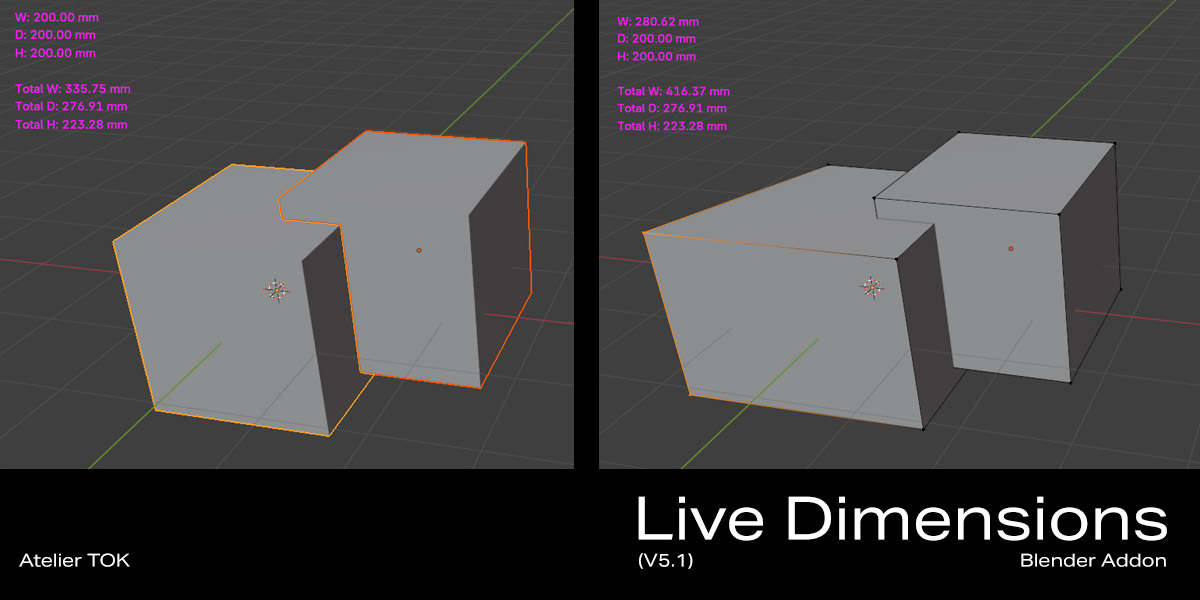
This handy tool will show the dimensions of an object while in edit mode. V4.2 includes display of dimensions in viewport (totally customizable).
Categories
Tags
Installation
- Download Live Dimensions and check which Blender versions the creator supports. Keep the installable archive (for example,
Live_Dimensions.zip) intact. If the download is a bundle, extract it first to find the add-on archive. - In Blender, go to Edit → Preferences → Add-ons. In Blender 4.2 and newer, open the top-right menu and choose Install from Disk. In older versions, click Install….
- Select the add-on archive (for example,
Live_Dimensions.zip) or its standalone.pyfile and confirm the installation. - Find the add-on in the Add-ons list and tick its checkbox if it isn’t already enabled.
Check the creator’s instructions for any extra setup, such as dependencies or license activation.
Compare with other products
Choose a category to find products to compare with this listing.
Variants
-
LiveDimensionsV3 disabled
Price: $3.99 · List price: $3.99
Variant versions
-
LiveDimensions V4.2 published
Created Jul 29, 2025 · Published Jul 29, 2025
Release notes (source)
<p>test</p>
-
-
LiveDimensionsV4.2 published
Price: $3.99 · List price: $3.99
Variant versions
-
LiveDimensions V5.1 published
Created Jun 9, 2026 · Published Jun 9, 2026
Release notes (source)
<p>Users reported the V4 addon not working in edit mode in blender 4.5.<br>Somehow dimensions were not updating live. <br>Fixed now! If you still have issues contact me. </p><p>Thanks for your continuous support. </p><p><br></p>
-
-
LiveDimensions V5.1 published
Price: $3.99 · List price: $3.99
Product versions
-
LiveDimensions V5.1 published
Created Jun 9, 2026 · Published Jun 9, 2026
Release notes (source)
<p>Users reported the V4 addon not working in edit mode in blender 4.5.<br>Somehow dimensions were not updating live. <br>Fixed now! If you still have issues contact me. </p><p>Thanks for your continuous support. </p><p><br></p>
-
LiveDimensions V4.2 published
Created Jul 29, 2025 · Published Jul 29, 2025
Release notes (source)
<p>test</p>
-
LiveDimensionsV3 published
Created May 30, 2025 · Published May 30, 2025
Release notes (source)
<p><b>Version 3 2025-06 Update:</b></p><p><b>Fixed: </b></p><p><b>1.
 Users had trouble keeping the addon turned on. Now upon instalation
addon is immediately switched on. New scene or restart blender, addon
stays on until user turns it off.</b></p><p><b>2. Works now also with plane and bezier objects. <br></b></p><p><b>Added: </b></p><p><b>1.
 Users can now place addon anywhere in the viewport now. (presets are
top left, top right, bottom left and bottom right).  Fully customizable
with padding from edge settings, font size and font color settings.</b></p><p><b>2. Can save layout as you please. </b></p><p><b>3. Multi object dimensions. Tool will now display dimensions of multiple selected objects. </b></p><p><b>Removed: </b></p><p><b>1. Copy object dimensions </b></p><p><b>2. Copy from one object to another. To streamline the addon, I removed parts that weren't providing clear value.</b></p><p><br></p>
-
V2 published
Created Oct 30, 2024 · Published Oct 30, 2024
Release notes (source)
added display of dimensions in viewport
viewport display can be block or line view
copy object dimensions and paste to other objects
copy object dimensions to clipboard