Product listing
Kyokaz's Toolbox
By Faiz Azhar ·
$1.99
List price: $1.99
Listing details
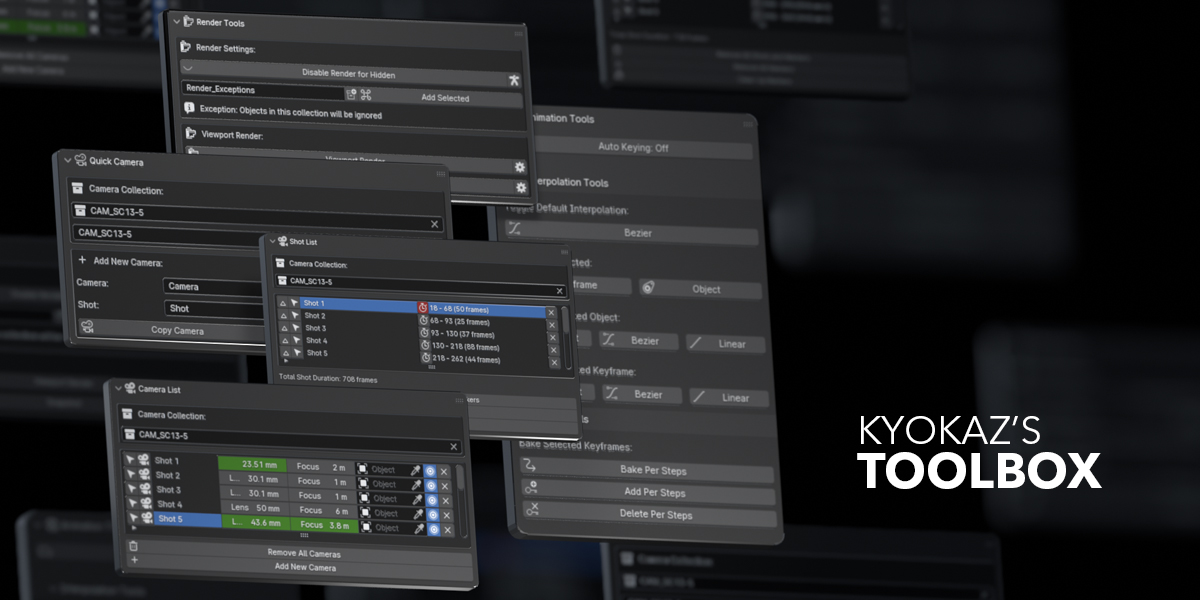
A set of useful camera management, animation and rendering tools for Blender.
Categories
Tags
Installation
- Download Kyokaz's Toolbox and check which Blender versions the creator supports. Keep the installable archive (for example,
Kyokaz's_Toolbox.zip) intact. If the download is a bundle, extract it first to find the add-on archive. - In Blender, go to Edit → Preferences → Add-ons. In Blender 4.2 and newer, open the top-right menu and choose Install from Disk. In older versions, click Install….
- Select the add-on archive (for example,
Kyokaz's_Toolbox.zip) or its standalone.pyfile and confirm the installation. - Find the add-on in the Add-ons list and tick its checkbox if it isn’t already enabled.
Check the creator’s instructions for any extra setup, such as dependencies or license activation.
Compare with other products
Choose a category to find products to compare with this listing.
Product versions
-
Kyokaz's Toolbox 2.6.6 published
Created Aug 9, 2026 · Published Aug 9, 2026
Release notes (source)
<p>New Feature: Sync Base Color to Viewport Display</p><p>Copy Base Color from each material's active/first Principled BSDF, Diffuse, or Emission node to its Viewport Display, great for doing environment blockings. (Can be accessed in the Render Tools subpanel)</p><p>This feature does not work well with textures as this is only useful for solid viewport, so if you have an object that has textures/base color overriden, it will most likely be ignored or copied from any existing node with base color slot available.</p>
-
Kyokaz Toolbox 2.6.4 published
Created Jul 16, 2026 · Published Jul 16, 2026
Release notes (source)
<p>General fixes and Small QoL adjustments.</p><p><b>Minor Improvements</b></p><p>- Added a Camera Info Overlay toggle to the Quick Camera pie menu.</p><p>- Added an option to adjust the active camera's passepartout from the pie menu.</p><p>- Default Camera Settings are no longer tied to the scene file. This was unintended behavior and has now been fixed.</p><p>- Fixed a potential crash when clicking the Add/Copy Camera and Shot button.</p><p>- Fixed an issue where Copy Camera could overwrite copied camera data with the default preferences.</p><p>- General fixes and stability improvements. Certain features should no longer spam warnings in the console.</p><p><br></p><p><b>Known Issues</b></p><p>- Canceling the DoF Picker may leave Depth of Field enabled after preview. (If this happens, you'll need to turn it off manually.)</p><p>- Newly added notes may appear in the top corner instead of the center of the viewport, making them difficult to find on certain display resolutions. (This only occurs when adding notes through the panel.)</p>
-
Kyokaz's Toolbox 2.6.3 published
Created Dec 22, 2025 · Published Dec 22, 2025
Release notes (source)
<h2 style="margin-top: 24px; margin-bottom: 16px; line-height: 1.25; padding-bottom: 0.3em; border-bottom: 0.533333px solid rgba(61, 68, 77, 0.7);">Minor UI Improvements</h2><ul style="padding-left: 2em; margin-bottom: 16px;"><li>Added visibility toggle for panels.</li><li style="margin-top: 0.25em;">Viewport Render changed into 'Playblast'.</li><li style="margin-top: 0.25em;">Start and End frame range buttons moved to the right.</li><li style="margin-top: 0.25em;">Combined "Camera Collection" and "Add New Camera" into a single "Add Camera" sub-panel.</li><li style="margin-top: 0.25em;">Added Apply to All Cameras, a checkmark button in Default Camera Settings for:<br>Passepartout: Apply default passepartout to all cameras<br>Clipping: Apply default clip start/end to all cameras</li></ul><h2 style="margin-top: 24px; margin-bottom: 16px; line-height: 1.25; padding-bottom: 0.3em; border-bottom: 0.533333px solid rgba(61, 68, 77, 0.7);">Other</h2><ul style="padding-left: 2em; margin-bottom: 0px !important;"><li style="">Fixed frame calculations, adjusted shot duration to exclude transition frame<br>Preview range no longer switches to the next shot on the last frame.</li><li style="margin-top: 0.25em;">Fixed compatibility issue with Animation Tools.</li></ul>
Related products
More from this creator
No other products from this creator.