Product listing
Gradient Flow
By Duchen ·
From $1.00
Listing details
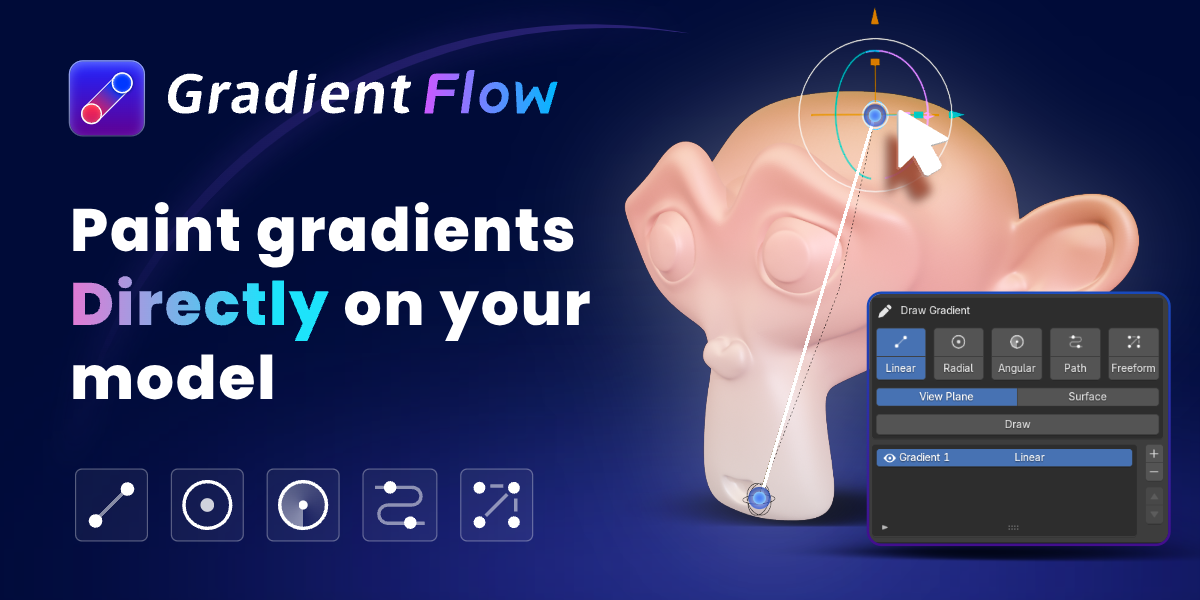
A powerful Blender add-on to generate and control gradient flows effortlessly.
Categories
Tags
Compare with other products
Choose a category to find products to compare with this listing.
Variants
-
GradientFlow Pro published
Price: $12.00 · List price: $20.00 · On sale
Variant versions
-
V3.0.7 published
Created Sep 8, 2026 · Published Sep 8, 2026
Release notes (source)
<h3 data-section-id="s3jgva" data-start="271" data-end="294" class="PDq2pG_selectionAnchorContainer">Gradient Flow 3.0.7<span aria-hidden="true" class="PDq2pG_selectionAnchor"></span></h3><p>
</p><ul data-start="296" data-end="587" data-is-last-node="" data-is-only-node="">
<li data-section-id="13kfzuj" data-start="296" data-end="388">
Added <strong data-start="304" data-end="321">S-key scaling</strong> for the center control point in Radial and Angular gradient modes.
</li>
<li data-section-id="1h9wfeq" data-start="389" data-end="521">
Fixed an issue where the <strong data-start="416" data-end="430">Base Color</strong> could be reset after adjusting other parameters while <strong data-start="485" data-end="508">Clip Outside Domain</strong> was enabled.
</li>
<li data-section-id="40kuod" data-start="522" data-end="587" data-is-last-node="">
Improved gradient editing stability and parameter preservation.</li></ul>
-
V3.0.0 published
Created Aug 30, 2026 · Published Aug 30, 2026
Release notes (source)
<h1>GradientFlow 3.0 Release Notes</h1><h2>1. Local Gradients and Edit Mode</h2><ul><li>Draw gradients on selected faces while in Blender Edit Mode.</li><li>Automatically creates an independent material so local gradients remain separate from the object’s main material.</li><li>Linear, Radial, Angular, Path, and Freeform gradients all support local drawing.</li><li>Automatically cleans up temporary materials when local gradients are removed, restoring the original material whenever possible.</li></ul><h2>2. Gradient Drawing and Controls</h2><ul><li>Create Bézier gradient paths from continuous edge chains or closed edge loops, with support for reversing path direction.</li><li>Added Angular Seam Blend to soften the transition between the last and first colors.</li><li>Added stepped gradients with Uniform and Independent per-segment modes.</li><li>Hold Shift during initial drawing or secondary handle movement to snap angles in 15° increments.</li></ul><h2>3. Built-in Gradient Palettes</h2><ul><li>Replaced the original V2 palettes with 70 gradients across 7 English categories:<ul><li>Fresh Ocean</li><li>Soft Pastels</li><li>Warm Sunset</li><li>Natural Earth</li><li>Neon Spectrum</li><li>Dark Luxury</li><li>Metallic Anisotropy</li></ul></li><li>Metallic gradients support non-uniform color-stop positions.</li><li>All palette categories are collapsed by default and can be expanded as needed.</li><li>Improved palette scrolling so the outer panel can continue scrolling after the color area reaches its limit.</li></ul><h2>4. Image-to-Gradient Extraction</h2><ul><li>Automatically analyze and extract dominant colors from images.</li><li>Uses the perceptual OKLab color space for more accurate color extraction.</li><li>Supports full-image analysis, path sampling, and individual color-point sampling.</li><li>Extracted colors can be removed, reordered, enabled, or disabled.</li><li>Apply extracted colors directly to the active gradient or save them as Project / Personal palettes.</li><li>Images are used only for sidebar sampling and are not added to the Blender scene.</li></ul><h2>5. Animation System</h2><h3>Motion</h3><ul><li>Motion has been upgraded from a drawing option into a dedicated animation module.</li><li>Linear, Radial, Angular, and Path gradients support automatic motion and directional controls.</li><li>Supports Once, Loop, and Ping-Pong playback, with Loop as the default mode.</li><li>Freeform gradients support seeded Wiggle animation.</li><li>Includes controls for speed, start frame, and phase offset.</li></ul><h3>K Gradient Frame</h3><ul><li>Records complete gradient states, including colors, color stops, stop positions, and control handles.</li><li>Supports state interpolation and Loop / Ping-Pong playback.</li><li>Creates editable proxy keyframes in the Timeline and Dope Sheet.</li><li>Moving, scaling, duplicating, or deleting keyframes automatically synchronizes with GradientFlow.</li><li>Fixed repeated keyframe overrides while editing at a stationary frame.</li><li>Automatically removes related keyframes when a layer is deleted.</li></ul><h3>Distortion</h3><p>Added five animatable gradient distortion types:</p><ul><li>Smooth Noise</li><li>Turbulence</li><li>Waves</li><li>Ripple</li><li>Twist</li></ul><p>Distortion results remain consistent across shader nodes, viewport previews, multi-object transfers, and current-frame baking.</p>
-
V2.2.2 published
Created Aug 24, 2026 · Published Aug 24, 2026
Release notes (source)
<h2>GradientFlow V2.2.2 Release Notes</h2><p>This update introduces the new <strong>Stepped Gradient</strong> feature.</p><ul>
<li>Convert smooth gradients into clearly separated color bands.</li>
<li>Available for Linear, Radial, Angular, and Path gradients.</li>
<li>Adjust the number of steps from 2 to 64.</li>
<li>Preserve existing Color Ramp stops and interpolation settings.</li>
<li>Stepped Gradient settings are retained in live materials, baked results, and transferred layers.</li>
<li>Improved overall stability and user experience.</li>
</ul>
-
V2.2.1 published
Created Aug 24, 2026 · Published Aug 24, 2026
Release notes (source)
<h2>GradientFlow Pro V2.2.1 Release Notes</h2><p>This release focuses on fixes related to freeform gradient controls and material node connections, improving stability and workflow compatibility.</p><ul>
<li>Fixed an issue where deleting a freeform gradient control point in the viewport did not update the color point list.</li>
<li>Fixed an issue where deleting a color point from the list caused the target object to lose its active state and the add-on panel to disappear.</li>
<li>Improved selection behavior after deleting a control point. An adjacent point is now activated automatically, while the remaining controls stay visible.</li>
<li>Fixed an issue where material updates could overwrite user-defined node connections.</li>
<li>Gradient output is now connected to <code>Base Color</code> only during initial creation. Connections moved to other inputs, such as <code>Roughness</code>, are preserved.</li>
<li>Improved deleted-control detection and orphaned-data cleanup in Blender 5.x.</li>
</ul>
-
V2.2.0 published
Created Aug 24, 2026 · Published Aug 24, 2026
Release notes (source)
<h2>GradientFlow V2.2.0 Update</h2><p><strong>Release Date: August 24, 2026</strong><br><strong>Compatible with Blender 4.5+</strong></p><p>This update introduces more precise gradient controls, a redesigned palette workflow, and improved material stability.</p><h3>What’s New</h3><ul><li>Added <strong>Planar and Volume modes</strong> for radial gradients, including adjustable depth controls.</li><li>Added <strong>domain clipping and edge feathering</strong> for Linear, Radial, Angular, and Path gradients.</li><li>Redesigned the palette system with <strong>Public, Project, and Personal libraries</strong>.</li><li>Added palette categories, gradient previews, rename/delete tools, and JSON import/export.</li><li>New gradients now inherit the material’s original base color for a more natural starting result.</li></ul><h3>Fixes & Improvements</h3><ul><li>Fixed material node feedback loops and unstable shader connections.</li><li>Improved compatibility with complex node graphs and localized Blender interfaces.</li><li>Fixed generated nodes overlapping existing shader nodes.</li><li>Fixed washed-out colors in the image sampler preview.</li><li>Improved ColorRamp synchronization after reopening <code dir="ltr">.blend</code> files.</li><li>Fixed incorrect target counts after batch gradient transfer.</li><li>Improved legacy project and palette migration.</li></ul><p>GradientFlow V2.2.0 makes gradients easier to control in 3D while turning palettes into reusable creative assets.</p>
-
V2.1.2 published
Created Aug 20, 2026 · Published Aug 20, 2026
Release notes (source)
<h3>GradientFlow v2.1.2 — Layer Stability Fix</h3><ul><li>Fixed an issue where material updates could stop responding when using three or more gradient layers.</li><li>Improved shader recompilation reliability for complex multi-layer gradients.</li><li>Reworked node-group rebuilding to prevent incomplete material states.</li><li>Added automatic retry handling for temporary Blender RNA update failures.</li><li>Improved stability when enabling, disabling, or adjusting gradient layers.</li></ul>
-
V2.1.1 published
Created Aug 19, 2026 · Published Aug 19, 2026
Release notes (source)
<h2>GradientFlow v2.1.1 — Stability Update</h2><p>This maintenance release improves material-node reliability in complex Blender projects.</p><h3>Fixes</h3><ul>
<li>Fixed an issue where reopening a project could create duplicate or circular GradientFlow node connections.</li>
<li>Fixed materials appearing completely black when custom or complex shader node groups were used.</li>
<li>Prevented GradientFlow-generated outputs from being incorrectly detected as original material inputs.</li>
<li>Added automatic cleanup of invalid feedback connections created by previous versions.</li>
</ul><h3>Improvements</h3><ul>
<li>Improved target shader and input-socket detection for custom node groups.</li>
<li>Added stable socket identification to preserve connections across project reloads.</li>
<li>Improved restoration of previously saved material connections.</li>
</ul><p>Users experiencing this issue should update to v2.1.1 and reopen the original <code>.blend</code> file.</p>
-
V2.1.0 published
Created Aug 19, 2026 · Published Aug 19, 2026
Release notes (source)
<h3>GradientFlow Pro 2.1.0 — Release Notes</h3><p>GradientFlow Pro 2.1.0 expands the original four-gradient system with Angular gradients and introduces several workflow and synchronization improvements.</p><ol start="1"><li><p><strong>Added Angular Gradient</strong><br>Angular joins Linear, Radial, Bézier Path, and Freeform as the fifth gradient type. Create rotational color transitions around a customizable center and adjust individual color stops directly through viewport controls.</p></li><li><p><strong>Improved Gradient Property Cloning</strong><br>Select multiple target objects and copy gradient properties to them in a single operation. Once copying is complete, the target list is cleared automatically while the source object remains available for the next batch.</p></li><li><p><strong>Added Related Color Generation</strong><br>When creating a new gradient, GradientFlow automatically reads the active material’s base color and generates a coordinated color variation. This provides a more natural starting point and reduces the need for manual color adjustments.</p></li><li><p><strong>Fixed Color Card Synchronization</strong><br>Resolved an issue where the color cards below the gradient editor did not update correctly after adding a new color stop.</p></li></ol>
-
V1.1.0 published
Created Aug 19, 2026 · Published Aug 19, 2026
Release notes (source)
<div class="paragraph" dir="auto" style="scrollbar-color: transparent transparent; font-family: -apple-system, BlinkMacSystemFont, "Segoe UI", system-ui, Roboto, "Noto Sans", Ubuntu, Cantarell, "Helvetica Neue", sans-serif, Arial, "PingFang SC", "Source Han Sans SC", "Microsoft YaHei UI", "Microsoft YaHei", "Noto Sans CJK SC"; font-variant-numeric: inherit; font-variant-east-asian: inherit; font-variant-alternates: inherit; font-variant-position: inherit; font-variant-emoji: inherit; font-stretch: inherit; line-height: 26px; font-optical-sizing: inherit; font-size-adjust: inherit; font-kerning: inherit; font-feature-settings: inherit; font-variation-settings: inherit; font-language-override: inherit; vertical-align: baseline; border: 0px; margin: 0px 0px 16px; padding: 0px; letter-spacing: 0px; white-space: pre-wrap; word-break: break-word; max-width: 100%; text-shadow: none; color: rgba(0, 0, 0, 0.9);"><span class="" style="scrollbar-color: transparent transparent; font-family: inherit; font-style: inherit; font-variant: inherit; font-stretch: inherit; font-size: inherit; line-height: inherit; font-optical-sizing: inherit; font-size-adjust: inherit; font-kerning: inherit; font-feature-settings: inherit; font-variation-settings: inherit; font-language-override: inherit; vertical-align: baseline; border: 0px; margin: 0px; padding: 0px;"><b>GradientFlow Pro 1.0 — Initial Release</b></span></div><div class="paragraph" dir="auto" style="scrollbar-color: transparent transparent; font-family: -apple-system, BlinkMacSystemFont, "Segoe UI", system-ui, Roboto, "Noto Sans", Ubuntu, Cantarell, "Helvetica Neue", sans-serif, Arial, "PingFang SC", "Source Han Sans SC", "Microsoft YaHei UI", "Microsoft YaHei", "Noto Sans CJK SC"; font-variant-numeric: inherit; font-variant-east-asian: inherit; font-variant-alternates: inherit; font-variant-position: inherit; font-variant-emoji: inherit; font-stretch: inherit; line-height: 26px; font-optical-sizing: inherit; font-size-adjust: inherit; font-kerning: inherit; font-feature-settings: inherit; font-variation-settings: inherit; font-language-override: inherit; vertical-align: baseline; border: 0px; margin: 0px 0px 16px; padding: 0px; letter-spacing: 0px; white-space: pre-wrap; word-break: break-word; max-width: 100%; text-shadow: none; color: rgba(0, 0, 0, 0.9);">GradientFlow Pro introduces an interactive workflow for creating, combining, and managing editable gradients directly on mesh surfaces in Blender.</div><div class="paragraph" dir="auto" style="scrollbar-color: transparent transparent; font-family: -apple-system, BlinkMacSystemFont, "Segoe UI", system-ui, Roboto, "Noto Sans", Ubuntu, Cantarell, "Helvetica Neue", sans-serif, Arial, "PingFang SC", "Source Han Sans SC", "Microsoft YaHei UI", "Microsoft YaHei", "Noto Sans CJK SC"; font-variant-numeric: inherit; font-variant-east-asian: inherit; font-variant-alternates: inherit; font-variant-position: inherit; font-variant-emoji: inherit; font-stretch: inherit; line-height: 26px; font-optical-sizing: inherit; font-size-adjust: inherit; font-kerning: inherit; font-feature-settings: inherit; font-variation-settings: inherit; font-language-override: inherit; vertical-align: baseline; border: 0px; margin: 0px 0px 16px; padding: 0px; letter-spacing: 0px; white-space: pre-wrap; word-break: break-word; max-width: 100%; text-shadow: none; color: rgba(0, 0, 0, 0.9);"><span style="scrollbar-color: transparent transparent; font-family: inherit; font-style: inherit; font-variant: inherit; font-weight: 600; font-stretch: inherit; font-size: inherit; line-height: inherit; font-optical-sizing: inherit; font-size-adjust: inherit; font-kerning: inherit; font-feature-settings: inherit; font-variation-settings: inherit; font-language-override: inherit; vertical-align: baseline; border: 0px; margin: 0px; padding: 0px;">Four Gradient Types</span><br style="scrollbar-color: transparent transparent; font-family: inherit;">Create Linear, Radial, Bézier Path, and Freeform multi-point gradients for a wide range of visual styles.</div><div class="paragraph" dir="auto" style="scrollbar-color: transparent transparent; font-family: -apple-system, BlinkMacSystemFont, "Segoe UI", system-ui, Roboto, "Noto Sans", Ubuntu, Cantarell, "Helvetica Neue", sans-serif, Arial, "PingFang SC", "Source Han Sans SC", "Microsoft YaHei UI", "Microsoft YaHei", "Noto Sans CJK SC"; font-variant-numeric: inherit; font-variant-east-asian: inherit; font-variant-alternates: inherit; font-variant-position: inherit; font-variant-emoji: inherit; font-stretch: inherit; line-height: 26px; font-optical-sizing: inherit; font-size-adjust: inherit; font-kerning: inherit; font-feature-settings: inherit; font-variation-settings: inherit; font-language-override: inherit; vertical-align: baseline; border: 0px; margin: 0px 0px 16px; padding: 0px; letter-spacing: 0px; white-space: pre-wrap; word-break: break-word; max-width: 100%; text-shadow: none; color: rgba(0, 0, 0, 0.9);"><span class="" style="scrollbar-color: transparent transparent; font-family: inherit; font-style: inherit; font-variant: inherit; font-weight: 600; font-stretch: inherit; font-size: inherit; line-height: inherit; font-optical-sizing: inherit; font-size-adjust: inherit; font-kerning: inherit; font-feature-settings: inherit; font-variation-settings: inherit; font-language-override: inherit; vertical-align: baseline; border: 0px; margin: 0px; padding: 0px;">Layer-Based Gradient Composition</span><br style="scrollbar-color: transparent transparent; font-family: inherit;">Stack multiple gradient layers on a single object and independently control their visibility, opacity, blending modes, and color transitions.</div><div class="paragraph" dir="auto" style="scrollbar-color: transparent transparent; font-family: -apple-system, BlinkMacSystemFont, "Segoe UI", system-ui, Roboto, "Noto Sans", Ubuntu, Cantarell, "Helvetica Neue", sans-serif, Arial, "PingFang SC", "Source Han Sans SC", "Microsoft YaHei UI", "Microsoft YaHei", "Noto Sans CJK SC"; font-variant-numeric: inherit; font-variant-east-asian: inherit; font-variant-alternates: inherit; font-variant-position: inherit; font-variant-emoji: inherit; font-stretch: inherit; line-height: 26px; font-optical-sizing: inherit; font-size-adjust: inherit; font-kerning: inherit; font-feature-settings: inherit; font-variation-settings: inherit; font-language-override: inherit; vertical-align: baseline; border: 0px; margin: 0px 0px 16px; padding: 0px; letter-spacing: 0px; white-space: pre-wrap; word-break: break-word; max-width: 100%; text-shadow: none; color: rgba(0, 0, 0, 0.9);"><span style="scrollbar-color: transparent transparent; font-family: inherit; font-style: inherit; font-variant: inherit; font-weight: 600; font-stretch: inherit; font-size: inherit; line-height: inherit; font-optical-sizing: inherit; font-size-adjust: inherit; font-kerning: inherit; font-feature-settings: inherit; font-variation-settings: inherit; font-language-override: inherit; vertical-align: baseline; border: 0px; margin: 0px; padding: 0px;">Interactive Viewport Controls</span><br style="scrollbar-color: transparent transparent; font-family: inherit;">Position and adjust gradients directly on mesh surfaces using intuitive controls in the 3D Viewport.</div><div class="paragraph" dir="auto" style="scrollbar-color: transparent transparent; font-family: -apple-system, BlinkMacSystemFont, "Segoe UI", system-ui, Roboto, "Noto Sans", Ubuntu, Cantarell, "Helvetica Neue", sans-serif, Arial, "PingFang SC", "Source Han Sans SC", "Microsoft YaHei UI", "Microsoft YaHei", "Noto Sans CJK SC"; font-variant-numeric: inherit; font-variant-east-asian: inherit; font-variant-alternates: inherit; font-variant-position: inherit; font-variant-emoji: inherit; font-stretch: inherit; line-height: 26px; font-optical-sizing: inherit; font-size-adjust: inherit; font-kerning: inherit; font-feature-settings: inherit; font-variation-settings: inherit; font-language-override: inherit; vertical-align: baseline; border: 0px; margin: 0px 0px 16px; padding: 0px; letter-spacing: 0px; white-space: pre-wrap; word-break: break-word; max-width: 100%; text-shadow: none; color: rgba(0, 0, 0, 0.9);"><span style="scrollbar-color: transparent transparent; font-family: inherit; font-style: inherit; font-variant: inherit; font-weight: 600; font-stretch: inherit; font-size: inherit; line-height: inherit; font-optical-sizing: inherit; font-size-adjust: inherit; font-kerning: inherit; font-feature-settings: inherit; font-variation-settings: inherit; font-language-override: inherit; vertical-align: baseline; border: 0px; margin: 0px; padding: 0px;">Image-Based Color Extraction</span><br style="scrollbar-color: transparent transparent; font-family: inherit;">Extract colors from reference images and apply them directly to gradients, making it easier to build palettes from existing visual material.</div><div class="paragraph" dir="auto" style="scrollbar-color: transparent transparent; font-family: -apple-system, BlinkMacSystemFont, "Segoe UI", system-ui, Roboto, "Noto Sans", Ubuntu, Cantarell, "Helvetica Neue", sans-serif, Arial, "PingFang SC", "Source Han Sans SC", "Microsoft YaHei UI", "Microsoft YaHei", "Noto Sans CJK SC"; font-variant-numeric: inherit; font-variant-east-asian: inherit; font-variant-alternates: inherit; font-variant-position: inherit; font-variant-emoji: inherit; font-stretch: inherit; line-height: 26px; font-optical-sizing: inherit; font-size-adjust: inherit; font-kerning: inherit; font-feature-settings: inherit; font-variation-settings: inherit; font-language-override: inherit; vertical-align: baseline; border: 0px; margin: 0px 0px 16px; padding: 0px; letter-spacing: 0px; white-space: pre-wrap; word-break: break-word; max-width: 100%; text-shadow: none; color: rgba(0, 0, 0, 0.9);"><span style="scrollbar-color: transparent transparent; font-family: inherit; font-style: inherit; font-variant: inherit; font-weight: 600; font-stretch: inherit; font-size: inherit; line-height: inherit; font-optical-sizing: inherit; font-size-adjust: inherit; font-kerning: inherit; font-feature-settings: inherit; font-variation-settings: inherit; font-language-override: inherit; vertical-align: baseline; border: 0px; margin: 0px; padding: 0px;">Palette Management</span><br style="scrollbar-color: transparent transparent; font-family: inherit;">Choose from built-in palettes or create and save custom color collections for future projects.</div><div class="paragraph" dir="auto" style="scrollbar-color: transparent transparent; font-family: -apple-system, BlinkMacSystemFont, "Segoe UI", system-ui, Roboto, "Noto Sans", Ubuntu, Cantarell, "Helvetica Neue", sans-serif, Arial, "PingFang SC", "Source Han Sans SC", "Microsoft YaHei UI", "Microsoft YaHei", "Noto Sans CJK SC"; font-variant-numeric: inherit; font-variant-east-asian: inherit; font-variant-alternates: inherit; font-variant-position: inherit; font-variant-emoji: inherit; font-stretch: inherit; line-height: 26px; font-optical-sizing: inherit; font-size-adjust: inherit; font-kerning: inherit; font-feature-settings: inherit; font-variation-settings: inherit; font-language-override: inherit; vertical-align: baseline; border: 0px; margin: 0px 0px 16px; padding: 0px; letter-spacing: 0px; white-space: pre-wrap; word-break: break-word; max-width: 100%; text-shadow: none; color: rgba(0, 0, 0, 0.9);"><span style="scrollbar-color: transparent transparent; font-family: inherit; font-style: inherit; font-variant: inherit; font-weight: 600; font-stretch: inherit; font-size: inherit; line-height: inherit; font-optical-sizing: inherit; font-size-adjust: inherit; font-kerning: inherit; font-feature-settings: inherit; font-variation-settings: inherit; font-language-override: inherit; vertical-align: baseline; border: 0px; margin: 0px; padding: 0px;">Gradient Property Cloning</span><br style="scrollbar-color: transparent transparent; font-family: inherit;">Copy complete gradient setups between objects while proportionally adapting their placement to different model dimensions.</div><div class="paragraph" dir="auto" style="scrollbar-color: transparent transparent; font-family: -apple-system, BlinkMacSystemFont, "Segoe UI", system-ui, Roboto, "Noto Sans", Ubuntu, Cantarell, "Helvetica Neue", sans-serif, Arial, "PingFang SC", "Source Han Sans SC", "Microsoft YaHei UI", "Microsoft YaHei", "Noto Sans CJK SC"; font-variant-numeric: inherit; font-variant-east-asian: inherit; font-variant-alternates: inherit; font-variant-position: inherit; font-variant-emoji: inherit; font-stretch: inherit; line-height: 26px; font-optical-sizing: inherit; font-size-adjust: inherit; font-kerning: inherit; font-feature-settings: inherit; font-variation-settings: inherit; font-language-override: inherit; vertical-align: baseline; border: 0px; margin: 0px 0px 16px; padding: 0px; letter-spacing: 0px; white-space: pre-wrap; word-break: break-word; max-width: 100%; text-shadow: none; color: rgba(0, 0, 0, 0.9);"><span class="" style="scrollbar-color: transparent transparent; font-family: inherit; font-style: inherit; font-variant: inherit; font-weight: 600; font-stretch: inherit; font-size: inherit; line-height: inherit; font-optical-sizing: inherit; font-size-adjust: inherit; font-kerning: inherit; font-feature-settings: inherit; font-variation-settings: inherit; font-language-override: inherit; vertical-align: baseline; border: 0px; margin: 0px; padding: 0px;">Native Color Ramp Integration</span><br style="scrollbar-color: transparent transparent; font-family: inherit;">Refine gradient colors, stops, and interpolation through Blender's native Color Ramp for a familiar and fully editable workflow.</div><div class="paragraph" dir="auto" style="scrollbar-color: transparent transparent; font-family: -apple-system, BlinkMacSystemFont, "Segoe UI", system-ui, Roboto, "Noto Sans", Ubuntu, Cantarell, "Helvetica Neue", sans-serif, Arial, "PingFang SC", "Source Han Sans SC", "Microsoft YaHei UI", "Microsoft YaHei", "Noto Sans CJK SC"; font-variant-numeric: inherit; font-variant-east-asian: inherit; font-variant-alternates: inherit; font-variant-position: inherit; font-variant-emoji: inherit; font-stretch: inherit; line-height: 26px; font-optical-sizing: inherit; font-size-adjust: inherit; font-kerning: inherit; font-feature-settings: inherit; font-variation-settings: inherit; font-language-override: inherit; vertical-align: baseline; border: 0px; margin: 0px 0px 16px; padding: 0px; letter-spacing: 0px; white-space: pre-wrap; word-break: break-word; max-width: 100%; text-shadow: none; color: rgba(0, 0, 0, 0.9);"><span class="" style="scrollbar-color: transparent transparent; font-family: inherit; font-style: inherit; font-variant: inherit; font-weight: 600; font-stretch: inherit; font-size: inherit; line-height: inherit; font-optical-sizing: inherit; font-size-adjust: inherit; font-kerning: inherit; font-feature-settings: inherit; font-variation-settings: inherit; font-language-override: inherit; vertical-align: baseline; border: 0px; margin: 0px; padding: 0px;">Color Attribute Baking</span><br style="scrollbar-color: transparent transparent; font-family: inherit;">Bake gradient results into color attributes for efficient integration with materials, procedural workflows, and downstream production tasks.</div><div><br></div>
-
-
GradientFlow Lite published
Price: $1.00 · List price: $1.66 · On sale
Variant versions
-
V2.0.0 published
Created Sep 3, 2026 · Published Sep 3, 2026
Release notes (source)
<h2 data-section-id="1ox1mg1" data-start="16" data-end="43" class="PDq2pG_selectionAnchorContainer">GradientFlow Lite V2.0.0<span aria-hidden="true" class="PDq2pG_selectionAnchor"></span></h2><p data-start="45" data-end="144">This update expands the Lite workflow with more creative control and a clearer upgrade path to Pro.</p><p>

</p><ul data-start="146" data-end="390">
<li data-section-id="11kp6lr" data-start="146" data-end="182">
Up to <strong data-start="154" data-end="182">2 Linear Gradient layers</strong>
</li>
<li data-section-id="11qp74s" data-start="183" data-end="216">
Full <strong data-start="190" data-end="216">Preset Palette Library</strong>
</li>
<li data-section-id="m9osdy" data-start="217" data-end="242">
<strong data-start="219" data-end="234">Auto Motion</strong> support
</li>
<li data-section-id="1lgi6qn" data-start="243" data-end="272">
<strong data-start="245" data-end="272">Smooth Noise Distortion</strong>
</li>
<li data-section-id="18o3ywq" data-start="273" data-end="304">
<strong data-start="275" data-end="304">Uniform Stepped Gradients</strong>
</li>
<li data-section-id="3j0l1n" data-start="305" data-end="356">
Clearer <strong data-start="315" data-end="356">Pro feature locks and upgrade prompts</strong>
</li>
<li data-section-id="11iwgp7" data-start="357" data-end="390">
Improved stability and workflow</li></ul>
-
V1.0.0 published
Created Aug 24, 2026 · Published Aug 24, 2026
Release notes (source)
<h2>GradientFlow Demo V1.0.0 Release Notes</h2><p>This update introduces stepped gradients and improves material node connection behavior.</p><ul><li>Added a <strong>Stepped Gradient</strong> mode for Linear Gradients, creating clearly separated color bands.</li><li>Supports between 2 and 64 gradient steps.</li><li>Stepped gradients work consistently in both live previews and baked results.</li><li>GradientFlow automatically detects and connects to the Base Color input during initial setup.</li><li>User-defined node connections are now preserved during later gradient edits and material rebuilds.</li><li>Improved overall stability and the material node editing experience.</li></ul>
-
V0.5.0 published
Created Aug 19, 2026 · Published Aug 19, 2026
Release notes (source)
<h3>GradientFlow Demo</h3><p>GradientFlow Demo offers a focused introduction to GradientFlow’s interactive gradient-design workflow in Blender. It includes the essential tools needed to create, edit, and combine Linear gradients directly on mesh surfaces.</p><ol start="1"><li><p><strong>Linear Gradient Creation</strong><br>Create editable Linear gradients and apply color transitions directly to mesh surfaces.</p></li><li><p><strong>Interactive Viewport Controls</strong><br>Position and adjust gradients visually through intuitive controls in Blender’s 3D Viewport.</p></li><li><p><strong>Layer-Based Composition</strong><br>Stack multiple Linear gradient layers and independently control their visibility, opacity, blending modes, and colors.</p></li><li><p><strong>Native Color Ramp Integration</strong><br>Edit color stops and interpolation using Blender’s native Color Ramp for a familiar and flexible workflow.</p></li><li><p><strong>Designed for Evaluation and Lightweight Workflows</strong><br>The Demo edition is ideal for exploring GradientFlow’s core workflow or handling projects that only require Linear gradients.</p></li></ol><p><strong>Demo Limitation</strong><br>GradientFlow Demo includes the Linear gradient type only. Upgrade to GradientFlow Pro to unlock all five gradient types, image-based color extraction, palette management, gradient property cloning, and color attribute baking.</p>
-
-
GradientFlow Team — 5~10 Users disabled
Price: $40.00 · List price: $66.66 · On sale
-
GradientFlow Studio — 20 Users disabled
Price: $119.00 · List price: $198.33 · On sale