Product listing
Gobo Tool
By Rick Speets ·
From $5.00
Listing details
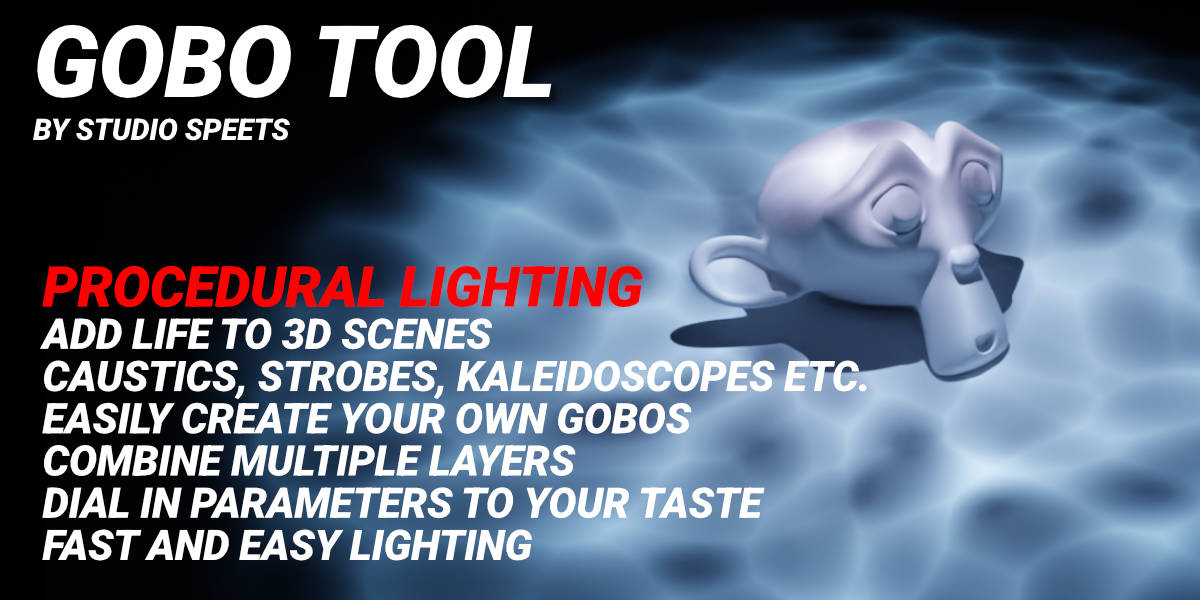
Easily add light and life to your Blender scenes with this Gobo Tool, allowing you to easily mix and match multiple animated Gobo layers, so you can make your own realistic lights in no time!
Categories
Tags
Compare with other products
Choose a category to find products to compare with this listing.
Variants
-
Freelancer version (LEGACY) disabled
Price: $15.00 · List price: $15.00
Variant versions
-
V1 - V* published
Created Jul 22, 2026 · Published Jul 1, 2026
Release notes (source)
<ul style="color:rgb(42, 31, 66);font-family:Inter , sans-serif;overflow:hidden !important;">
<li style="margin-bottom:1rem;">V1.0 - First release!</li>
<li style="margin-bottom:1rem;">V1.07 - The mixing of light layers now has a more cohesive light amount per layer, making mixing lights easier</li>
<li style="margin-bottom:1rem;">V1.07 - A masking section has been added, which adds functions like flickering lights, flash light, softbox and more!</li>
<li style="margin-bottom:1rem;">V1.2 - Improved and easier to use user interface / menu. New Light Layers like Kaleido and additional Mask layers.</li>
<li style="margin-bottom:1rem;">V1.21 - Some bugfixes and additional options for the Kaleido layer</li>
<li style="margin-bottom:1rem;">V1.25 - UV Mod section modulates the UV's of the Light and Mask layers. More Mask layers like (fake) Caustics, Triangle, Strobe, Stripe, Venetian Blinds. The Mask previously called Gradient has been reworked and is now called Divide. Image Texture now has a Light Layer AND a Mask Layer so you can load your own images as a Light source and a Mask source. Checkers Light Layer has been deprecated. Light and Mask mixing options have been added to the shader nodes (look for the blue frame in the Shader editor)</li>
<li style="margin-bottom:1rem;">V1.3 - Colorizer section got revamped and easier to control</li>
</ul>
-
-
Small studio version disabled
Price: $60.00 · List price: $60.00
Variant versions
-
V1 - V* published
Created Jul 22, 2026 · Published Jul 1, 2026
Release notes (source)
<ul style="color:rgb(42, 31, 66);font-family:Inter , sans-serif;overflow:hidden !important;">
<li style="margin-bottom:1rem;">V1.0 - First release!</li>
<li style="margin-bottom:1rem;">V1.07 - The mixing of light layers now has a more cohesive light amount per layer, making mixing lights easier</li>
<li style="margin-bottom:1rem;">V1.07 - A masking section has been added, which adds functions like flickering lights, flash light, softbox and more!</li>
<li style="margin-bottom:1rem;">V1.2 - Improved and easier to use user interface / menu. New Light Layers like Kaleido and additional Mask layers.</li>
<li style="margin-bottom:1rem;">V1.21 - Some bugfixes and additional options for the Kaleido layer</li>
<li style="margin-bottom:1rem;">V1.25 - UV Mod section modulates the UV's of the Light and Mask layers. More Mask layers like (fake) Caustics, Triangle, Strobe, Stripe, Venetian Blinds. The Mask previously called Gradient has been reworked and is now called Divide. Image Texture now has a Light Layer AND a Mask Layer so you can load your own images as a Light source and a Mask source. Checkers Light Layer has been deprecated. Light and Mask mixing options have been added to the shader nodes (look for the blue frame in the Shader editor)</li>
<li style="margin-bottom:1rem;">V1.3 - Colorizer section got revamped and easier to control</li>
</ul>
-
-
Big studio version disabled
Price: $120.00 · List price: $120.00
Variant versions
-
V1 - V* published
Created Jul 22, 2026 · Published Jul 1, 2026
Release notes (source)
<ul style="color:rgb(42, 31, 66);font-family:Inter , sans-serif;overflow:hidden !important;">
<li style="margin-bottom:1rem;">V1.0 - First release!</li>
<li style="margin-bottom:1rem;">V1.07 - The mixing of light layers now has a more cohesive light amount per layer, making mixing lights easier</li>
<li style="margin-bottom:1rem;">V1.07 - A masking section has been added, which adds functions like flickering lights, flash light, softbox and more!</li>
<li style="margin-bottom:1rem;">V1.2 - Improved and easier to use user interface / menu. New Light Layers like Kaleido and additional Mask layers.</li>
<li style="margin-bottom:1rem;">V1.21 - Some bugfixes and additional options for the Kaleido layer</li>
<li style="margin-bottom:1rem;">V1.25 - UV Mod section modulates the UV's of the Light and Mask layers. More Mask layers like (fake) Caustics, Triangle, Strobe, Stripe, Venetian Blinds. The Mask previously called Gradient has been reworked and is now called Divide. Image Texture now has a Light Layer AND a Mask Layer so you can load your own images as a Light source and a Mask source. Checkers Light Layer has been deprecated. Light and Mask mixing options have been added to the shader nodes (look for the blue frame in the Shader editor)</li>
<li style="margin-bottom:1rem;">V1.3 - Colorizer section got revamped and easier to control</li>
</ul>
-
-
Gobo Tool published
Price: $5.00 · List price: $5.00
Variant versions
-
V1.3 published
Created Jul 22, 2026 · Published Jul 21, 2026
Release notes (source)
<ul style="color:rgb(42, 31, 66);font-family:Inter , sans-serif;overflow:hidden !important;">
<li style="margin-bottom:1rem;">V1.0 - First release!</li>
<li style="margin-bottom:1rem;">V1.07 - The mixing of light layers now has a more cohesive light amount per layer, making mixing lights easier</li>
<li style="margin-bottom:1rem;">V1.07 - A masking section has been added, which adds functions like flickering lights, flash light, softbox and more!</li>
<li style="margin-bottom:1rem;">V1.2 - Improved and easier to use user interface / menu. New Light Layers like Kaleido and additional Mask layers.</li>
<li style="margin-bottom:1rem;">V1.21 - Some bugfixes and additional options for the Kaleido layer</li>
<li style="margin-bottom:1rem;">V1.25 - UV Mod section modulates the UV's of the Light and Mask layers. More Mask layers like (fake) Caustics, Triangle, Strobe, Stripe, Venetian Blinds. The Mask previously called Gradient has been reworked and is now called Divide. Image Texture now has a Light Layer AND a Mask Layer so you can load your own images as a Light source and a Mask source. Checkers Light Layer has been deprecated. Light and Mask mixing options have been added to the shader nodes (look for the blue frame in the Shader editor)</li>
<li style="margin-bottom:1rem;">V1.3 - Colorizer section got revamped and easier to control</li>
</ul>
-