Product listing
Geo-C-Thru
By Jiovanie Velazquez ·
$2.99
List price: $2.99
Listing details
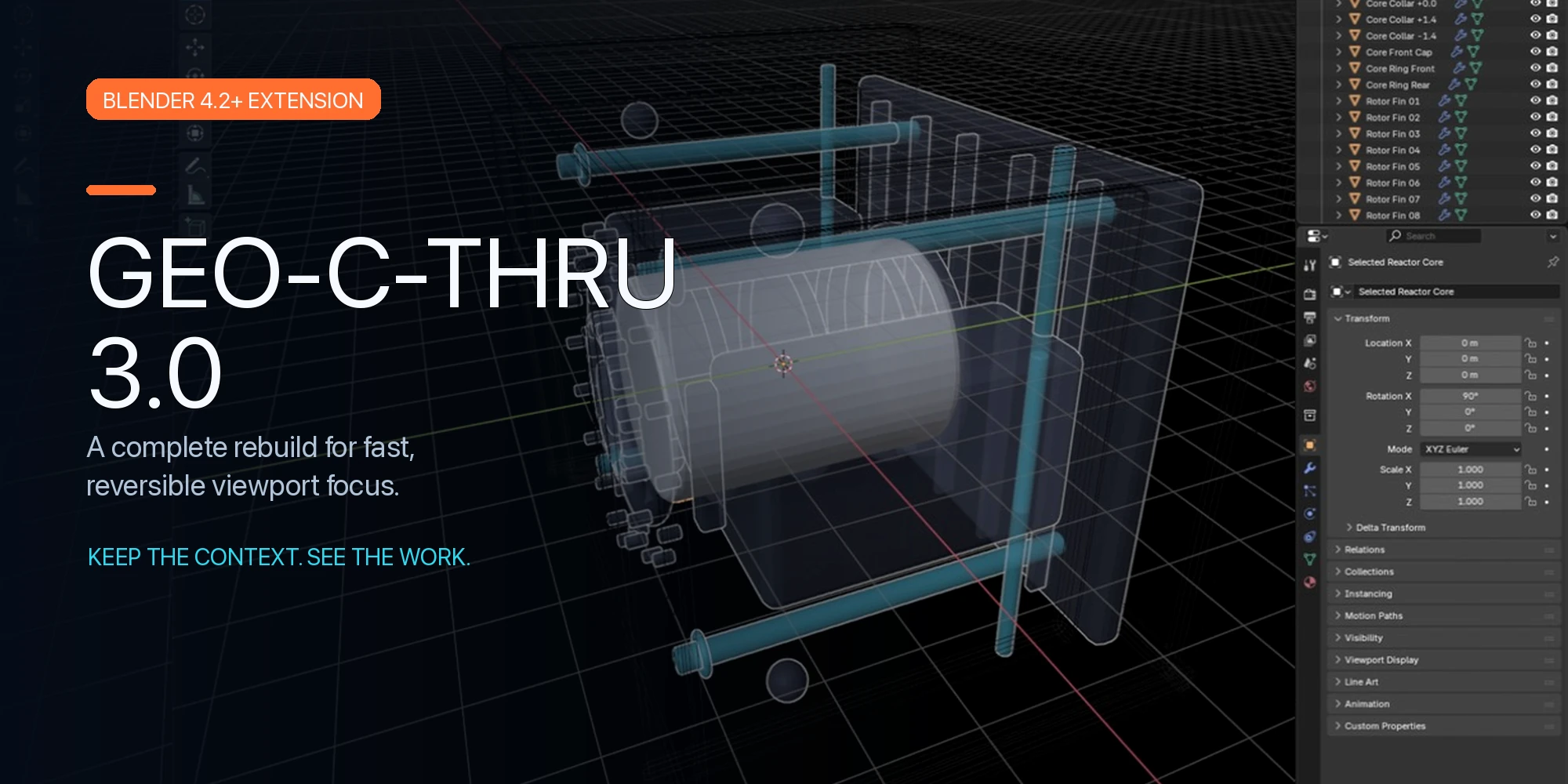
Geo-C-Thru 3.0 is a complete Blender 4.2+ viewport-focus extension. It makes it easy to focus on your selected models without visual clutter from the rest of the scene.. Alternatively you can see through your selected object to what lies beyond.
Categories
Tags
Installation
- Download Geo-C-Thru and check which Blender versions the creator supports. Keep the installable archive (for example,
Geo-C-Thru.zip) intact. If the download is a bundle, extract it first to find the add-on archive. - In Blender, go to Edit → Preferences → Add-ons. In Blender 4.2 and newer, open the top-right menu and choose Install from Disk. In older versions, click Install….
- Select the add-on archive (for example,
Geo-C-Thru.zip) or its standalone.pyfile and confirm the installation. - Find the add-on in the Add-ons list and tick its checkbox if it isn’t already enabled.
Check the creator’s instructions for any extra setup, such as dependencies or license activation.
Compare with other products
Choose a category to find products to compare with this listing.
Product versions
-
3.0.0 published
Created Aug 10, 2026 · Published Aug 10, 2026
Release notes (source)
<p>Geo-C-Thru 3.0 is a ground-up extension rewrite for Blender 4.2 and newer.</p><p><br></p><p>Major changes:</p><p>• Rebuilt around Blender's modern extension system</p><p>• Added Built-In, User Library, and This Project preset libraries</p><p>• Added explicit component ownership, favorites, import, export, and revert</p><p>• Added ordered, pointer-based Collection Rules with clear priority</p><p>• Added per-viewport scope and shading snapshots</p><p>• Added reversible Bypass and Reapply, Safe Restore, and a separate confirmed Emergency Reset Display</p><p>• Added migration guidance for Geo-C-Thru 2.x</p><p><br></p><p>Correctness and performance:</p><p>• Improved pre-save transitions and failed-save recovery</p><p>• Added coalesced scheduling and dependency-graph dirty sets</p><p>• Added pointer-keyed ownership and modern object-type support, including Text</p><p>• Overlay-only controls no longer force Solid shading</p><p>• Registration and cleanup are now idempotent</p><p><br></p><p>Compatibility:</p><p>• Requires Blender 4.2 or newer</p><p>• Tested with Blender 4.2 LTS, 4.5 LTS, 5.0, and 5.2 LTS</p><p>• Version 2.1 remains available for Blender 4.1 and older</p>
-
2.1.0 published
Created Nov 5, 2025 · Published Nov 5, 2025
Release notes (source)
<p><b>Key changes</b>:</p><p>- Re-adds support for MatCap lighting mode</p><p>- Adds a feature to force objects into a solid mode when nothing is selected, this makes it easier to see and select objects in your scene when you have "Wireframe Non-Selected" active.</p><p>- Adds the ability to toggle wireframes on/off, instead of requiring setting the opacity slider to 100 or 0. </p><p>- Increased preset limit to 50</p><p>- Improves two-way synchronization between the UI and the viewport, ensuring consistent shading and overlay settings.</p><p>- Fixes issues with viewport state restoration, particularly regarding background settings and object properties.</p><p>- Addresses problems related to settings application during add-on startup and preset loading, ensuring immediate and correct application.</p><p>- Increases the maximum number of preset slots to 50 and ensures compatibility with older presets.</p><p>- Adds a true two-way sync for the Wireframe Overlay toggle and opacity.</p><p>- Refactors the "Nuke" utility to avoid forcing Studio lighting and ensures it correctly resets object display properties.</p><p>- Implements a more robust view watcher to monitor and react to viewport changes.</p><p>- Interface tweaks for improved usability.</p>
-
2.0.10 archived
Created Sep 20, 2025 · Published Sep 20, 2025 · Archived Aug 10, 2026
Release notes (source)
<ul> <li>Added comprehensive Collection-Specific Overrides.</li> <li>Expanded object support to include Curve, Surface, Text, and Metaball objects.</li> <li>Implemented independent alpha controls for selected and non-selected object transparency.</li> <li>Added comprehensive viewport shading controls.</li> <li>A dynamic list of up to ten named presets with 9 included defaults.</li> <li>Full control over X-Ray, Cavity, Shadows, Outlines, Lighting, and Background.</li> <li>Adds a "Collection Overrides" system for per-collection display rules.</li> <li>Can now toggle the visibility of object origins.</li> <li>Separate alpha controls for selected and non-selected objects.</li> <li>UI overhaul with redesigned sections for "Global Settings" and "Collection Overrides."</li> <li>An enhanced "C-Thru" menu in the header for quick preset toggling.</li> <li>A more powerful combined "Reset & Resync" button ("Restore / Nuke")</li> <li>Ability to switch between "Perspective" and "Orthographic" views.</li> <li>Completely rewritten internal code with refinements, performance enhancements, and stability improvements.</li> <li>Fixed an error that could occur when loading presets.</li> <li>Addressed a potential issue related to viewport shading when toggling effects.</li> </ul><p><b>Use Geo-C-Thru 2.0.10 for Blender versions 4.2 and newer</b></p><p><b>Please use Geo-C-Thru.zip if you are having trouble installing. This file is intended for Blender versions earlier than 4.2.</b></p><ul> </ul> -
1.8.3 archived
Created Apr 27, 2025 · Published Apr 27, 2025 · Archived Aug 10, 2026
Release notes (source)
<p>Added a Quick Menu to the 3dview Header near the Viewport Shading options to instantly access your presets. No more NPanel clutter or memorizing shortcuts!</p>
-
1.8.21 archived
Created Apr 19, 2025 · Published Apr 19, 2025 · Archived Sep 21, 2025
Release notes (source)
<p>This is just a quick fix to address an issue where the addon would not load properly on certain macOS computers.</p>
-
1.8.2 archived
Created Mar 2, 2025 · Published Mar 3, 2025 · Archived Sep 21, 2025
Release notes (source)
<h3 style="background-color:transparent;">New in Version 1.8.2</h3><ul class="" style="background-color:transparent;">
<li class="ml-4 list-disc" style="background-color:transparent;">
<strong class="" style="background-color:transparent;">Preset Support!:</strong><span class="" style="background-color:transparent;"> Save up to four of your commonly used settings  combinations for quick access at the touch of a button.  Shortcut key and Quick Favorites support included!</span>
</li>
<li class="ml-4 list-disc" style="background-color:transparent;">
<b>Wireframe Opacity Slider: </b>Adjust the opacity of wireframe overlays directly from the addon panel.  Opacity settings can also be saved in presets.</li>
<li class="ml-4 list-disc" style="background-color:transparent;">
<strong class="" style="background-color:transparent;">Orthographic Wireframe Mode:</strong> Automatically switches non-selected objects to wireframe when in orthographic views, perfect for technical visualization and precision modeling.</li>
<li class="ml-4 list-disc" style="background-color:transparent;">
<strong class="" style="background-color:transparent;">Enhanced Performance:</strong><span style="background-color:transparent;"> Completely rewritten state management system improves responsiveness.</span>
</li>
<li class="ml-4 list-disc" style="background-color:transparent;">
<strong class="" style="background-color:transparent;">Improved UI: </strong><span class="" style="background-color:transparent;">Redesigned panel layout provides faster access to commonly used features while maintaining a clean, easier to read and intuitive workflow.</span>
</li>
<li class="ml-4 list-disc" style="background-color:transparent;">
<strong class="" style="background-color:transparent;">Blender 3.0+ Compatibility:</strong> Fully optimized for the latest Blender releases but works with Blender 3.0 and above.</li>
<li class="ml-4 list-disc" style="background-color:transparent;">
<strong class="" style="background-color:transparent;">Intelligent State Management</strong><span style="background-color:transparent;">: Objects properly return to their original display states when toggling features off.</span>
</li>
<li class="ml-4 list-disc" style="background-color:transparent;">
<strong class="" style="background-color:transparent;">Improved Selection Handling</strong>: More reliable tracking of selection changes for consistent visibility states.</li>
</ul>
-
First Release archived
Created Mar 2, 2025 · Published Jan 20, 2025 · Archived Sep 21, 2025
Release notes (source)
<h5 class="mb-3 fw-bold" style="color: rgb(33, 37, 41);">Original Product Description</h5><div class="product-content quarantine js-product-content-show" style="color: rgb(33, 37, 41); font-family: Inter, sans-serif;"><h1><span style="font-weight: bolder;">GeO-C-Thru: Enhanced Visibility Control for Blender</span></h1><p><span style="font-weight: bolder;">Streamline your 3D workflow with intuitive object visibility management.</span></p><p><span style="font-weight: bolder;">GeO-C-Thru</span> is a powerful Blender add-on that provides real-time control over object transparency, wireframes, colors, and more—all directly from the sidebar. Tailor your viewport to focus on what matters most in your scene. 3dsMAX has had this for a LOOOONG time, and now you can too!</p><p></p><div class="ratio ratio-16x9" style="width: 1004.55px;"><iframe frameborder="0" src="https://www.youtube.com/embed/iuDsYoXC5Mc" width="640" height="360" class="note-video-clip" style="width: 1004.55px; height: 565.057px;"></iframe></div><p></p><p></p><h2><span style="font-weight: bolder;">Features</span></h2><h3><span style="font-weight: bolder;">Dynamic Transparency Toggles</span></h3><ul><li><span style="font-weight: bolder;">Non-Selected Transparency:</span> Make non-selected objects semi-transparent to emphasize your current selection.</li><li><span style="font-weight: bolder;">Selected Transparency:</span> Adjust the transparency of selected objects for better visibility of underlying elements.</li><li><span style="font-weight: bolder;">Custom Alpha Value:</span> Set your preferred transparency level for precise control.</li></ul><p><img src="https://assets.superhivemarket.com/cache/6684ad3bee84dca208a82261c763a96f.gif"><br></p><ul></ul><h3><span style="font-weight: bolder;">Wireframe Display Options</span></h3><ul><li><span style="font-weight: bolder;">Non-Selected Wireframe:</span> View non-selected objects in wireframe mode without affecting selected objects.</li><li><span style="font-weight: bolder;">Selected Wireframe:</span> Toggle wireframe view for selected objects to inspect mesh topology easily.</li></ul><p><img src="https://assets.superhivemarket.com/cache/c1aeadf64fffaa94087bb97a8b08b470.gif"><br></p><ul></ul><h3><span style="font-weight: bolder;">Custom Color Settings</span></h3><ul><li><span style="font-weight: bolder;">Non-Selected Color:</span> Assign a specific color to non-selected objects for clearer differentiation.</li><li><span style="font-weight: bolder;">Selected Color:</span> Highlight selected objects with a custom color to enhance visibility.</li></ul><h3><span style="font-weight: bolder;">'In Front' Display</span></h3><ul><li><span style="font-weight: bolder;">Selected Objects 'In Front':</span> Ensure selected objects remain visible, even when they are behind other geometry.</li></ul><h3><span style="font-weight: bolder;">User-Friendly Interface</span></h3><ul><li><span style="font-weight: bolder;">Collapsible Categories:</span> Keep your workspace organized with collapsible sections for each setting category.</li><li><span style="font-weight: bolder;">Quick Access:</span> All controls are accessible from the familiar Blender sidebar under the <span style="font-weight: bolder;">GeO-C-Thru</span> tab.</li></ul><h3><span style="font-weight: bolder;">One-Click Reset</span></h3><ul><li><span style="font-weight: bolder;">Reset All Settings:</span> Revert all display adjustments to their original states with a single click.</li></ul><h2><span style="font-weight: bolder;">Benefits</span></h2><ul><li><span style="font-weight: bolder;">Improved Focus:</span> Simplify complex scenes by controlling the visibility of objects, allowing you to concentrate on specific areas without distractions.</li><li><span style="font-weight: bolder;">Enhanced Workflow:</span> Save time with quick toggles and settings that reduce the need to navigate multiple menus.</li><li><span style="font-weight: bolder;">Customization:</span> Personalize your viewport experience with adjustable transparency levels and color schemes.</li><li><span style="font-weight: bolder;">Real-Time Updates:</span> See changes instantly as you adjust settings, providing immediate visual feedback.</li></ul><h2><span style="font-weight: bolder;">Compatibility</span></h2><ul><li><span style="font-weight: bolder;">Blender Version:</span> Compatible with Blender 2.80 and above.</li></ul><h2><span style="font-weight: bolder;">How to Use</span></h2><ol><li><p><span style="font-weight: bolder;">Install the Add-on:</span></p><ul><li>Download the <code>geo_c_thru.py</code> file.</li><li>In Blender, go to <span style="font-weight: bolder;">Edit > Preferences > Add-ons</span>.</li><li>Click <span style="font-weight: bolder;">Install</span> and select the downloaded file.</li><li>Enable the add-on in the preferences.</li></ul></li><li><p><span style="font-weight: bolder;">Access the Panel:</span></p><ul><li>Open the <span style="font-weight: bolder;">3D Viewport</span>.</li><li>Press <span style="font-weight: bolder;">N</span> to open the sidebar.</li><li>Navigate to the <span style="font-weight: bolder;">GeO-C-Thru</span> tab.</li></ul></li><li><p><span style="font-weight: bolder;">Adjust Settings:</span></p><ul><li>Expand the desired category (Transparency, Wireframe, Color, Other Settings).</li><li>Customize settings to suit your workflow.</li></ul></li></ol><p></p><div class="ratio ratio-16x9" style="width: 1004.55px;"><iframe frameborder="0" src="https://www.youtube.com/embed/w_cbl5vSMbA" width="640" height="360" class="note-video-clip" style="width: 1004.55px; height: 565.057px;"></iframe></div><p></p><p><span style="font-weight: bolder; font-family: Degular, sans-serif; font-size: 2rem;">Support</span></p><ul><li><span style="font-weight: bolder;">Documentation:</span> [Link to documentation]</li><li><span style="font-weight: bolder;">Tutorials:</span> [Link to tutorials or demo videos]</li><li><span style="font-weight: bolder;">Contact:</span> For assistance, please contact [your contact information or support link]. l</li></ul><p class="">Robot model used for demonstration created by https://sketchfab.com/den3dmen</p></div>
Related products
More from this creator
No other products from this creator.