Product listing
Batch Render Manager
By Danger N00dle ·
$2.00
List price: $2.00
Listing details
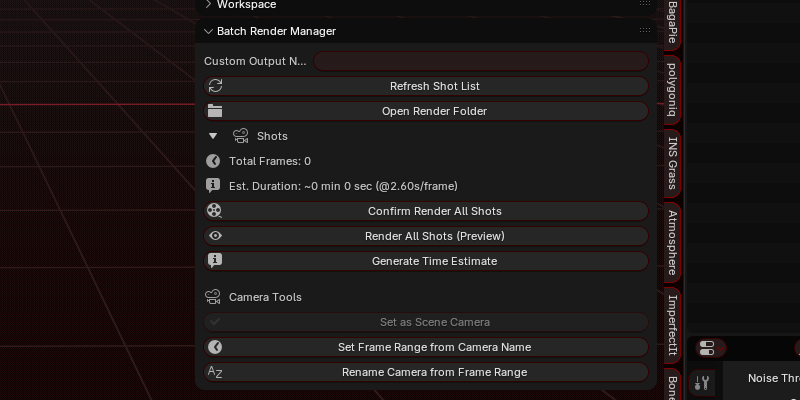
Batch render all your shots in a simple click. Automate the tedious task of setting up all your shots manually
Categories
Tags
Compare with other products
Choose a category to find products to compare with this listing.
Product versions
-
BRM 1.4.8 published
Created Dec 30, 2025 · Published Dec 30, 2025
Release notes (source)
<p>Added a visual indicator in the shots list to see which camera is currently active (Scene camera)<br>If the scene camera is not part of the shots list, nothing is shown.</p>
-
BRM 1.4.7 published
Created Dec 29, 2025 · Published Dec 29, 2025
Release notes (source)
<p>* Updated the "Preview Camera" button in the shot lists to apply their frame range into the timeline and jump the timeline to the shot's first frame.</p>
-
BRM 1.4.2 published
Created Sep 11, 2025 · Published Sep 11, 2025
Release notes (source)
<p>Changed the text in a few places to make it more consistent.</p>
-
BRM 1.4.1 published
Created Sep 11, 2025 · Published Sep 11, 2025
Release notes (source)
<h3 style="line-height:1.44;background-color:#ffffff;margin-top:0pt;margin-bottom:4pt;"><span style="font-size:13pt;font-family:Arial , sans-serif;color:#000000;background-color:transparent;font-weight:700;font-style:normal;font-variant:normal;text-decoration:none;vertical-align:baseline;white-space:pre;white-space:pre-wrap;">1. Time Estimation Overhaul</span></h3><h3><b style="font-weight:normal;"><ul style="margin-top:0;margin-bottom:0;padding-inline-start:48px;">
<li style="list-style-type:disc;font-size:12pt;font-family:Arial , sans-serif;color:#000000;background-color:transparent;font-weight:400;font-style:normal;font-variant:normal;text-decoration:none;vertical-align:baseline;white-space:pre;"><p style="line-height:1.38;background-color:#ffffff;margin-top:0pt;margin-bottom:0pt;"><span style="font-size:12pt;font-family:Arial , sans-serif;color:#000000;background-color:transparent;font-weight:400;font-style:normal;font-variant:normal;text-decoration:none;vertical-align:baseline;white-space:pre;white-space:pre-wrap;">Added Addon Preferences for flexible time-estimate settings:</span></p></li>
<ul style="margin-top:0;margin-bottom:0;padding-inline-start:48px;">
<li style="list-style-type:circle;font-size:12pt;font-family:Arial , sans-serif;color:#000000;background-color:transparent;font-weight:400;font-style:normal;font-variant:normal;text-decoration:none;vertical-align:baseline;white-space:pre;"><p style="line-height:1.38;margin-top:0pt;margin-bottom:0pt;"><span style="font-size:12pt;font-family:Arial , sans-serif;color:#000000;background-color:transparent;font-weight:400;font-style:normal;font-variant:normal;text-decoration:none;vertical-align:baseline;white-space:pre;white-space:pre-wrap;">Choose between Single, Fixed Count, Percent, or Adaptive frame sampling.</span></p></li>
<li style="list-style-type:circle;font-size:12pt;font-family:Arial , sans-serif;color:#000000;background-color:transparent;font-weight:400;font-style:normal;font-variant:normal;text-decoration:none;vertical-align:baseline;white-space:pre;"><p style="line-height:1.38;margin-top:0pt;margin-bottom:0pt;"><span style="font-size:12pt;font-family:Arial , sans-serif;color:#000000;background-color:transparent;font-weight:400;font-style:normal;font-variant:normal;text-decoration:none;vertical-align:baseline;white-space:pre;white-space:pre-wrap;">Control min/max samples for Adaptive mode.</span></p></li>
<li style="list-style-type:circle;font-size:12pt;font-family:Arial , sans-serif;color:#000000;background-color:transparent;font-weight:400;font-style:normal;font-variant:normal;text-decoration:none;vertical-align:baseline;white-space:pre;"><p style="line-height:1.38;margin-top:0pt;margin-bottom:0pt;"><span style="font-size:12pt;font-family:Arial , sans-serif;color:#000000;background-color:transparent;font-weight:400;font-style:normal;font-variant:normal;text-decoration:none;vertical-align:baseline;white-space:pre;white-space:pre-wrap;">Pick which render engine to use for estimates (match, always current, always Workbench).</span></p></li>
<li style="list-style-type:circle;font-size:12pt;font-family:Arial , sans-serif;color:#000000;background-color:transparent;font-weight:400;font-style:normal;font-variant:normal;text-decoration:none;vertical-align:baseline;white-space:pre;"><p style="line-height:1.38;margin-top:0pt;margin-bottom:0pt;"><span style="font-size:12pt;font-family:Arial , sans-serif;color:#000000;background-color:transparent;font-weight:400;font-style:normal;font-variant:normal;text-decoration:none;vertical-align:baseline;white-space:pre;white-space:pre-wrap;">Option to temporarily lower resolution for faster estimates.</span></p></li>
<li style="list-style-type:circle;font-size:12pt;font-family:Arial , sans-serif;color:#000000;background-color:transparent;font-weight:400;font-style:normal;font-variant:normal;text-decoration:none;vertical-align:baseline;white-space:pre;"><p style="line-height:1.38;margin-top:0pt;margin-bottom:0pt;"><span style="font-size:12pt;font-family:Arial , sans-serif;color:#000000;background-color:transparent;font-weight:400;font-style:normal;font-variant:normal;text-decoration:none;vertical-align:baseline;white-space:pre;white-space:pre-wrap;">Option to show sampled frames in dialogs and/or log them to file.</span></p></li>
</ul>
<li style="list-style-type:disc;font-size:12pt;font-family:Arial , sans-serif;color:#000000;background-color:transparent;font-weight:400;font-style:normal;font-variant:normal;text-decoration:none;vertical-align:baseline;white-space:pre;"><p style="line-height:1.38;background-color:#ffffff;margin-top:0pt;margin-bottom:0pt;"><span style="font-size:12pt;font-family:Arial , sans-serif;color:#000000;background-color:transparent;font-weight:400;font-style:normal;font-variant:normal;text-decoration:none;vertical-align:baseline;white-space:pre;white-space:pre-wrap;">Render time estimates are now logged in a unified file:</span><span style="font-size:12pt;font-family:Arial , sans-serif;color:#000000;background-color:transparent;font-weight:400;font-style:normal;font-variant:normal;text-decoration:none;vertical-align:baseline;white-space:pre;white-space:pre-wrap;"><br></span><span style="font-size:10.5pt;font-family:'Courier New' , monospace;color:#d63384;background-color:transparent;font-weight:400;font-style:normal;font-variant:normal;text-decoration:none;vertical-align:baseline;white-space:pre;white-space:pre-wrap;">//Renders/render_estimates.log</span><span style="font-size:12pt;font-family:Arial , sans-serif;color:#000000;background-color:transparent;font-weight:400;font-style:normal;font-variant:normal;text-decoration:none;vertical-align:baseline;white-space:pre;white-space:pre-wrap;"> (previously </span><span style="font-size:10.5pt;font-family:'Courier New' , monospace;color:#d63384;background-color:transparent;font-weight:400;font-style:normal;font-variant:normal;text-decoration:none;vertical-align:baseline;white-space:pre;white-space:pre-wrap;">render_times.log</span><span style="font-size:12pt;font-family:Arial , sans-serif;color:#000000;background-color:transparent;font-weight:400;font-style:normal;font-variant:normal;text-decoration:none;vertical-align:baseline;white-space:pre;white-space:pre-wrap;">).</span></p></li>
<li style="list-style-type:disc;font-size:12pt;font-family:Arial , sans-serif;color:#000000;background-color:transparent;font-weight:400;font-style:normal;font-variant:normal;text-decoration:none;vertical-align:baseline;white-space:pre;"><p style="line-height:1.38;background-color:#ffffff;margin-top:0pt;margin-bottom:0pt;"><span style="font-size:12pt;font-family:Arial , sans-serif;color:#000000;background-color:transparent;font-weight:400;font-style:normal;font-variant:normal;text-decoration:none;vertical-align:baseline;white-space:pre;white-space:pre-wrap;">Log uses blocks (“Latest run”) so the addon can always show the latest estimate.</span></p></li>
<li style="list-style-type:disc;font-size:12pt;font-family:Arial , sans-serif;color:#000000;background-color:transparent;font-weight:400;font-style:normal;font-variant:normal;text-decoration:none;vertical-align:baseline;white-space:pre;"><p style="line-height:1.38;background-color:#ffffff;margin-top:0pt;margin-bottom:12pt;"><span style="font-size:12pt;font-family:Arial , sans-serif;color:#000000;background-color:transparent;font-weight:400;font-style:normal;font-variant:normal;text-decoration:none;vertical-align:baseline;white-space:pre;white-space:pre-wrap;">Automatic estimation can run when confirming a render, instead of requiring a manual benchmark step.</span></p></li>
</ul></b></h3><h3 style="line-height:1.44;background-color:#ffffff;margin-top:0pt;margin-bottom:4pt;"><span style="font-size:13pt;font-family:Arial , sans-serif;color:#000000;background-color:transparent;font-weight:700;font-style:normal;font-variant:normal;text-decoration:none;vertical-align:baseline;white-space:pre;white-space:pre-wrap;">2. Shot Management Improvements</span></h3><h3><b style="font-weight:normal;"><ul style="margin-top:0;margin-bottom:0;padding-inline-start:48px;">
<li style="list-style-type:disc;font-size:12pt;font-family:Arial , sans-serif;color:#000000;background-color:transparent;font-weight:400;font-style:normal;font-variant:normal;text-decoration:none;vertical-align:baseline;white-space:pre;"><p style="line-height:1.38;background-color:#ffffff;margin-top:0pt;margin-bottom:0pt;"><span style="font-size:12pt;font-family:Arial , sans-serif;color:#000000;background-color:transparent;font-weight:400;font-style:normal;font-variant:normal;text-decoration:none;vertical-align:baseline;white-space:pre;white-space:pre-wrap;">Each shot now has an extra toggle: “Skip This”, allowing exclusion without deleting.</span></p></li>
<li style="list-style-type:disc;font-size:12pt;font-family:Arial , sans-serif;color:#000000;background-color:transparent;font-weight:400;font-style:normal;font-variant:normal;text-decoration:none;vertical-align:baseline;white-space:pre;"><p style="line-height:1.38;background-color:#ffffff;margin-top:0pt;margin-bottom:0pt;"><span style="font-size:12pt;font-family:Arial , sans-serif;color:#000000;background-color:transparent;font-weight:400;font-style:normal;font-variant:normal;text-decoration:none;vertical-align:baseline;white-space:pre;white-space:pre-wrap;">Refreshing the shot list remembers shot options (</span><span style="font-size:10.5pt;font-family:'Courier New' , monospace;color:#d63384;background-color:transparent;font-weight:400;font-style:normal;font-variant:normal;text-decoration:none;vertical-align:baseline;white-space:pre;white-space:pre-wrap;">Only This</span><span style="font-size:12pt;font-family:Arial , sans-serif;color:#000000;background-color:transparent;font-weight:400;font-style:normal;font-variant:normal;text-decoration:none;vertical-align:baseline;white-space:pre;white-space:pre-wrap;">, </span><span style="font-size:10.5pt;font-family:'Courier New' , monospace;color:#d63384;background-color:transparent;font-weight:400;font-style:normal;font-variant:normal;text-decoration:none;vertical-align:baseline;white-space:pre;white-space:pre-wrap;">Start Here</span><span style="font-size:12pt;font-family:Arial , sans-serif;color:#000000;background-color:transparent;font-weight:400;font-style:normal;font-variant:normal;text-decoration:none;vertical-align:baseline;white-space:pre;white-space:pre-wrap;">, </span><span style="font-size:10.5pt;font-family:'Courier New' , monospace;color:#d63384;background-color:transparent;font-weight:400;font-style:normal;font-variant:normal;text-decoration:none;vertical-align:baseline;white-space:pre;white-space:pre-wrap;">Cancel After</span><span style="font-size:12pt;font-family:Arial , sans-serif;color:#000000;background-color:transparent;font-weight:400;font-style:normal;font-variant:normal;text-decoration:none;vertical-align:baseline;white-space:pre;white-space:pre-wrap;">, </span><span style="font-size:10.5pt;font-family:'Courier New' , monospace;color:#d63384;background-color:transparent;font-weight:400;font-style:normal;font-variant:normal;text-decoration:none;vertical-align:baseline;white-space:pre;white-space:pre-wrap;">Expanded</span><span style="font-size:12pt;font-family:Arial , sans-serif;color:#000000;background-color:transparent;font-weight:400;font-style:normal;font-variant:normal;text-decoration:none;vertical-align:baseline;white-space:pre;white-space:pre-wrap;">, </span><span style="font-size:10.5pt;font-family:'Courier New' , monospace;color:#d63384;background-color:transparent;font-weight:400;font-style:normal;font-variant:normal;text-decoration:none;vertical-align:baseline;white-space:pre;white-space:pre-wrap;">Skip This</span><span style="font-size:12pt;font-family:Arial , sans-serif;color:#000000;background-color:transparent;font-weight:400;font-style:normal;font-variant:normal;text-decoration:none;vertical-align:baseline;white-space:pre;white-space:pre-wrap;">).</span></p></li>
<li style="list-style-type:disc;font-size:12pt;font-family:Arial , sans-serif;color:#000000;background-color:transparent;font-weight:400;font-style:normal;font-variant:normal;text-decoration:none;vertical-align:baseline;white-space:pre;"><p style="line-height:1.38;background-color:#ffffff;margin-top:0pt;margin-bottom:12pt;"><span style="font-size:12pt;font-family:Arial , sans-serif;color:#000000;background-color:transparent;font-weight:400;font-style:normal;font-variant:normal;text-decoration:none;vertical-align:baseline;white-space:pre;white-space:pre-wrap;">Frame range detection is more robust (supports extra spaces and dashes like </span><span style="font-size:10.5pt;font-family:'Courier New' , monospace;color:#d63384;background-color:transparent;font-weight:400;font-style:normal;font-variant:normal;text-decoration:none;vertical-align:baseline;white-space:pre;white-space:pre-wrap;">–</span><span style="font-size:12pt;font-family:Arial , sans-serif;color:#000000;background-color:transparent;font-weight:400;font-style:normal;font-variant:normal;text-decoration:none;vertical-align:baseline;white-space:pre;white-space:pre-wrap;">/</span><span style="font-size:10.5pt;font-family:'Courier New' , monospace;color:#d63384;background-color:transparent;font-weight:400;font-style:normal;font-variant:normal;text-decoration:none;vertical-align:baseline;white-space:pre;white-space:pre-wrap;">—</span><span style="font-size:12pt;font-family:Arial , sans-serif;color:#000000;background-color:transparent;font-weight:400;font-style:normal;font-variant:normal;text-decoration:none;vertical-align:baseline;white-space:pre;white-space:pre-wrap;">).</span></p></li>
</ul></b></h3><h3 style="line-height:1.44;background-color:#ffffff;margin-top:0pt;margin-bottom:4pt;"><span style="font-size:13pt;font-family:Arial , sans-serif;color:#000000;background-color:transparent;font-weight:700;font-style:normal;font-variant:normal;text-decoration:none;vertical-align:baseline;white-space:pre;white-space:pre-wrap;">3. Render Workflow</span></h3><h3><b style="font-weight:normal;"><ul style="margin-top:0;margin-bottom:0;padding-inline-start:48px;">
<li style="list-style-type:disc;font-size:12pt;font-family:Arial , sans-serif;color:#000000;background-color:transparent;font-weight:400;font-style:normal;font-variant:normal;text-decoration:none;vertical-align:baseline;white-space:pre;"><p style="line-height:1.38;background-color:#ffffff;margin-top:0pt;margin-bottom:0pt;"><span style="font-size:12pt;font-family:Arial , sans-serif;color:#000000;background-color:transparent;font-weight:400;font-style:normal;font-variant:normal;text-decoration:none;vertical-align:baseline;white-space:pre;white-space:pre-wrap;">New unified operator: Estimate & Confirm Render:</span></p></li>
<ul style="margin-top:0;margin-bottom:0;padding-inline-start:48px;">
<li style="list-style-type:circle;font-size:12pt;font-family:Arial , sans-serif;color:#000000;background-color:transparent;font-weight:400;font-style:normal;font-variant:normal;text-decoration:none;vertical-align:baseline;white-space:pre;"><p style="line-height:1.38;margin-top:0pt;margin-bottom:0pt;"><span style="font-size:12pt;font-family:Arial , sans-serif;color:#000000;background-color:transparent;font-weight:400;font-style:normal;font-variant:normal;text-decoration:none;vertical-align:baseline;white-space:pre;white-space:pre-wrap;">Runs (or re-uses) a time estimate.</span></p></li>
<li style="list-style-type:circle;font-size:12pt;font-family:Arial , sans-serif;color:#000000;background-color:transparent;font-weight:400;font-style:normal;font-variant:normal;text-decoration:none;vertical-align:baseline;white-space:pre;"><p style="line-height:1.38;margin-top:0pt;margin-bottom:0pt;"><span style="font-size:12pt;font-family:Arial , sans-serif;color:#000000;background-color:transparent;font-weight:400;font-style:normal;font-variant:normal;text-decoration:none;vertical-align:baseline;white-space:pre;white-space:pre-wrap;">Shows a confirmation dialog with duration, shot count, and optional shot/sample details.</span></p></li>
<li style="list-style-type:circle;font-size:12pt;font-family:Arial , sans-serif;color:#000000;background-color:transparent;font-weight:400;font-style:normal;font-variant:normal;text-decoration:none;vertical-align:baseline;white-space:pre;"><p style="line-height:1.38;margin-top:0pt;margin-bottom:0pt;"><span style="font-size:12pt;font-family:Arial , sans-serif;color:#000000;background-color:transparent;font-weight:400;font-style:normal;font-variant:normal;text-decoration:none;vertical-align:baseline;white-space:pre;white-space:pre-wrap;">User then confirms to proceed with either Final or Preview render.</span></p></li>
</ul>
<li style="list-style-type:disc;font-size:12pt;font-family:Arial , sans-serif;color:#000000;background-color:transparent;font-weight:400;font-style:normal;font-variant:normal;text-decoration:none;vertical-align:baseline;white-space:pre;"><p style="line-height:1.38;background-color:#ffffff;margin-top:0pt;margin-bottom:0pt;"><span style="font-size:12pt;font-family:Arial , sans-serif;color:#000000;background-color:transparent;font-weight:400;font-style:normal;font-variant:normal;text-decoration:none;vertical-align:baseline;white-space:pre;white-space:pre-wrap;">Removed the old “Generate Time Estimate” button (manual benchmark operator).</span></p></li>
<li style="list-style-type:disc;font-size:12pt;font-family:Arial , sans-serif;color:#000000;background-color:transparent;font-weight:400;font-style:normal;font-variant:normal;text-decoration:none;vertical-align:baseline;white-space:pre;"><p style="line-height:1.38;background-color:#ffffff;margin-top:0pt;margin-bottom:12pt;"><span style="font-size:12pt;font-family:Arial , sans-serif;color:#000000;background-color:transparent;font-weight:400;font-style:normal;font-variant:normal;text-decoration:none;vertical-align:baseline;white-space:pre;white-space:pre-wrap;">Batch rendering is now centralized through a helper (</span><span style="font-size:10.5pt;font-family:'Courier New' , monospace;color:#d63384;background-color:transparent;font-weight:400;font-style:normal;font-variant:normal;text-decoration:none;vertical-align:baseline;white-space:pre;white-space:pre-wrap;">run_batch_render</span><span style="font-size:12pt;font-family:Arial , sans-serif;color:#000000;background-color:transparent;font-weight:400;font-style:normal;font-variant:normal;text-decoration:none;vertical-align:baseline;white-space:pre;white-space:pre-wrap;">) that handles both preview and final.</span></p></li>
</ul></b></h3><h3 style="line-height:1.44;background-color:#ffffff;margin-top:0pt;margin-bottom:4pt;"><span style="font-size:13pt;font-family:Arial , sans-serif;color:#000000;background-color:transparent;font-weight:700;font-style:normal;font-variant:normal;text-decoration:none;vertical-align:baseline;white-space:pre;white-space:pre-wrap;">4. Camera Tools Enhancements</span></h3><h3><b style="font-weight:normal;"><ul style="margin-top:0;margin-bottom:0;padding-inline-start:48px;">
<li style="list-style-type:disc;font-size:12pt;font-family:Arial , sans-serif;color:#000000;background-color:transparent;font-weight:400;font-style:normal;font-variant:normal;text-decoration:none;vertical-align:baseline;white-space:pre;"><p style="line-height:1.38;background-color:#ffffff;margin-top:0pt;margin-bottom:0pt;"><span style="font-size:12pt;font-family:Arial , sans-serif;color:#000000;background-color:transparent;font-weight:400;font-style:normal;font-variant:normal;text-decoration:none;vertical-align:baseline;white-space:pre;white-space:pre-wrap;">Set as Scene Camera operator:</span></p></li>
<ul style="margin-top:0;margin-bottom:0;padding-inline-start:48px;">
<li style="list-style-type:circle;font-size:12pt;font-family:Arial , sans-serif;color:#000000;background-color:transparent;font-weight:400;font-style:normal;font-variant:normal;text-decoration:none;vertical-align:baseline;white-space:pre;"><p style="line-height:1.38;margin-top:0pt;margin-bottom:0pt;"><span style="font-size:12pt;font-family:Arial , sans-serif;color:#000000;background-color:transparent;font-weight:400;font-style:normal;font-variant:normal;text-decoration:none;vertical-align:baseline;white-space:pre;white-space:pre-wrap;">Works with explicit camera name or a single selected camera.</span></p></li>
<li style="list-style-type:circle;font-size:12pt;font-family:Arial , sans-serif;color:#000000;background-color:transparent;font-weight:400;font-style:normal;font-variant:normal;text-decoration:none;vertical-align:baseline;white-space:pre;"><p style="line-height:1.38;margin-top:0pt;margin-bottom:0pt;"><span style="font-size:12pt;font-family:Arial , sans-serif;color:#000000;background-color:transparent;font-weight:400;font-style:normal;font-variant:normal;text-decoration:none;vertical-align:baseline;white-space:pre;white-space:pre-wrap;">Automatically switches the viewport to that camera.</span></p></li>
</ul>
<li style="list-style-type:disc;font-size:12pt;font-family:Arial , sans-serif;color:#000000;background-color:transparent;font-weight:400;font-style:normal;font-variant:normal;text-decoration:none;vertical-align:baseline;white-space:pre;"><p style="line-height:1.38;background-color:#ffffff;margin-top:0pt;margin-bottom:0pt;"><span style="font-size:12pt;font-family:Arial , sans-serif;color:#000000;background-color:transparent;font-weight:400;font-style:normal;font-variant:normal;text-decoration:none;vertical-align:baseline;white-space:pre;white-space:pre-wrap;">Preview Selected Camera operator:</span></p></li>
<ul style="margin-top:0;margin-bottom:0;padding-inline-start:48px;"><li style="list-style-type:circle;font-size:12pt;font-family:Arial , sans-serif;color:#000000;background-color:transparent;font-weight:400;font-style:normal;font-variant:normal;text-decoration:none;vertical-align:baseline;white-space:pre;"><p style="line-height:1.38;margin-top:0pt;margin-bottom:0pt;"><span style="font-size:12pt;font-family:Arial , sans-serif;color:#000000;background-color:transparent;font-weight:400;font-style:normal;font-variant:normal;text-decoration:none;vertical-align:baseline;white-space:pre;white-space:pre-wrap;">Lets you quickly preview a single selected camera in viewport.</span></p></li></ul>
<li style="list-style-type:disc;font-size:12pt;font-family:Arial , sans-serif;color:#000000;background-color:transparent;font-weight:400;font-style:normal;font-variant:normal;text-decoration:none;vertical-align:baseline;white-space:pre;"><p style="line-height:1.38;background-color:#ffffff;margin-top:0pt;margin-bottom:0pt;"><span style="font-size:12pt;font-family:Arial , sans-serif;color:#000000;background-color:transparent;font-weight:400;font-style:normal;font-variant:normal;text-decoration:none;vertical-align:baseline;white-space:pre;white-space:pre-wrap;">Set Frame Range from Camera:</span></p></li>
<ul style="margin-top:0;margin-bottom:0;padding-inline-start:48px;">
<li style="list-style-type:circle;font-size:12pt;font-family:Arial , sans-serif;color:#000000;background-color:transparent;font-weight:400;font-style:normal;font-variant:normal;text-decoration:none;vertical-align:baseline;white-space:pre;"><p style="line-height:1.38;margin-top:0pt;margin-bottom:0pt;"><span style="font-size:12pt;font-family:Arial , sans-serif;color:#000000;background-color:transparent;font-weight:400;font-style:normal;font-variant:normal;text-decoration:none;vertical-align:baseline;white-space:pre;white-space:pre-wrap;">Can now use multiple selected cameras and combines their ranges (min start, max end).</span></p></li>
<li style="list-style-type:circle;font-size:12pt;font-family:Arial , sans-serif;color:#000000;background-color:transparent;font-weight:400;font-style:normal;font-variant:normal;text-decoration:none;vertical-align:baseline;white-space:pre;"><p style="line-height:1.38;margin-top:0pt;margin-bottom:12pt;"><span style="font-size:12pt;font-family:Arial , sans-serif;color:#000000;background-color:transparent;font-weight:400;font-style:normal;font-variant:normal;text-decoration:none;vertical-align:baseline;white-space:pre;white-space:pre-wrap;">Still falls back to active scene camera if none selected.</span></p></li>
</ul>
</ul></b></h3><h3 style="line-height:1.44;background-color:#ffffff;margin-top:0pt;margin-bottom:4pt;"><span style="font-size:13pt;font-family:Arial , sans-serif;color:#000000;background-color:transparent;font-weight:700;font-style:normal;font-variant:normal;text-decoration:none;vertical-align:baseline;white-space:pre;white-space:pre-wrap;">5. UI / Panel Updates</span></h3><h3><span style="font-weight:normal;"><ul style="margin-bottom:0px;padding-inline-start:48px;">
<li style="list-style-type:disc;font-size:12pt;font-family:Arial , sans-serif;background-color:transparent;vertical-align:baseline;white-space:pre;"><p style="line-height:1.38;margin-top:0pt;margin-bottom:0pt;"><span style="font-size:12pt;background-color:transparent;vertical-align:baseline;">Per-shot UI now includes:</span></p></li>
<ul style="padding-inline-start:48px;">
<li style="list-style-type:circle;font-size:12pt;font-family:Arial , sans-serif;background-color:transparent;vertical-align:baseline;white-space:pre;"><p style="line-height:1.38;margin-top:0pt;margin-bottom:0pt;"><span style="font-size:12pt;background-color:transparent;vertical-align:baseline;">A “Preview Camera” button next to each shot.</span></p></li>
<li style="list-style-type:circle;font-size:12pt;font-family:Arial , sans-serif;background-color:transparent;vertical-align:baseline;white-space:pre;"><p style="line-height:1.38;margin-top:0pt;margin-bottom:0pt;"><span style="font-size:12pt;background-color:transparent;vertical-align:baseline;">The new “Skip This” checkbox.</span></p></li>
</ul>
<li style="list-style-type:disc;font-size:12pt;font-family:Arial , sans-serif;background-color:transparent;vertical-align:baseline;white-space:pre;"><p style="line-height:1.38;margin-top:0pt;margin-bottom:0pt;"><span style="font-size:12pt;background-color:transparent;vertical-align:baseline;">Render section:</span></p></li>
<ul style="padding-inline-start:48px;">
<li style="list-style-type:circle;font-size:12pt;font-family:Arial , sans-serif;background-color:transparent;vertical-align:baseline;white-space:pre;"><p style="line-height:1.38;margin-top:0pt;margin-bottom:0pt;"><span style="font-size:12pt;background-color:transparent;vertical-align:baseline;">Shows total frames and estimated duration (from latest log).</span></p></li>
<li style="list-style-type:circle;font-size:12pt;font-family:Arial , sans-serif;background-color:transparent;vertical-align:baseline;white-space:pre;"><p style="line-height:1.38;margin-top:0pt;margin-bottom:0pt;"><span style="font-size:12pt;background-color:transparent;vertical-align:baseline;">Render buttons updated:</span></p></li>
<ul style="padding-inline-start:48px;">
<li style="list-style-type:square;font-size:12pt;font-family:Arial , sans-serif;background-color:transparent;vertical-align:baseline;white-space:pre;"><p style="line-height:1.38;margin-top:0pt;margin-bottom:0pt;"><span style="font-size:12pt;background-color:transparent;vertical-align:baseline;">Confirm Render All Shots (Final).</span></p></li>
<li style="list-style-type:square;font-size:12pt;font-family:Arial , sans-serif;background-color:transparent;vertical-align:baseline;white-space:pre;"><p style="line-height:1.38;margin-top:0pt;margin-bottom:0pt;"><span style="font-size:12pt;background-color:transparent;vertical-align:baseline;">Render All Shots (Preview).</span></p></li>
</ul>
<li style="list-style-type:circle;font-size:12pt;font-family:Arial , sans-serif;background-color:transparent;vertical-align:baseline;white-space:pre;"><p style="line-height:1.38;margin-top:0pt;margin-bottom:0pt;"><span style="font-size:12pt;background-color:transparent;vertical-align:baseline;">Old time estimate button removed (estimation happens automatically or via dialog).</span></p></li>
</ul>
<li style="list-style-type:disc;font-size:12pt;font-family:Arial , sans-serif;background-color:transparent;vertical-align:baseline;white-space:pre;"><p style="line-height:1.38;margin-top:0pt;margin-bottom:0pt;"><span style="font-size:12pt;background-color:transparent;vertical-align:baseline;">Camera Tools section:</span></p></li>
<ul style="padding-inline-start:48px;"><li style="list-style-type:circle;font-size:12pt;font-family:Arial , sans-serif;background-color:transparent;vertical-align:baseline;white-space:pre;"><p style="line-height:1.38;margin-top:0pt;margin-bottom:12pt;"><span style="font-size:12pt;background-color:transparent;vertical-align:baseline;">Added “Preview Selected Camera”.</span></p></li></ul>
</ul></span></h3>
Related products
More from this creator
No other products from this creator.